BreakFinder Wind Explorer
Philipp Winkler- 3 歳以上対象年齢
- カスタマイズカテゴリ
- 2026/11/9更新日
- 無料価格
com.breakfinder.watchface.windのGoogle Play公式ページにリンクしています。最終確認:2026/11/19。
このアプリについて
Googleによる英語 (アメリカ合衆国)からの自動翻訳です。
凧や翼用の風速計:風速(ノット)、風向、沖合または陸風の表示。
手首に装着できる、ウィンドスポーツ用ゲージ。一目で風向き、風向、そしてその風がスポーツをする価値があるかどうかが分かります。
この文字盤は無料です。無料のBreakFinder Wear OSアプリと、ホームスポット(breakfinder.surf)を設定したBreakFinderアカウントが必要です。アプリがインストールされていない場合は、文字盤には時計と「BreakFinderをインストール」というヒントが表示されます。
⌚ Wear OSウォッチで
文字盤のみ。アプリ画面、タイル、独自のコンプリケーションはありません。3つのスロットには、デフォルトで無料のBreakFinder Wear OSアプリから3つのコンプリケーション(BreakFinder Face Wind Gauge、Face Wind Direction、Face Kite Size)が表示されます。文字盤エディターで、各スロットに別のデータソースを選択できます。時計はウォッチ本体から取得されます。
表示内容
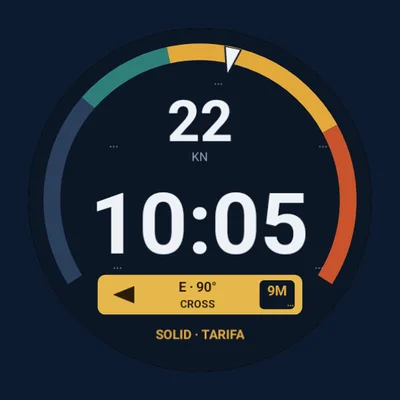
• 風速を0~40ノットのスケール(穏やか、微風、強風、強風)で表示する針
• 大きな時計
• 風向タイル(オフショア:緑、クロス:黄、オンショア:赤で色分け)と、風向を示す文字
• 凧サイズのチップ(BreakFinder Premium)
• 常時表示ディスプレイには穏やかな輪郭線が表示されます
最新情報がない場合でも正直に表示
古いレポートは、リアルタイム表示ではなく、ゲージを薄く表示します。データがない場合は、その旨が画面に表示されます。
ウォッチ専用設計
ウォッチフェイスフォーマットを採用し、画面上でコードが実行されないため、バッテリー消費を抑えます。
設定方法
1. Wear OSウォッチにBreakFinderアプリをインストールし、サインインします。
2. breakfinder.surfでホームスポットを設定します。
3. ウォッチフェイスとしてBreakFinder Wind Explorerを選択します。
Wear OS 4以降に対応。
セットアップガイド:https://breakfinder.surf/watch
サポート:support@breakfinder.surf
プライバシーポリシー:https://breakfinder.surf/en/datenschutz
原文を表示
A gauge for wind sports on your wrist. Glance down and know if it blows, from where, and whether the gusts are worth it.
The face is free. It needs the free BreakFinder Wear OS app and a BreakFinder account with a home spot (breakfinder.surf). Without the app the face shows the clock and the hint INSTALL BREAKFINDER.
⌚ ON YOUR WEAR OS WATCH
A watch face, nothing else: no app screens, no tile, no complications of its own. Its three slots read three complications by default from the free BreakFinder Wear OS app (Breakfinder Face Wind Gauge, Face Wind Direction, Face Kite Size). In the face editor you can pick another data source for every slot. The clock comes from the watch itself.
WHAT YOU SEE
• Wind in knots on a 0-40 scale (calm, light, sweet, over) with a needle
• A big clock
• A direction tile coloured by offshore (green), cross (yellow) or onshore (red), with the direction in words
• A kite size chip (BreakFinder Premium)
• The Always-On display shows a calm outline
HONEST WHEN IT HAS NOTHING NEW
An old report fades the gauge instead of passing it off as live. Without data the face says so.
BUILT FOR THE WATCH
Watch Face Format, no code running in the face, so it is light on the battery.
SET UP
1. Install the BreakFinder app on your Wear OS watch and sign in
2. Set your home spot at breakfinder.surf
3. Pick BreakFinder Wind Explorer as your watch face
Wear OS 4 or newer.
Setup guide: https://breakfinder.surf/watch
Support: support@breakfinder.surf
Privacy: https://breakfinder.surf/en/datenschutz
データ セーフティ
このアプリが収集・共有するデータについて、Philipp WinklerがGoogle Playで申告している内容です。
- 第三者と共有されるデータはありません詳しくは、デベロッパーが共有を申告する方法についての説明をご覧ください
- データは収集されません詳しくは、デベロッパーが収集を申告する方法についての説明をご覧ください
新機能
バージョン 1.0.1 · 2026/11/9
First release: a wind gauge for kite and wing on Wear OS.
開発元の連絡先
- ウェブサイトbreakfinder.surf
- メールsupport@breakfinder.surf
- プライバシーポリシーbreakfinder.surf
- 住所Burghof 1 24939 Flensburg Germany
情報
- 提供元
- Philipp Winkler
- カテゴリ
- カスタマイズ
- バージョン
- 1.0.1
- 更新日
- 2026/11/9
- リリース
- 2026/11/9
- 対象年齢
- 3 歳以上
- 価格
- 無料
- パッケージ名
- com.breakfinder.watchface.wind