BreakFinder Wind Explorer
Philipp Winkler- PEGI 3Classification d’âge
- PersonnalisationCatégorie
- 09/11/2026Mis à jour
- GratuitPrix
Renvoie vers la fiche Google Play officielle de com.breakfinder.watchface.wind. Dernière vérification le 19/11/2026.
À propos de cette application
Traduction automatique par Google. Langue d’origine : Anglais (États-Unis).
Un anémomètre pour cerf-volant et aile : nœuds, direction, au large ou à terre.
Un indicateur de vent à votre poignet. Un coup d'œil suffit pour savoir s'il y a du vent, d'où il vient et si les rafales valent le coup.
Le cadran est gratuit. Il nécessite l'application gratuite BreakFinder pour Wear OS et un compte BreakFinder avec un spot dédié (breakfinder.surf). Sans l'application, le cadran affiche l'heure et le message « INSTALLER BREAKFINDER ».
⌚ SUR VOTRE MONTRE WEAR OS
Un cadran, rien de plus : pas d'écrans d'application, pas de vignette, pas de complications. Ses trois emplacements affichent par défaut trois complications de l'application gratuite BreakFinder pour Wear OS (Indicateur de vent Breakfinder, Direction du vent, Taille du cerf-volant). Dans l'éditeur de cadran, vous pouvez choisir une autre source de données pour chaque emplacement. L'heure provient de la montre elle-même.
CE QUE VOUS VOYEZ
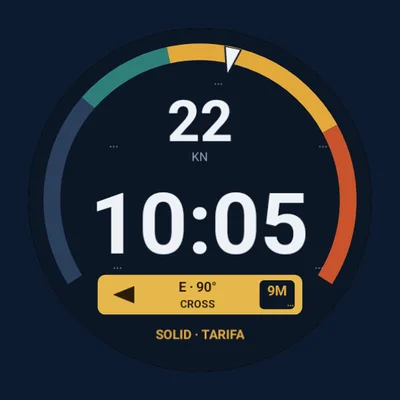
• Vent en nœuds sur une échelle de 0 à 40 (calme, léger, doux, fort) avec une aiguille
• Une grande horloge
• Une tuile de direction colorée selon qu'il s'agisse d'un vent du large (vert), d'un vent transversal (jaune) ou d'un vent de terre (rouge), avec la direction indiquée en toutes lettres
• Un indicateur de vent de la taille d'un cerf-volant (BreakFinder Premium)
• L'affichage permanent montre un contour de vent calme
INTELLIGENT EN CAS D'ABSENCE DE NOUVELLES MESURES
Un ancien rapport estompe l'indicateur au lieu de le faire passer pour un vent en temps réel. Sans données, l'affichage le précise.
CONÇU POUR LA MONTRE
Format cadran, aucun code exécuté dans le cadran, donc faible consommation de batterie.
CONFIGURATION
1. Installez l'application BreakFinder sur votre montre Wear OS et connectez-vous.
2. Définissez votre spot de référence sur breakfinder.surf.
3. Choisissez BreakFinder Wind Explorer comme cadran.
Wear OS 4 ou version ultérieure.
Guide d'installation : https://breakfinder.surf/watch
Assistance : support@breakfinder.surf
Confidentialité : https://breakfinder.surf/en/datenschutz
Afficher le texte d’origine
A gauge for wind sports on your wrist. Glance down and know if it blows, from where, and whether the gusts are worth it.
The face is free. It needs the free BreakFinder Wear OS app and a BreakFinder account with a home spot (breakfinder.surf). Without the app the face shows the clock and the hint INSTALL BREAKFINDER.
⌚ ON YOUR WEAR OS WATCH
A watch face, nothing else: no app screens, no tile, no complications of its own. Its three slots read three complications by default from the free BreakFinder Wear OS app (Breakfinder Face Wind Gauge, Face Wind Direction, Face Kite Size). In the face editor you can pick another data source for every slot. The clock comes from the watch itself.
WHAT YOU SEE
• Wind in knots on a 0-40 scale (calm, light, sweet, over) with a needle
• A big clock
• A direction tile coloured by offshore (green), cross (yellow) or onshore (red), with the direction in words
• A kite size chip (BreakFinder Premium)
• The Always-On display shows a calm outline
HONEST WHEN IT HAS NOTHING NEW
An old report fades the gauge instead of passing it off as live. Without data the face says so.
BUILT FOR THE WATCH
Watch Face Format, no code running in the face, so it is light on the battery.
SET UP
1. Install the BreakFinder app on your Wear OS watch and sign in
2. Set your home spot at breakfinder.surf
3. Pick BreakFinder Wind Explorer as your watch face
Wear OS 4 or newer.
Setup guide: https://breakfinder.surf/watch
Support: support@breakfinder.surf
Privacy: https://breakfinder.surf/en/datenschutz
Sécurité des données
Ce que Philipp Winkler déclare sur Google Play au sujet des données que cette application collecte et partage.
- Aucune donnée partagée avec des tiersEn savoir plus sur la manière dont les développeurs déclarent le partage
- Aucune donnée collectéeEn savoir plus sur la manière dont les développeurs déclarent la collecte
Nouveautés
Version 1.0.1 · 09/11/2026
First release: a wind gauge for kite and wing on Wear OS.
Coordonnées du développeur
- Site webbreakfinder.surf
- E-mailsupport@breakfinder.surf
- Politique de confidentialitébreakfinder.surf
- AdresseBurghof 1 24939 Flensburg Germany
Informations
- Proposée par
- Philipp Winkler
- Catégorie
- Personnalisation
- Version
- 1.0.1
- Mis à jour
- 09/11/2026
- Publié
- 09/11/2026
- Classification d’âge
- PEGI 3
- Prix
- Gratuit
- Nom du package
- com.breakfinder.watchface.wind