BreakFinder Wind Explorer
Philipp Winkler- Rating 3+Batasan usia
- PersonalisasiKategori
- 9/11/2026Diperbarui
- GratisHarga
Tertaut ke halaman resmi com.breakfinder.watchface.wind di Google Play. Terakhir diperiksa pada 19/11/2026.
Tentang aplikasi ini
Terjemahan otomatis oleh Google. Bahasa asli: Inggris (Amerika Serikat).
Alat pengukur angin untuk layang-layang dan sayap: kecepatan angin (knot), arah angin, lepas pantai atau darat.
Sebuah indikator angin untuk olahraga angin di pergelangan tangan Anda. Lihat ke bawah dan ketahui apakah angin bertiup, dari mana, dan apakah hembusan anginnya sepadan.
Tampilan jam ini gratis. Anda memerlukan aplikasi BreakFinder Wear OS gratis dan akun BreakFinder dengan lokasi utama (breakfinder.surf). Tanpa aplikasi, tampilan jam hanya menampilkan jam dan petunjuk INSTAL BREAKFINDER.
⌚ DI JAM TANGAN WEAR OS ANDA
Hanya tampilan jam, tidak lebih: tidak ada layar aplikasi, tidak ada ubin, tidak ada komplikasi sendiri. Tiga slotnya secara default membaca tiga komplikasi dari aplikasi BreakFinder Wear OS gratis (Breakfinder Face Wind Gauge, Face Wind Direction, Face Kite Size). Di editor tampilan jam, Anda dapat memilih sumber data lain untuk setiap slot. Jam berasal dari jam tangan itu sendiri.
APA YANG ANDA LIHAT
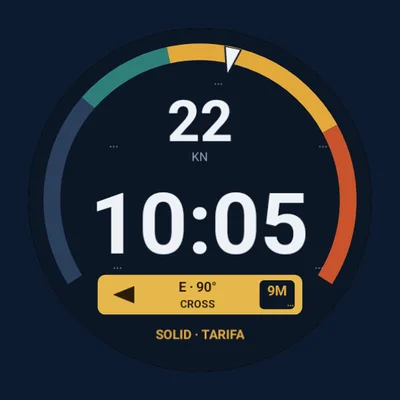
• Kecepatan angin dalam knot pada skala 0-40 (tenang, ringan, sedang, berlebihan) dengan jarum penunjuk
• Jam besar
• Ubin arah yang diwarnai berdasarkan arah angin lepas pantai (hijau), angin silang (kuning) atau angin darat (merah), dengan arah dalam bentuk kata-kata
• Chip seukuran layang-layang (BreakFinder Premium)
• Layar Always-On menampilkan garis luar yang tenang
JUJUR KETIKA TIDAK ADA YANG BARU
Laporan lama memudarkan pengukur alih-alih menampilkannya sebagai data langsung. Tanpa data, tampilan jam menunjukkan demikian.
DIRANCANG UNTUK JAM TANGAN
Format Tampilan Jam, tidak ada kode yang berjalan di tampilan jam, sehingga hemat baterai.
PENYIAPAN
1. Instal aplikasi BreakFinder di jam tangan Wear OS Anda dan masuk
2. Atur lokasi rumah Anda di breakfinder.surf
3. Pilih BreakFinder Wind Explorer sebagai tampilan jam Anda
Wear OS 4 atau yang lebih baru.
Panduan pengaturan: https://breakfinder.surf/watch
Dukungan: support@breakfinder.surf
Privasi: https://breakfinder.surf/en/datenschutz
Tampilkan teks asli
A gauge for wind sports on your wrist. Glance down and know if it blows, from where, and whether the gusts are worth it.
The face is free. It needs the free BreakFinder Wear OS app and a BreakFinder account with a home spot (breakfinder.surf). Without the app the face shows the clock and the hint INSTALL BREAKFINDER.
⌚ ON YOUR WEAR OS WATCH
A watch face, nothing else: no app screens, no tile, no complications of its own. Its three slots read three complications by default from the free BreakFinder Wear OS app (Breakfinder Face Wind Gauge, Face Wind Direction, Face Kite Size). In the face editor you can pick another data source for every slot. The clock comes from the watch itself.
WHAT YOU SEE
• Wind in knots on a 0-40 scale (calm, light, sweet, over) with a needle
• A big clock
• A direction tile coloured by offshore (green), cross (yellow) or onshore (red), with the direction in words
• A kite size chip (BreakFinder Premium)
• The Always-On display shows a calm outline
HONEST WHEN IT HAS NOTHING NEW
An old report fades the gauge instead of passing it off as live. Without data the face says so.
BUILT FOR THE WATCH
Watch Face Format, no code running in the face, so it is light on the battery.
SET UP
1. Install the BreakFinder app on your Wear OS watch and sign in
2. Set your home spot at breakfinder.surf
3. Pick BreakFinder Wind Explorer as your watch face
Wear OS 4 or newer.
Setup guide: https://breakfinder.surf/watch
Support: support@breakfinder.surf
Privacy: https://breakfinder.surf/en/datenschutz
Keamanan data
Yang dinyatakan Philipp Winkler di Google Play tentang data yang dikumpulkan dan dibagikan aplikasi ini.
- Tidak ada data yang dibagikan kepada pihak ketigaPelajari lebih lanjut cara developer menyatakan pembagian data
- Tidak ada data yang dikumpulkanPelajari lebih lanjut cara developer menyatakan pengumpulan data
Yang baru
Versi 1.0.1 · 9/11/2026
First release: a wind gauge for kite and wing on Wear OS.
Kontak pengembang
- Situs webbreakfinder.surf
- Emailsupport@breakfinder.surf
- Kebijakan Privasibreakfinder.surf
- AlamatBurghof 1 24939 Flensburg Germany
Informasi
- Ditawarkan oleh
- Philipp Winkler
- Kategori
- Personalisasi
- Versi
- 1.0.1
- Diperbarui
- 9/11/2026
- Dirilis
- 9/11/2026
- Batasan usia
- Rating 3+
- Harga
- Gratis
- Nama paket
- com.breakfinder.watchface.wind