CELEST5602 Data Hub Watch
CELEST WatchesContiene anuncios
- PEGI 3Clasificación por edad
- PersonalizaciónCategoría
- 5/8/2026Actualizado
- 2,09 €Precio
Enlaza a la ficha oficial de com.watchfacestudio.celest5602 en Google Play. Última comprobación el 28/11/2026.
Acerca de esta aplicación
Traducción automática de Google. Idioma original: Inglés (Estados Unidos).
Reloj digital con pantalla meteorológica, pronóstico para 3 días, probabilidad de lluvia y 30 colores.
Digital y con la previsión meteorológica como prioridad: el reloj CELEST5602 Data Hub muestra la previsión de tres días en una fila independiente en la esfera: un icono, la temperatura máxima y mínima, y la probabilidad de lluvia para cada día. Requiere Wear OS 5 o superior (para las funciones meteorológicas): Galaxy Watch, Pixel Watch y todos los dispositivos Wear OS 5 o superior.
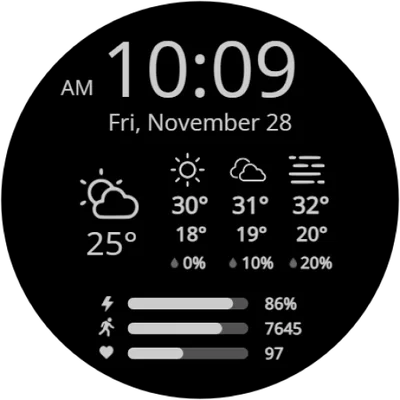
La esfera se muestra en bandas desde la parte superior: la hora con AM/PM, la fecha completa escrita debajo, y las condiciones actuales con un icono grande y la temperatura a la izquierda, con la previsión para los tres días junto a ellas. En la parte inferior, la batería, los pasos y la frecuencia cardíaca se muestran con un icono, una barra de progreso y un valor, para que se interpreten como datos temporales antes de leer los números. Las temperaturas se ajustan a la configuración de Celsius o Fahrenheit del teléfono, y el texto estático es multilingüe.
⚡ Características
- Pronóstico del tiempo para tres días con icono, temperatura mínima/máxima y probabilidad de precipitación
- Condiciones meteorológicas actuales con un icono grande del tiempo y la temperatura
- Hora digital con AM/PM y fecha completa
- Indicadores de batería, pasos y frecuencia cardíaca en barras de progreso
- Temperatura en grados Celsius o Fahrenheit, según la configuración de tu teléfono
- Texto estático multilingüe
- Tres complicaciones opcionales a juego con el color
🎨 Personalización
- 30 combinaciones de colores
- Oculta los datos predeterminados de la parte inferior para añadir complicaciones
- Tres complicaciones circulares opcionales a juego con el color
Nota: Las complicaciones personalizadas no son visibles en todas las combinaciones de colores debido a una limitación técnica del formato de la esfera del reloj. Si el tiempo no se actualiza automáticamente, cambia a otra esfera y vuelve a la anterior; si es necesario, reinicia el reloj y el teléfono.
✅ Dispositivos compatibles
- Google Pixel Watch/2/3/4/5
- OnePlus Watch 2/2R/3/4
- Oppo Watch X2/X3
- Samsung Galaxy Watch 4/4 Classic/5/5 Pro/6/6 Classic/7/8/8 Classic/9/FE/Ultra (2024)/(2025)/Ultra 2
- Xiaomi Watch 2/2 Pro/5
🎁 Promoción 2x1: https://celest-watches.com/bogo/
✨ Explora la colección completa de CELEST en un solo lugar: incluye todas las esferas para Wear OS, HUAWEI y Apple Watch, además de nuestras aplicaciones y herramientas, con la app Catálogo CELEST: https://play.google.com/store/apps/details?id=com.celestwatches.catalog
🔧 Ayuda con la instalación
¿Tienes problemas? Te ayudamos: - Usa el menú desplegable junto a "Instalar" en tu teléfono para seleccionar el modelo de tu reloj o instálalo directamente desde la app de Play Store de tu reloj.
- La actualización de los datos meteorológicos (si la esfera del reloj muestra el clima) puede tardar un poco después de la instalación, pero cambiar a otra esfera y volver a la anterior, o reiniciar tanto el reloj como el teléfono, suele solucionar el problema.
- Consulta nuestra guía de instalación y solución de problemas: https://celest-watches.com/installation-troubleshooting/
- Contáctanos en info@celest-watches.com para obtener asistencia rápida.
📞 Soporte y Comunidad
📧 Soporte: info@celest-watches.com
📱 Sigue a @celestwatches en Instagram y suscríbete a nuestro boletín para estar al tanto de los nuevos lanzamientos y ofertas: https://celest-watches.com/newsletter/
Mostrar el texto original
Digital, and weather-first: CELEST5602 Data Hub Watch gives three days of forecast their own row on the dial — an icon, a high and a low, and the chance of rain for each day. Wear OS 5+ required (for weather functions) — Galaxy Watch, Pixel Watch, and all Wear OS 5+ devices.
The dial reads in bands from the top: the time with AM/PM, the full written date beneath it, then current conditions with a large icon and temperature on the left and the three forecast days beside them. Along the bottom, battery, steps, and heart rate each get an icon, a progress bar, and a value, so you take them in as lengths before you read the numbers. Temperatures follow your phone's Celsius or Fahrenheit setting, and the static text is multilingual.
⚡ Features
- Three-day forecast with icon, min/max temperature, and chance of precipitation
- Current conditions with a large weather icon and temperature
- Digital time with AM/PM and the full written date
- Battery, steps, and heart rate as labeled progress bars
- Celsius or Fahrenheit, following your phone's settings
- Fully multilingual static text
- Three optional color-matched complications
🎨 Customization
- 30 color combinations
- Hide the default data at the bottom to add complications instead
- Three optional color-matched circular complications
Please note: custom complications are not visible on every color combination, a technical restriction of the watch face format. If the weather doesn't refresh on its own, switch to another watch face and back, then restart your watch and phone if needed.
✅ Compatible Devices
- Google Pixel Watch/2/3/4/5
- OnePlus Watch 2/2R/3/4
- Oppo Watch X2/X3
- Samsung Galaxy Watch 4/4 Classic/5/5 Pro/6/6 Classic/7/8/8 Classic/9/FE/Ultra (2024)/(2025)/Ultra 2
- Xiaomi Watch 2/2 Pro/5
🎁 BOGO Promotion: https://celest-watches.com/bogo/
✨ Explore the complete CELEST collection in one place — including all Wear OS, HUAWEI, and Apple Watch faces, along with our apps and tools — with the CELEST Catalog app: https://play.google.com/store/apps/details?id=com.celestwatches.catalog
🔧 Installation Help
Having trouble? We've got you covered:
- Use the dropdown menu next to "Install" on your phone to select your watch model or install directly from your watch's Play Store app.
- Updating weather data (if the watch face shows weather) may take time after installation but switching to another watch face and switching back or restarting both the watch and phone usually helps.
- Check out our installation and troubleshooting guide: https://celest-watches.com/installation-troubleshooting/
- Contact us at info@celest-watches.com for quick support
📞 Support & Community
📧 Support: info@celest-watches.com
📱 Follow @celestwatches on Instagram and subscribe to our newsletter to get notified of new releases and deals: https://celest-watches.com/newsletter/
Seguridad de los datos
Lo que CELEST Watches declara en Google Play sobre los datos que esta aplicación recopila y comparte.
- No se comparten datos con tercerosMás información sobre cómo los desarrolladores declaran lo que comparten
- No se recogen datosMás información sobre cómo los desarrolladores declaran lo que recogen
Novedades
5/8/2026
Updated to target Android 16 (API 36).
Contacto del desarrollador
- Sitio webcelest-watches.com
- Correo electrónicoinfo@celest-watches.com
- Política de privacidadcelest-watches.com
- DirecciónBudapest ERZSEBET UTCA 32 04. 5 em. 28 a. 1041 Hungary
Información
- Ofrecida por
- CELEST Watches
- Categoría
- Personalización
- Actualizado
- 5/8/2026
- Publicado
- 22/11/2025
- Clasificación por edad
- PEGI 3
- Precio
- 2,09 €
- Nombre del paquete
- com.watchfacestudio.celest5602