CELEST5602 Data Hub Watch
CELEST Watches広告を含む
- 3 歳以上対象年齢
- カスタマイズカテゴリ
- 2026/8/5更新日
- ¥350価格
com.watchfacestudio.celest5602のGoogle Play公式ページにリンクしています。最終確認:2026/11/28。
このアプリについて
Googleによる英語 (アメリカ合衆国)からの自動翻訳です。
3日間の天気予報、降水確率、30色のカラーバリエーションを備えたデジタル天気ウォッチフェイス。
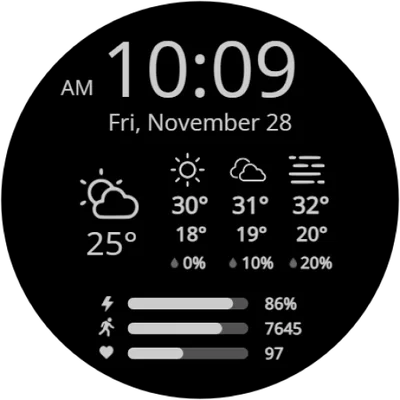
デジタル表示で天気予報を最優先に:CELEST5602データハブウォッチは、文字盤上に3日間の天気予報を専用の行で表示します。各日のアイコン、最高気温と最低気温、そして降水確率が表示されます。天気予報機能を使用するにはWear OS 5以降が必要です。Galaxy Watch、Pixel Watch、およびすべてのWear OS 5以降搭載デバイスに対応しています。
文字盤は上から順に、午前/午後付きの時刻、その下に日付、左側に大きなアイコンと気温、そしてその横に3日間の天気予報が表示されます。下部には、バッテリー残量、歩数、心拍数がそれぞれアイコン、プログレスバー、そして数値で表示されるため、数値を見る前にその数値を把握できます。気温はスマートフォンの摂氏または華氏設定に従い、表示されるテキストは多言語に対応しています。
⚡ 機能
- アイコン、最低/最高気温、降水確率を含む3日間の天気予報
- 大きな天気アイコンと気温で現在の天気を表示
- 午前/午後表示と日付をフルネームで表示するデジタル時刻表示
- バッテリー残量、歩数、心拍数をプログレスバーで表示
- スマートフォンの設定に応じて摂氏または華氏を表示
- 多言語対応の静止テキスト表示
- 3種類のカラーマッチングされたコンプリケーション(オプション)
🎨 カスタマイズ
- 30種類のカラーバリエーション
- 下部のデフォルトデータを非表示にして、代わりにコンプリケーションを追加
- 3種類のカラーマッチングされた円形コンプリケーション(オプション)
ご注意:カスタムコンプリケーションは、ウォッチフェイスのフォーマット上の技術的な制限により、すべてのカラーバリエーションで表示されるわけではありません。天気情報が自動的に更新されない場合は、別のウォッチフェイスに切り替えてから元に戻し、必要に応じてウォッチとスマートフォンを再起動してください。
✅ 対応デバイス
- Google Pixel Watch/2/3/4/5
- OnePlus Watch 2/2R/3/4
- Oppo Watch X2/X3
- Samsung Galaxy Watch 4/4 Classic/5/5 Pro/6/6 Classic/7/8/8 Classic/9/FE/Ultra (2024)/(2025)/Ultra 2
- Xiaomi Watch 2/2 Pro/5
🎁 BOGOキャンペーン:https://celest-watches.com/bogo/
✨ CELESTカタログアプリで、Wear OS、HUAWEI、Apple Watchの文字盤をはじめ、アプリやツールなど、CELESTの全コレクションをまとめてご覧いただけます:https://play.google.com/store/apps/details?id=com.celestwatches.catalog
🔧 インストールヘルプ
お困りですか?ご安心ください。
- スマートフォンの「インストール」横にあるドロップダウンメニューから、お使いの時計のモデルを選択するか、時計のPlayストアアプリから直接インストールしてください。
- 天気予報データ(ウォッチフェイスに天気予報が表示される場合)の更新には、インストール後に時間がかかる場合があります。別のウォッチフェイスに切り替えてから元に戻すか、時計とスマートフォンの両方を再起動すると、通常は問題が解決します。
- インストールとトラブルシューティングガイドをご覧ください:https://celest-watches.com/installation-troubleshooting/
- 迅速なサポートが必要な場合は、info@celest-watches.comまでお問い合わせください。
📞 サポート&コミュニティ
📧 サポート:info@celest-watches.com
📱 Instagramで@celestwatchesをフォローし、ニュースレターにご登録いただくと、新製品やお得な情報をお知らせします:https://celest-watches.com/newsletter/
原文を表示
Digital, and weather-first: CELEST5602 Data Hub Watch gives three days of forecast their own row on the dial — an icon, a high and a low, and the chance of rain for each day. Wear OS 5+ required (for weather functions) — Galaxy Watch, Pixel Watch, and all Wear OS 5+ devices.
The dial reads in bands from the top: the time with AM/PM, the full written date beneath it, then current conditions with a large icon and temperature on the left and the three forecast days beside them. Along the bottom, battery, steps, and heart rate each get an icon, a progress bar, and a value, so you take them in as lengths before you read the numbers. Temperatures follow your phone's Celsius or Fahrenheit setting, and the static text is multilingual.
⚡ Features
- Three-day forecast with icon, min/max temperature, and chance of precipitation
- Current conditions with a large weather icon and temperature
- Digital time with AM/PM and the full written date
- Battery, steps, and heart rate as labeled progress bars
- Celsius or Fahrenheit, following your phone's settings
- Fully multilingual static text
- Three optional color-matched complications
🎨 Customization
- 30 color combinations
- Hide the default data at the bottom to add complications instead
- Three optional color-matched circular complications
Please note: custom complications are not visible on every color combination, a technical restriction of the watch face format. If the weather doesn't refresh on its own, switch to another watch face and back, then restart your watch and phone if needed.
✅ Compatible Devices
- Google Pixel Watch/2/3/4/5
- OnePlus Watch 2/2R/3/4
- Oppo Watch X2/X3
- Samsung Galaxy Watch 4/4 Classic/5/5 Pro/6/6 Classic/7/8/8 Classic/9/FE/Ultra (2024)/(2025)/Ultra 2
- Xiaomi Watch 2/2 Pro/5
🎁 BOGO Promotion: https://celest-watches.com/bogo/
✨ Explore the complete CELEST collection in one place — including all Wear OS, HUAWEI, and Apple Watch faces, along with our apps and tools — with the CELEST Catalog app: https://play.google.com/store/apps/details?id=com.celestwatches.catalog
🔧 Installation Help
Having trouble? We've got you covered:
- Use the dropdown menu next to "Install" on your phone to select your watch model or install directly from your watch's Play Store app.
- Updating weather data (if the watch face shows weather) may take time after installation but switching to another watch face and switching back or restarting both the watch and phone usually helps.
- Check out our installation and troubleshooting guide: https://celest-watches.com/installation-troubleshooting/
- Contact us at info@celest-watches.com for quick support
📞 Support & Community
📧 Support: info@celest-watches.com
📱 Follow @celestwatches on Instagram and subscribe to our newsletter to get notified of new releases and deals: https://celest-watches.com/newsletter/
データ セーフティ
このアプリが収集・共有するデータについて、CELEST WatchesがGoogle Playで申告している内容です。
- 第三者と共有されるデータはありません詳しくは、デベロッパーが共有を申告する方法についての説明をご覧ください
- データは収集されません詳しくは、デベロッパーが収集を申告する方法についての説明をご覧ください
新機能
2026/8/5
Updated to target Android 16 (API 36).
開発元の連絡先
- ウェブサイトcelest-watches.com
- メールinfo@celest-watches.com
- プライバシーポリシーcelest-watches.com
- 住所Budapest ERZSEBET UTCA 32 04. 5 em. 28 a. 1041 Hungary
情報
- 提供元
- CELEST Watches
- カテゴリ
- カスタマイズ
- 更新日
- 2026/8/5
- リリース
- 2025/11/22
- 対象年齢
- 3 歳以上
- 価格
- ¥350
- パッケージ名
- com.watchfacestudio.celest5602