CELEST5602 Data Hub Watch
CELEST WatchesReklam içerir
- PEGI 3Yaş sınırı
- KişiselleştirmeKategori
- 05.08.2026Güncellendi
- ₺109,99Fiyat
com.watchfacestudio.celest5602 için resmi Google Play sayfasına bağlanır. Son kontrol: 28.11.2026.
Bu uygulama hakkında
Google tarafından otomatik çeviri. Orijinal dil: İngilizce (Amerika Birleşik Devletleri).
3 günlük hava tahmini, yağmur olasılığı ve 30 renk seçeneği sunan dijital hava durumu saati kadranı.
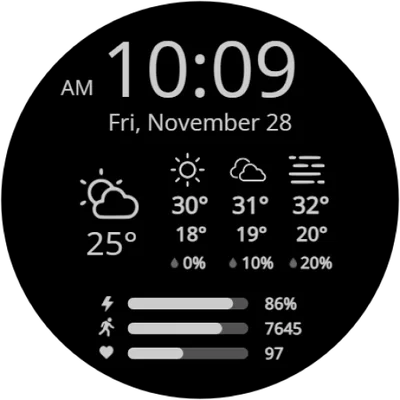
Dijital ve hava durumu odaklı: CELEST5602 Veri Merkezi Saati, kadran üzerinde üç günlük hava tahminini ayrı bir satırda gösteriyor — her gün için bir simge, en yüksek ve en düşük sıcaklık ve yağmur olasılığı. Hava durumu fonksiyonları için Wear OS 5+ gereklidir — Galaxy Watch, Pixel Watch ve tüm Wear OS 5+ cihazlar.
Kadran, üstten başlayarak şeritler halinde okunur: AM/PM ile saat, altında tam tarih, ardından solda büyük bir simge ve sıcaklık ile mevcut koşullar ve yanlarında üç günlük hava tahmini. Altta, pil, adım sayısı ve kalp atış hızı için ayrı bir simge, ilerleme çubuğu ve değer bulunur, böylece sayıları okumadan önce bunları uzunluk olarak algılarsınız. Sıcaklıklar telefonunuzun Celsius veya Fahrenheit ayarını takip eder ve statik metin çok dillidir.
⚡ Özellikler
- Üç günlük hava tahmini (ikon, minimum/maksimum sıcaklık ve yağış olasılığı ile)
- Mevcut hava durumu (büyük hava durumu ikonu ve sıcaklık ile)
- Dijital saat (AM/PM ve tam tarih ile)
- Pil, adım ve kalp atış hızı (etiketli ilerleme çubukları olarak)
- Telefonunuzun ayarlarına göre Santigrat veya Fahrenheit cinsinden gösterim
- Tamamen çok dilli statik metin
- Üç isteğe bağlı renk uyumlu komplikasyon
🎨 Özelleştirme
- 30 renk kombinasyonu
- Varsayılan verileri gizleyerek yerine komplikasyonlar ekleyin
- Üç isteğe bağlı renk uyumlu dairesel komplikasyon
Lütfen dikkat: Özel komplikasyonlar her renk kombinasyonunda görünmez; bu, saat kadranı formatının teknik bir kısıtlamasıdır. Hava durumu otomatik olarak yenilenmezse, başka bir saat kadranına geçin ve geri dönün, gerekirse saatinizi ve telefonunuzu yeniden başlatın.
✅ Uyumlu Cihazlar
- Google Pixel Watch/2/3/4/5
- OnePlus Watch 2/2R/3/4
- Oppo Watch X2/X3
- Samsung Galaxy Watch 4/4 Classic/5/5 Pro/6/6 Classic/7/8/8 Classic/9/FE/Ultra (2024)/(2025)/Ultra 2
- Xiaomi Watch 2/2 Pro/5
🎁 Bir Alana Bir Bedava Kampanyası: https://celest-watches.com/bogo/
✨ Tüm Wear OS, HUAWEI ve Apple Watch saat kadranları, uygulamalarımız ve araçlarımız dahil olmak üzere eksiksiz CELEST koleksiyonunu tek bir yerde keşfedin — CELEST Katalog uygulamasıyla: https://play.google.com/store/apps/details?id=com.celestwatches.catalog
🔧 Kurulum Yardımı
Sorun mu yaşıyorsunuz? Endişelenmeyin, biz hallederiz:
- Telefonunuzdaki "Yükle"nin yanındaki açılır menüyü kullanarak saat modelinizi seçin veya doğrudan saatinizin Play Store uygulamasından yükleyin.
- Hava durumu verilerinin güncellenmesi (saat kadranı hava durumunu gösteriyorsa) kurulumdan sonra zaman alabilir, ancak başka bir saat kadranına geçip tekrar eski haline dönmek veya hem saati hem de telefonu yeniden başlatmak genellikle yardımcı olur.
- Kurulum ve sorun giderme kılavuzumuza göz atın: https://celest-watches.com/installation-troubleshooting/
- Hızlı destek için info@celest-watches.com adresinden bizimle iletişime geçin.
📞 Destek ve Topluluk
📧 Destek: info@celest-watches.com
📱 Yeni yayınlardan ve fırsatlardan haberdar olmak için Instagram'da @celestwatches'ı takip edin ve bültenimize abone olun: https://celest-watches.com/newsletter/
Orijinal metni göster
Digital, and weather-first: CELEST5602 Data Hub Watch gives three days of forecast their own row on the dial — an icon, a high and a low, and the chance of rain for each day. Wear OS 5+ required (for weather functions) — Galaxy Watch, Pixel Watch, and all Wear OS 5+ devices.
The dial reads in bands from the top: the time with AM/PM, the full written date beneath it, then current conditions with a large icon and temperature on the left and the three forecast days beside them. Along the bottom, battery, steps, and heart rate each get an icon, a progress bar, and a value, so you take them in as lengths before you read the numbers. Temperatures follow your phone's Celsius or Fahrenheit setting, and the static text is multilingual.
⚡ Features
- Three-day forecast with icon, min/max temperature, and chance of precipitation
- Current conditions with a large weather icon and temperature
- Digital time with AM/PM and the full written date
- Battery, steps, and heart rate as labeled progress bars
- Celsius or Fahrenheit, following your phone's settings
- Fully multilingual static text
- Three optional color-matched complications
🎨 Customization
- 30 color combinations
- Hide the default data at the bottom to add complications instead
- Three optional color-matched circular complications
Please note: custom complications are not visible on every color combination, a technical restriction of the watch face format. If the weather doesn't refresh on its own, switch to another watch face and back, then restart your watch and phone if needed.
✅ Compatible Devices
- Google Pixel Watch/2/3/4/5
- OnePlus Watch 2/2R/3/4
- Oppo Watch X2/X3
- Samsung Galaxy Watch 4/4 Classic/5/5 Pro/6/6 Classic/7/8/8 Classic/9/FE/Ultra (2024)/(2025)/Ultra 2
- Xiaomi Watch 2/2 Pro/5
🎁 BOGO Promotion: https://celest-watches.com/bogo/
✨ Explore the complete CELEST collection in one place — including all Wear OS, HUAWEI, and Apple Watch faces, along with our apps and tools — with the CELEST Catalog app: https://play.google.com/store/apps/details?id=com.celestwatches.catalog
🔧 Installation Help
Having trouble? We've got you covered:
- Use the dropdown menu next to "Install" on your phone to select your watch model or install directly from your watch's Play Store app.
- Updating weather data (if the watch face shows weather) may take time after installation but switching to another watch face and switching back or restarting both the watch and phone usually helps.
- Check out our installation and troubleshooting guide: https://celest-watches.com/installation-troubleshooting/
- Contact us at info@celest-watches.com for quick support
📞 Support & Community
📧 Support: info@celest-watches.com
📱 Follow @celestwatches on Instagram and subscribe to our newsletter to get notified of new releases and deals: https://celest-watches.com/newsletter/
Veri güvenliği
Bu uygulamanın topladığı ve paylaştığı veriler hakkında CELEST Watches tarafından Google Play üzerinde yapılan beyan.
- Üçüncü taraflarla veri paylaşımı yokGeliştiricilerin, veri paylaşımını nasıl beyan ettikleri hakkında daha fazla bilgi edinin
- Veri toplanamadıGeliştiricilerin, veri toplamayı nasıl beyan ettikleri hakkında daha fazla bilgi edinin
Yenilikler
05.08.2026
Updated to target Android 16 (API 36).
Geliştirici iletişim bilgileri
- Web sitesicelest-watches.com
- E-postainfo@celest-watches.com
- Gizlilik politikasıcelest-watches.com
- AdresBudapest ERZSEBET UTCA 32 04. 5 em. 28 a. 1041 Hungary
Bilgiler
- Sunan
- CELEST Watches
- Kategori
- Kişiselleştirme
- Güncellendi
- 05.08.2026
- Yayın tarihi
- 22.11.2025
- Yaş sınırı
- PEGI 3
- Fiyat
- ₺109,99
- Paket adı
- com.watchfacestudio.celest5602