CELEST5602 Data Hub Watch
CELEST WatchesBerisi iklan
- Rating 3+Batasan usia
- PersonalisasiKategori
- 5/8/2026Diperbarui
- Rp 35.000Harga
Tertaut ke halaman resmi com.watchfacestudio.celest5602 di Google Play. Terakhir diperiksa pada 28/11/2026.
Tentang aplikasi ini
Terjemahan otomatis oleh Google. Bahasa asli: Inggris (Amerika Serikat).
Tampilan jam digital cuaca dengan prakiraan 3 hari, kemungkinan hujan & 30 warna.
Digital, dan mengutamakan cuaca: Jam tangan CELEST5602 Data Hub menampilkan ramalan cuaca tiga hari dalam satu baris di layar — ikon, suhu tertinggi dan terendah, serta kemungkinan hujan untuk setiap hari. Membutuhkan Wear OS 5+ (untuk fungsi cuaca) — Galaxy Watch, Pixel Watch, dan semua perangkat Wear OS 5+.
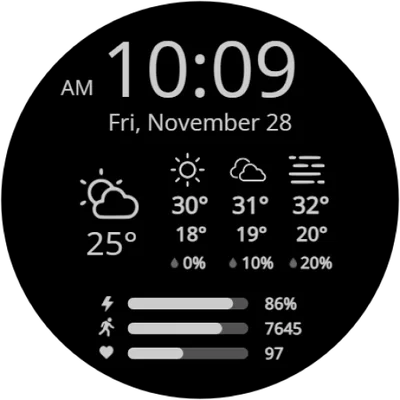
Layar menampilkan informasi cuaca dari atas: waktu dengan AM/PM, tanggal lengkap di bawahnya, kemudian kondisi cuaca saat ini dengan ikon besar dan suhu di sebelah kiri, serta tiga hari ramalan cuaca di sampingnya. Di bagian bawah, baterai, langkah, dan detak jantung masing-masing memiliki ikon, bilah kemajuan, dan nilai, sehingga Anda dapat melihatnya sebagai satuan sebelum membaca angkanya. Suhu mengikuti pengaturan Celsius atau Fahrenheit di ponsel Anda, dan teks statisnya multibahasa.
⚡ Fitur
- Prakiraan cuaca tiga hari dengan ikon, suhu min/maks, dan kemungkinan curah hujan
- Kondisi cuaca saat ini dengan ikon cuaca besar dan suhu
- Waktu digital dengan AM/PM dan tanggal lengkap
- Baterai, langkah, dan detak jantung sebagai bilah kemajuan berlabel
- Celcius atau Fahrenheit, sesuai pengaturan ponsel Anda
- Teks statis multibahasa sepenuhnya
- Tiga komplikasi opsional yang serasi dengan warna
🎨 Kustomisasi
- 30 kombinasi warna
- Sembunyikan data default di bagian bawah untuk menambahkan komplikasi sebagai gantinya
- Tiga komplikasi melingkar opsional yang serasi dengan warna
Harap diperhatikan: komplikasi kustom tidak terlihat pada setiap kombinasi warna, batasan teknis dari format tampilan jam. Jika cuaca tidak diperbarui secara otomatis, beralihlah ke tampilan jam lain dan kembali, lalu mulai ulang jam tangan dan ponsel Anda jika perlu.
✅ Perangkat yang Kompatibel
- Google Pixel Watch/2/3/4/5
- OnePlus Watch 2/2R/3/4
- Oppo Watch X2/X3
- Samsung Galaxy Watch 4/4 Classic/5/5 Pro/6/6 Classic/7/8/8 Classic/9/FE/Ultra (2024)/(2025)/Ultra 2
- Xiaomi Watch 2/2 Pro/5
🎁 Promosi BOGO: https://celest-watches.com/bogo/
✨ Jelajahi koleksi CELEST lengkap di satu tempat — termasuk semua tampilan Wear OS, HUAWEI, dan Apple Watch, beserta aplikasi dan alat kami — dengan aplikasi CELEST Catalog: https://play.google.com/store/apps/details?id=com.celestwatches.catalog
🔧 Bantuan Instalasi
Mengalami masalah? Kami siap membantu Anda:
- Gunakan menu tarik-turun di sebelah "Instal" di ponsel Anda untuk memilih model jam tangan Anda atau instal langsung dari aplikasi Play Store di jam tangan Anda.
- Memperbarui data cuaca (jika tampilan jam tangan menunjukkan cuaca) mungkin membutuhkan waktu setelah instalasi, tetapi beralih ke tampilan jam tangan lain dan kembali lagi atau memulai ulang jam tangan dan ponsel biasanya membantu.
- Lihat panduan instalasi dan pemecahan masalah kami: https://celest-watches.com/installation-troubleshooting/
- Hubungi kami di info@celest-watches.com untuk dukungan cepat
📞 Dukungan & Komunitas
📧 Dukungan: info@celest-watches.com
📱 Ikuti @celestwatches di Instagram dan berlangganan buletin kami untuk mendapatkan pemberitahuan tentang rilis dan penawaran baru: https://celest-watches.com/newsletter/
Tampilkan teks asli
Digital, and weather-first: CELEST5602 Data Hub Watch gives three days of forecast their own row on the dial — an icon, a high and a low, and the chance of rain for each day. Wear OS 5+ required (for weather functions) — Galaxy Watch, Pixel Watch, and all Wear OS 5+ devices.
The dial reads in bands from the top: the time with AM/PM, the full written date beneath it, then current conditions with a large icon and temperature on the left and the three forecast days beside them. Along the bottom, battery, steps, and heart rate each get an icon, a progress bar, and a value, so you take them in as lengths before you read the numbers. Temperatures follow your phone's Celsius or Fahrenheit setting, and the static text is multilingual.
⚡ Features
- Three-day forecast with icon, min/max temperature, and chance of precipitation
- Current conditions with a large weather icon and temperature
- Digital time with AM/PM and the full written date
- Battery, steps, and heart rate as labeled progress bars
- Celsius or Fahrenheit, following your phone's settings
- Fully multilingual static text
- Three optional color-matched complications
🎨 Customization
- 30 color combinations
- Hide the default data at the bottom to add complications instead
- Three optional color-matched circular complications
Please note: custom complications are not visible on every color combination, a technical restriction of the watch face format. If the weather doesn't refresh on its own, switch to another watch face and back, then restart your watch and phone if needed.
✅ Compatible Devices
- Google Pixel Watch/2/3/4/5
- OnePlus Watch 2/2R/3/4
- Oppo Watch X2/X3
- Samsung Galaxy Watch 4/4 Classic/5/5 Pro/6/6 Classic/7/8/8 Classic/9/FE/Ultra (2024)/(2025)/Ultra 2
- Xiaomi Watch 2/2 Pro/5
🎁 BOGO Promotion: https://celest-watches.com/bogo/
✨ Explore the complete CELEST collection in one place — including all Wear OS, HUAWEI, and Apple Watch faces, along with our apps and tools — with the CELEST Catalog app: https://play.google.com/store/apps/details?id=com.celestwatches.catalog
🔧 Installation Help
Having trouble? We've got you covered:
- Use the dropdown menu next to "Install" on your phone to select your watch model or install directly from your watch's Play Store app.
- Updating weather data (if the watch face shows weather) may take time after installation but switching to another watch face and switching back or restarting both the watch and phone usually helps.
- Check out our installation and troubleshooting guide: https://celest-watches.com/installation-troubleshooting/
- Contact us at info@celest-watches.com for quick support
📞 Support & Community
📧 Support: info@celest-watches.com
📱 Follow @celestwatches on Instagram and subscribe to our newsletter to get notified of new releases and deals: https://celest-watches.com/newsletter/
Keamanan data
Yang dinyatakan CELEST Watches di Google Play tentang data yang dikumpulkan dan dibagikan aplikasi ini.
- Tidak ada data yang dibagikan kepada pihak ketigaPelajari lebih lanjut cara developer menyatakan pembagian data
- Tidak ada data yang dikumpulkanPelajari lebih lanjut cara developer menyatakan pengumpulan data
Yang baru
5/8/2026
Updated to target Android 16 (API 36).
Kontak pengembang
- Situs webcelest-watches.com
- Emailinfo@celest-watches.com
- Kebijakan Privasicelest-watches.com
- AlamatBudapest ERZSEBET UTCA 32 04. 5 em. 28 a. 1041 Hungary
Informasi
- Ditawarkan oleh
- CELEST Watches
- Kategori
- Personalisasi
- Diperbarui
- 5/8/2026
- Dirilis
- 22/11/2025
- Batasan usia
- Rating 3+
- Harga
- Rp 35.000
- Nama paket
- com.watchfacestudio.celest5602