
Ejectify
Eject all drives in one click
Diseñada para iPhone, iPad, Mac
Gratis · Compras en la aplicación
- Clasificación por edad4+
- CategoríaUtilidades
- DesarrolladorAlexander Fitterling
- IdiomasInglés+ 29 más
- Tamaño1,6 MB
Enlaza a la página oficial de App Store
Download.org no aloja ningún archivo de Ejectify. El botón abre la página de la aplicación en App Store, donde la publica Alexander Fitterling. Ficha comprobada por última vez el 21/11/2026.
Capturas de pantalla

Acerca de
El desarrollador no ha proporcionado este texto en tu idioma.
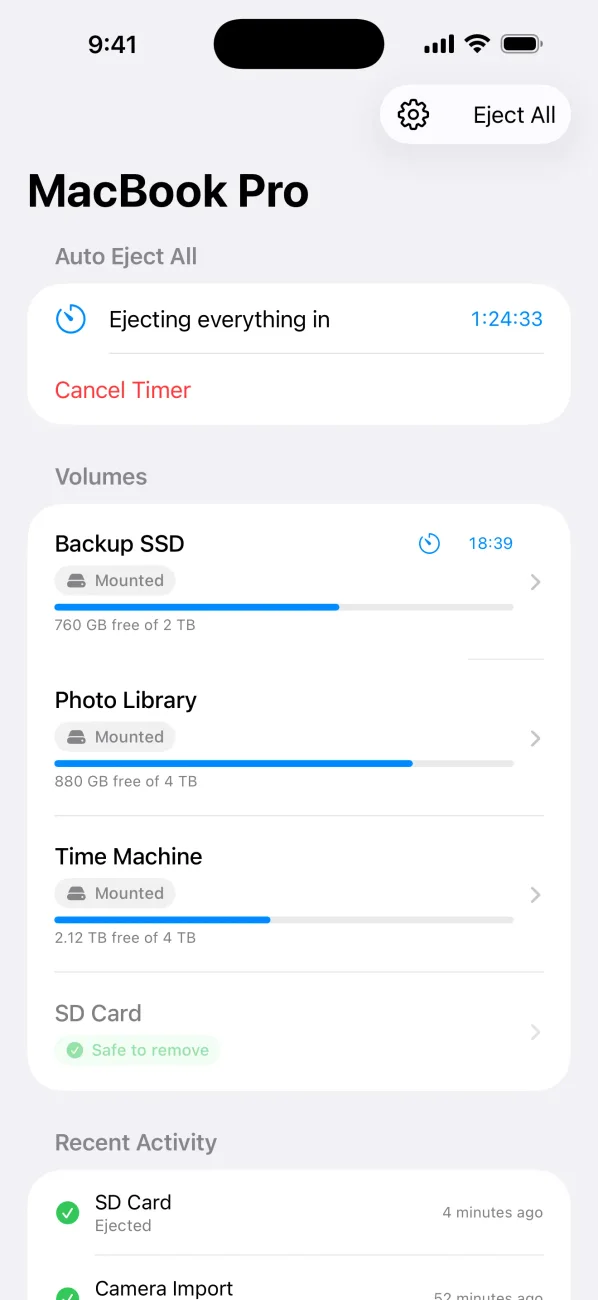
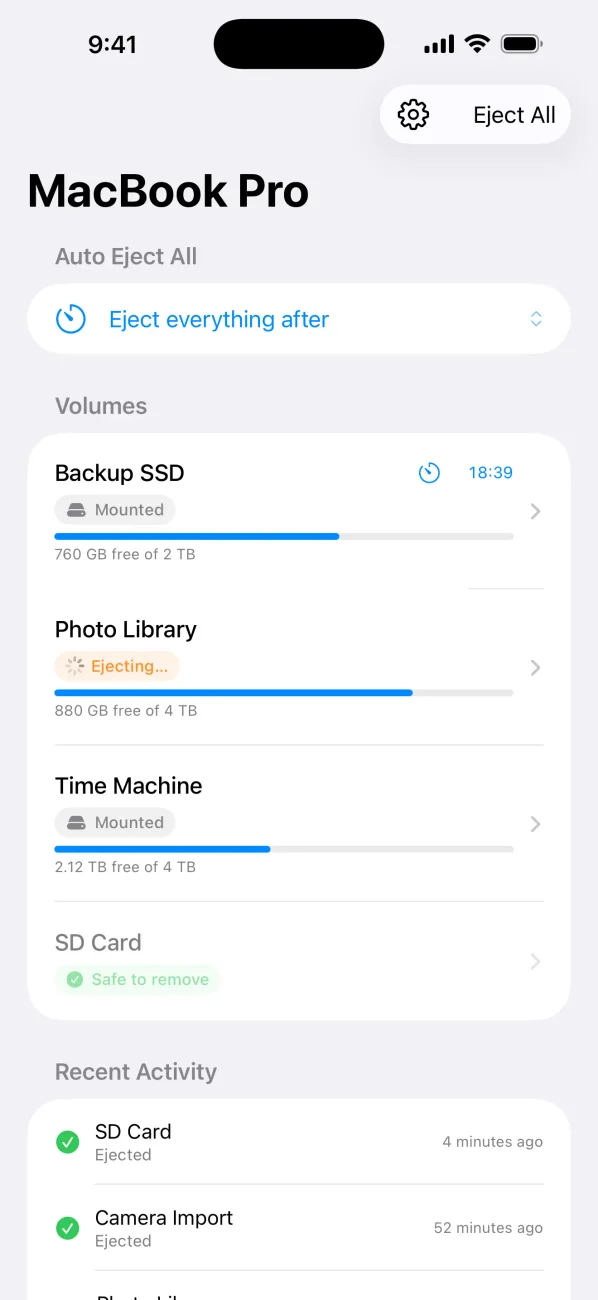
Ejectify for iPhone is the companion to Ejectify on your Mac. It shows every external drive plugged into your Mac and lets you eject any of them without getting up.
EVERY MAC, EVERY DRIVE
Each Mac running Ejectify appears with its drives, how full they are, and whether it's online right now. Turn on "Allow control from my iPhone" on the Mac and it shows up here.
EJECT FROM ANYWHERE
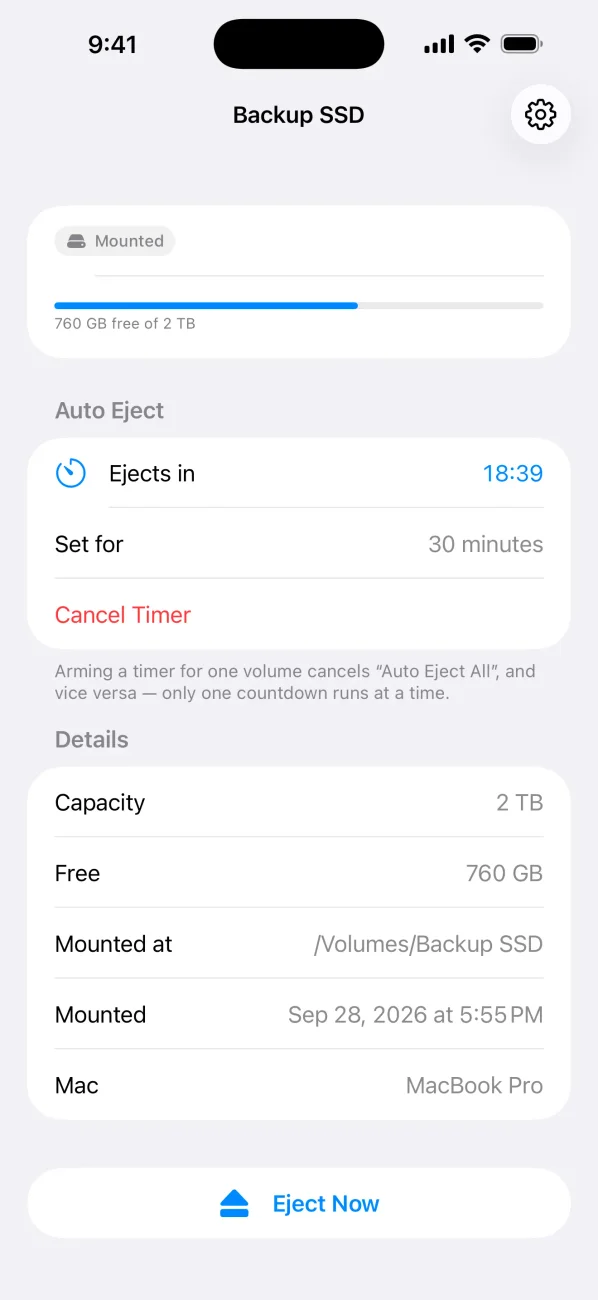
Tap a drive to eject it, or eject everything at once. Your Mac does the work and reports back — including when a drive refuses because something is still using it, and what that something was.
KNOW WHEN IT'S SAFE TO UNPLUG
A notification arrives the moment a drive is unmounted, whether you asked for it from here, from the Mac's menu bar, from a timer, or from an AI assistant. It arrives even if this app has been force-quit.
AUTO EJECT ON A TIMER
Arm a countdown for one drive or for all of them and watch it tick down. Part of the same one-time Auto Eject unlock as the Mac — buy it once, on either platform, and it works on both.
YOUR MAC, AI-CAPABLE
Ejectify on the Mac also speaks MCP (Model Context Protocol). Switch on "Allow AI assistants to control this Mac" and Claude or ChatGPT can list your drives and eject them for you — "eject my backup drive" is the whole interaction. Ask from your desk, tap from your phone, or let a timer handle it; every eject shows up here the same way, with the same notification.
PRIVATE BY CONSTRUCTION
Everything syncs through your own iCloud private database — your Apple account, Apple's infrastructure, no server of ours in the middle. No account to create, no tracking, nothing collected. The AI connector on the Mac never leaves the machine: it talks to Ejectify over a private local socket, only while you've switched it on, and only Claude and ChatGPT are accepted.
Requires Ejectify on a Mac running macOS 12 or later, signed into the same iCloud account.
Novedades
Versión 1.4.7 · 13/11/2026
• Recent Activity now shows why an eject failed in full, including the drive type (e.g. “USB · HDD · LaCie Mobile Drive”).
• Works with the new diagnostics and repeated-ejection options in Ejectify 1.4.7 for Mac.
Privacidad de la aplicación
Lo que Alexander Fitterling declara en App Store sobre cómo esta aplicación gestiona los datos.
-
Datos vinculados a ti
Pueden recopilarse y vincularse a tu identidad.
- Identificadores
- Datos de uso
- Otros datos
-
Datos no vinculados a ti
Pueden recopilarse, pero no se vinculan a tu identidad.
- Diagnóstico
Las prácticas de privacidad pueden variar, por ejemplo, según las funciones que uses o tu edad.
Información
- Vendedor
- Alexander Fitterling
- Categoría
- Utilidades
- Versión
- 1.4.7
- Actualizado
- 13/11/2026
- Publicado
- 23/6/2026
- Tamaño
- 1,6 MB
- Requiere
- iOS 17.0 o posterior
- Clasificación por edad
- 4+
- Precio
- Gratis
- Compras en la aplicación
- Sí
- Idiomas
- Inglés, Árabe, Checo, Danés, Neerlandés, Finés, Francés, Alemán, Griego, Hebreo, Hindi, Húngaro + 18 más
- Copyright
- © 2026 Alex Fitterling
Quizá también te guste
-
 Limpia audio - CleanfyVoz clara en tus vídeos
-
 Ejecta: Water Eject & CleanerUtilidades
-
 DriveShelfUtilidades
-
 Gateway Config AppUtilidades
-
 Clesqo: Clean, Scan, OrganizeLimpieza · Compresión · Escan
-
 Water Eject | Speaker CleanerUtilidades
-
 BlockR: Spam Call BlockerUtilidades
-
 dB Toolkit: SonómetroPruebas, no solo un número
-
 DuoIoTUtilidades
-
 SweetSpot Signal FinderUtilidades