Nero Receiver
The best DLNA streaming player
Diseñada para iPhone, iPad, Mac, iPod touch
Gratis · Compras en la aplicación
- Clasificación por edad4+
- CategoríaFoto y vídeo
- DesarrolladorNero AG
- IdiomasInglés+ 14 más
- Tamaño15,8 MB
Enlaza a la página oficial de App Store
Download.org no aloja ningún archivo de Nero Receiver. El botón abre la página de la aplicación en App Store, donde la publica Nero AG. Ficha comprobada por última vez el 12/11/2026.
Capturas de pantalla

Acerca de
El desarrollador no ha proporcionado este texto en tu idioma.
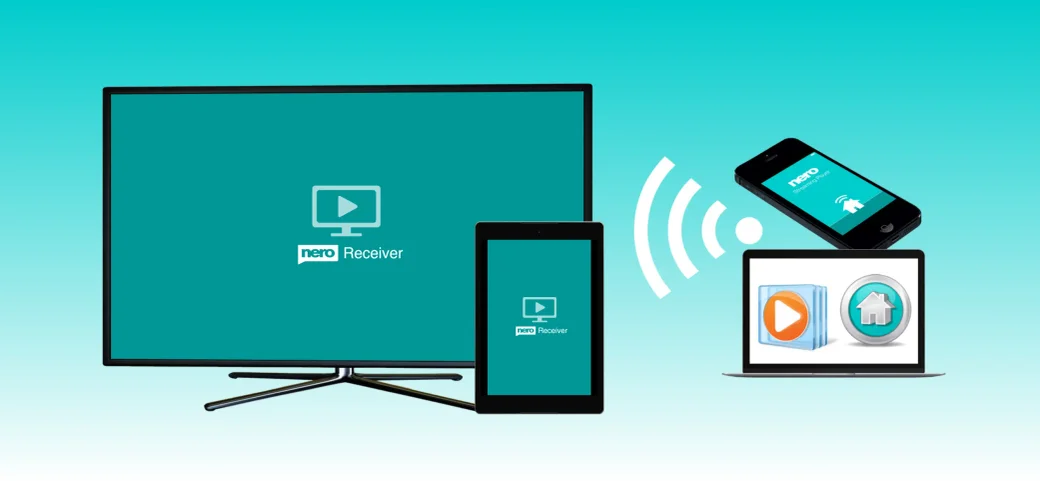
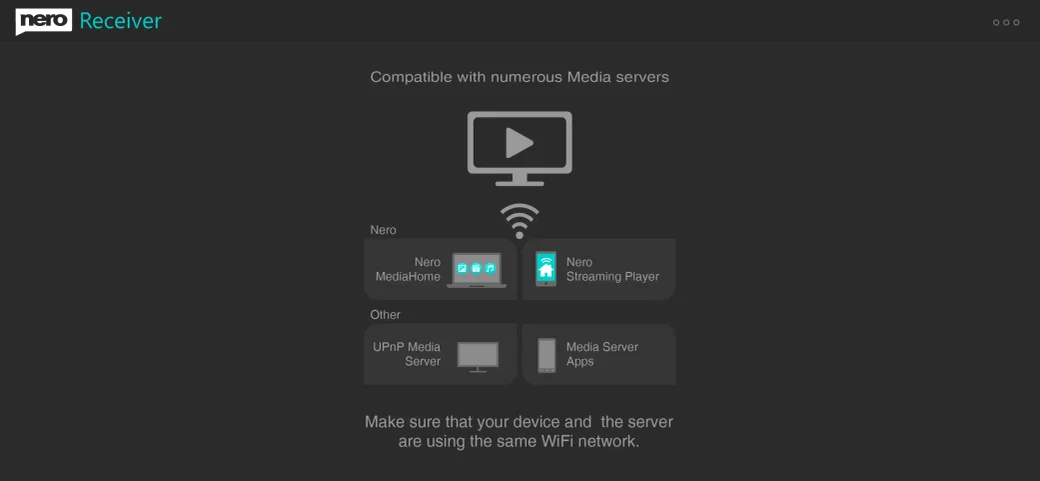
Stream videos, photos & music via your PC in your home network and play your media wirelessly on your mobile device with super easy to use Nero Receiver App. Also stream media files between different mobile devices within the same WiFi network – even platform independent. E.g. use Nero Streaming Player App on one mobile device as a wireless media controller and via Nero Receiver App let your second mobile device become your wireless media player. Nero Receiver App is also compatible with numerous other UPnP / DLNA media servers and media player apps.
* Stream videos, photos & music to your tablet in the garden!
* Listen to PC music playlists on your smartphone in the bedroom!
* Friends came over? Show some photos & slideshows sitting on the couch!
Nero Receiver provides you with an easy and high quality solution!
- Play photos, videos & music stored on the PC to your mobile device
- Stream music and music playlists
- Stream photos and slideshows
- Cast single videos or several videos in a row
- Play any media file from Media Player® to your tablet or mobile
- Cast media files using any UPnP / DLNA media servers
- Pause or stop media playback and skip titles using your smartphone
Special features in combination with Nero MediaHome®:
- AI Tags: automatic categorize your photos by content
- Transcoding: always stream in device-compatible format
- Face Recognition: automatic categorization of your photo library by persons
- Geotagging: sort photos by places you have visited
- Themed Slideshows: stream slideshows with automatic intro/outro, transitions & music
How to stream to Nero Receiver App via Nero MediaHome:
1. Open Nero MediaHome on your PC.
2. In the upper right corner you'll find a screen symbol as ‘Play To’ device selection window.
3. Select your tablet or smartphone from the list.
4. Select a video, photo, a slideshow, or a music playlist in Nero MediaHome.
5. Press play in Nero MediaHome & start enjoying your content around the house on your mobile device!
For how to proceed with other UPNP / DLNA media servers check out Nero Know HowApp under FAQ 'Nero Receiver'.
Please note:
Your PC and mobile device need to be on the same WiFi. It is highly recommended to use only in private and secured wireless networks.
Novedades
Versión 1.0.32 · 13/1/2026
Fixed minor issues and improved performance.
Privacidad de la aplicación
Lo que Nero AG declara en App Store sobre cómo esta aplicación gestiona los datos.
-
Datos usados para rastrearte
Pueden usarse para rastrearte en aplicaciones y sitios web propiedad de otras empresas.
- Datos de uso
-
Datos no vinculados a ti
Pueden recopilarse, pero no se vinculan a tu identidad.
- Datos de uso
Las prácticas de privacidad pueden variar, por ejemplo, según las funciones que uses o tu edad.
Información
- Vendedor
- Nero AG
- Categoría
- Foto y vídeo
- Versión
- 1.0.32
- Actualizado
- 13/1/2026
- Publicado
- 5/10/2014
- Tamaño
- 15,8 MB
- Requiere
- iOS 11.0 o posterior
- Clasificación por edad
- 4+
- Precio
- Gratis
- Compras en la aplicación
- Sí
- Idiomas
- Inglés, Checo, Neerlandés, Francés, Alemán, Italiano, Japonés, Coreano, Polaco, Portugués, Ruso, Chino simplificado + 3 más
- Copyright
- © 2026 Nero AG
Quizá también te guste
-
 TV Cast for DLNA Smart TVFoto y vídeo
-
 Conflux - Video PlayerFoto y vídeo
-
 Screen Mirroring App - TV CastMirror to Device & Smart View
-
 Tubio - Vídeos de web a TVSmart TV, Cast, DLNA
-
 TV AssistReproducir medios móviles a TV
-
 Smart Mirror | TV & DeviceCast Screen, View Stream Video
-
 Reproductor - Sweet JuiceReproductor de vídeo y audio
-
 TV Cast Pro for DLNA Smart TVFoto y vídeo
-
 Smart TV Cast: Foto y VídeoFotos y vídeos en tu TV
-
 Photo Video Cast to ChromecastFoto y vídeo