
- Clasificación por edad17+
- CategoríaProductividad
- DesarrolladorPBD LLC
- IdiomasInglés
- Tamaño17,2 MB
Enlaza a la página oficial de App Store
Download.org no aloja ningún archivo de Shotup AI. El botón abre la página de la aplicación en App Store, donde la publica PBD LLC. Ficha comprobada por última vez el 28/11/2026.
Capturas de pantalla




Acerca de
El desarrollador no ha proporcionado este texto en tu idioma.
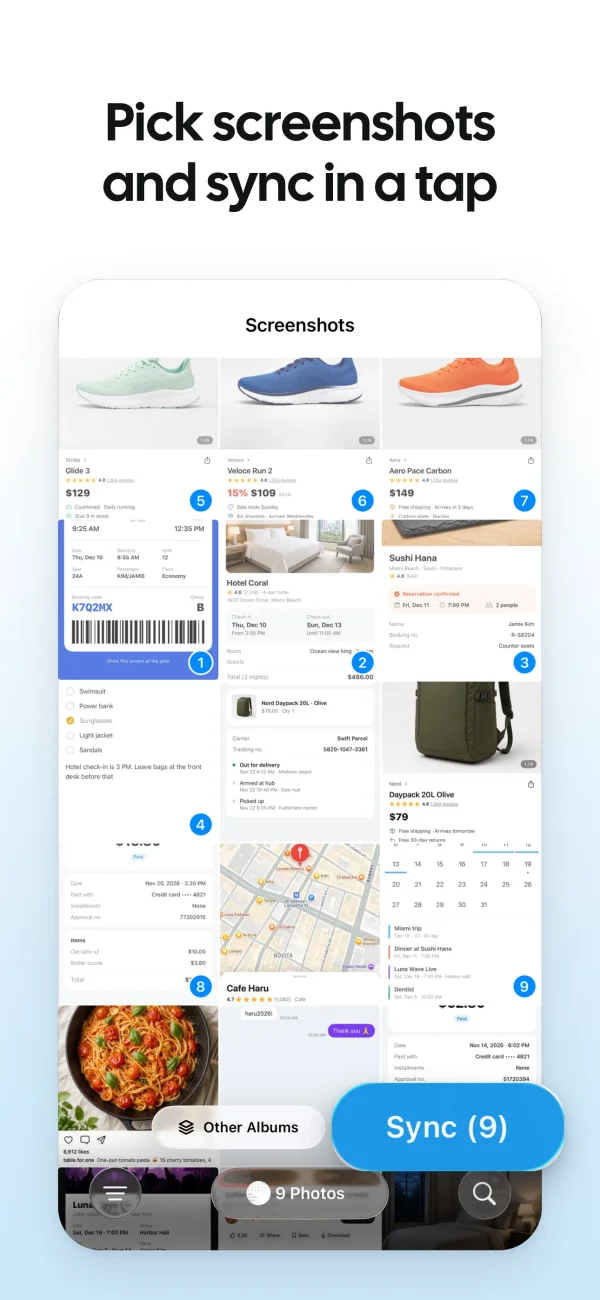
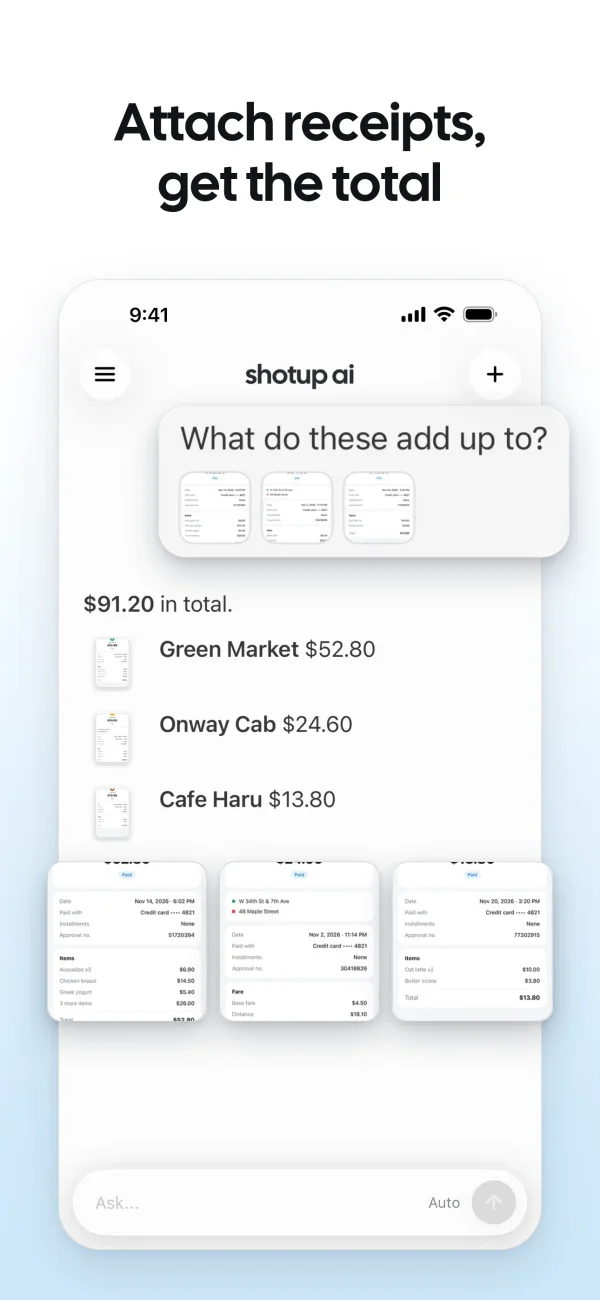
Shotup AI learns and remembers your screenshots.
It understands the context and visuals of your shots, and answers any questions about them in chat.
We all take screenshots — of posts, articles, restaurants, maps, design inspiration - things we considered important to save and revisit later. However, many of them end up forgotten, buried deep in our photo album. Rarely do we scroll through hundreds of images to find the one we need. What if you had a second brain — a photographic memory - that could remember not just the image but the entire context of every screenshot you’ve ever taken?
We are introducing Shotup AI. It doesn’t just store your screenshots — it learns from them. Whether you’re trying to recall an article or a social media post with tips, life hacks, or restaurant recommendations, Shotup AI gives you the references and insights you need based on the stored screenshot knowledge. It’s more than a chatting AI. It’s your backup memory.
How it works:
1. Select and sync screenshots you want the AI to remember.
2. The AI learns the context and visuals of the selected screenshots, and organizes key information.
3. Ask anything about the synced shots. Shotup AI will answer based on the relevant knowledge it learned from your screenshots.
4. You can also pick from 'Suggested Questions,' the question options Shotup AI generated based on the screenshot information it learned.
For shoppers: Take screenshots of nice jacket or shoes you saw on Amazon, the brand websites or even on the instagram ads. Shotup AI will organize and list down all the items you took from different sites.
For students: Take screenshots of your note, online articles, life hacks or tips so Shotup AI can give you reminders and summarize relevant information whenever you need.
For designers: Take screenshots of design references, art pieces, mood board, fonts, color codes and more. Shotup AI will suggest relevant shots you took when you need inspiration from your past savings. You can ask - "Show me the warm cozy interior design references I saved." and it will find the right screenshots from you synced list.
For everyone: Take screenshots of nice restaurants on Google Map, so it can suggest nice restaurants around there when you ask later. You can also take screenshots of your Whatsapp chat so it remembers your meeting schedule, time and location.
Support & Feedback: hello@shotup.ai
---
Terms of Use: https://www.apple.com/legal/internet-services/itunes/dev/stdeula/
Privacy Policy: https://www.shotup.ai/termsandprivacy
Novedades
Versión 3.4 · 27/11/2026
- Clearer onboarding: swipe through what Shotup does, then sign in.
- First sync sheet: sync your recent screenshots in one tap, or pick them yourself.
- After the first sync, suggested questions highlight so you can ask right away.
- Account deletion now returns you to the sign-in screen.
- Photo access screen refreshed.
Privacidad de la aplicación
Lo que PBD LLC declara en App Store sobre cómo esta aplicación gestiona los datos.
-
Datos no vinculados a ti
Pueden recopilarse, pero no se vinculan a tu identidad.
- Información de contacto
- Contactos
- Contenido del usuario
- Historial de búsqueda
- Historial de navegación
- Identificadores
- Datos de uso
- Diagnóstico
Las prácticas de privacidad pueden variar, por ejemplo, según las funciones que uses o tu edad.
Información
- Vendedor
- PBD LLC
- Categoría
- Productividad
- Versión
- 3.4
- Actualizado
- 27/11/2026
- Publicado
- 7/1/2025
- Tamaño
- 17,2 MB
- Requiere
- iOS 17.0 o posterior
- Clasificación por edad
- 17+
- Precio
- Gratis
- Idiomas
- Inglés
- Copyright
- © Shotup AI 2026
Quizá también te guste
-
 Screenshot AI: Gallery CleanerEspacio libre con búsqueda IA
-
 Stupid NotesProductividad
-
 Kiro - Screenshot AIProductividad
-
 camp - organize screenshotsProductividad
-
 SnapStash - AI Screenshot orgProductividad
-
 Captureist – screenshot toolProductividad
-
 Stash: Organizador de capturasOrdena con IA y busca el texto
-
 VisuelScreenshots & Photos Organizer
-
 Eyeball: Links Log & RemindersProductividad
-
 01 LightProductividad