
Splicon: Split View Icon Maker
1-Tap Split Screen Shortcuts
Diseñada para iPhone, iPad
Gratis · Compras en la aplicación
- Clasificación por edad4+
- CategoríaProductividad
- Desarrolladoraiko ueda
- IdiomasJaponés+ 1 más
- Tamaño938,0 KB
Enlaza a la página oficial de App Store
Download.org no aloja ningún archivo de Splicon: Split View Icon Maker. El botón abre la página de la aplicación en App Store, donde la publica aiko ueda. Ficha comprobada por última vez el 12/11/2026.
Capturas de pantalla
Acerca de
El desarrollador no ha proporcionado este texto en tu idioma.
Tired of manually opening Split View every time?
You know how it goes: open App A, drag App B from the Dock, adjust the divider, start working — and then do it all over again next time.
Splicon fixes this for good.
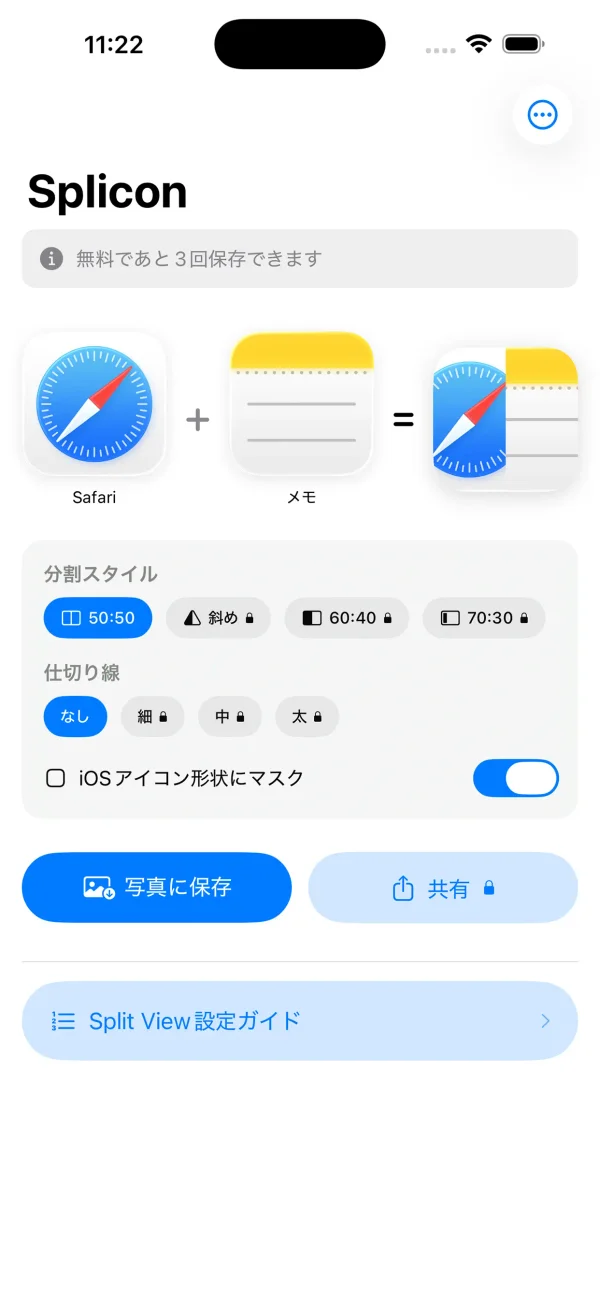
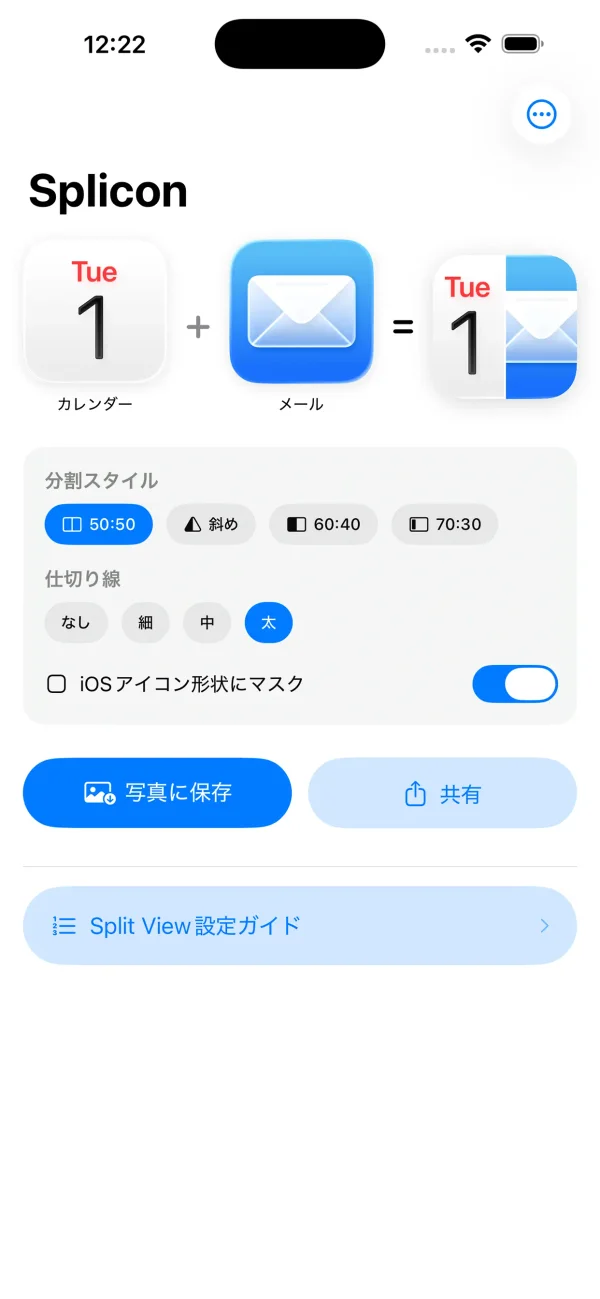
Create a custom icon that launches two apps in Split View with a single tap. Set it once on your Home Screen, and you're done forever.
WHY SPLICON EXISTS
iOS Shortcuts can create Split View shortcuts — but the only icon option is an emoji. When you have five or six shortcuts, a row of random emojis tells you nothing.
Splicon generates a clean side-by-side icon from the actual app icons of both apps, so you can see at a glance which pair you're launching.
HOW IT WORKS (5 minutes, once)
1. Search and select your two apps inside Splicon
2. Your combined icon is generated instantly
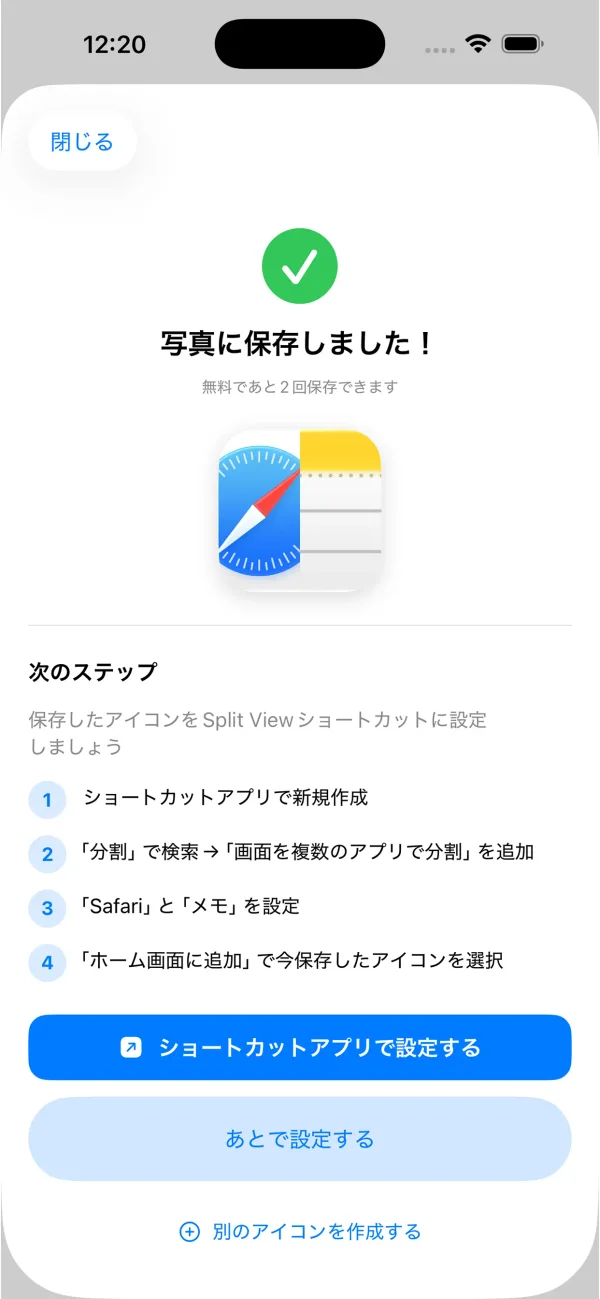
3. Save it to Photos
4. Open the Shortcuts app, create a Split View shortcut, and set the saved icon
5. Add to Home Screen — done
POPULAR COMBINATIONS
• ChatGPT + YouTube — research while watching
• Gmail + Calendar — reply without switching apps
• Notion + Slack — document conversations in real time
• Kindle + Obsidian — read and capture notes together
• YouTube + GoodNotes — take notes during video lectures
• Perplexity + Safari — verify research sources side by side
PLANS
Free — Create and save up to 3 icon pairs
Pro (one-time purchase) — Unlimited pairs + icon history for easy regeneration
REQUIREMENTS
• iPad only
• iPadOS 15 or later
• Split View-compatible iPad model
Turn your iPad into the multitasking machine it was built to be.
Novedades
Versión 2.3.0 · 23/5/2026
Added English (U.S.) localization. Splicon is now available in English for users worldwide.
Privacidad de la aplicación
Lo que aiko ueda declara en App Store sobre cómo esta aplicación gestiona los datos.
-
No se recopilan datos
El desarrollador no recopila ningún dato de esta aplicación.
Las prácticas de privacidad pueden variar, por ejemplo, según las funciones que uses o tu edad.
Información
- Vendedor
- aiko ueda
- Categoría
- Productividad
- Versión
- 2.3.0
- Actualizado
- 23/5/2026
- Publicado
- 15/5/2026
- Tamaño
- 938,0 KB
- Requiere
- iOS 17.0 o posterior
- Clasificación por edad
- 4+
- Precio
- Gratis
- Compras en la aplicación
- Sí
- Idiomas
- Japonés, Inglés
- Copyright
- © 2026 Ueda
Quizá también te guste
-
 Analog Focus - Pomodoro TimerProductividad
-
 OCRスキャナー- 文字認識Productividad
-
 Voice DigestProductividad
-
 TextwellProductividad
-
 YORVIA: バイトの給料計算とシフト管理Productividad
-
 毎日ルーティンProductividad
-
 Truly Simple Slide DeckProductividad
-
 Koyomi Planner|手帳とカレンダーProductividad
-
 Plantillas para Excel ProPlantillas Excel Profesionales
-
 Convertidor Foto a PDF MakerEscáner y editor de imágenes