rens watchface91
rens watchfaces- PEGI 3Classification d’âge
- PersonnalisationCatégorie
- 18/10/2026Mis à jour
- 0,69 €Prix
Renvoie vers la fiche Google Play officielle de com.watchfacestudio.rens_watchface91. Dernière vérification le 14/11/2026.

Captures d’écran



À propos de cette application
Traduction automatique par Google. Langue d’origine : Anglais (États-Unis).
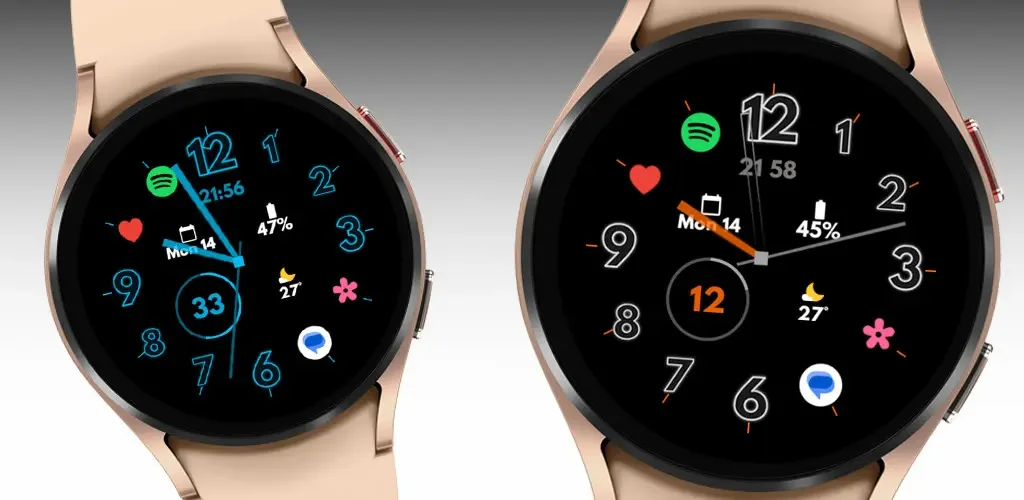
Cadran de montre hybride
REMARQUE IMPORTANTE
**Si "Cette application n'est pas disponible pour votre appareil" apparaît, utilisez le Play Store sur un navigateur WEB (CHROME) à partir d'un navigateur Web de PC ou d'ordinateur portable ou de téléphone au lieu de l'application Play Store sur votre téléphone. Copiez et collez le lien du cadran de la montre dans un navigateur WEB (CHROME), puis installez.
L'objectif de Rens Watchfaces est de vous fournir le meilleur cadran de montre afin que vous puissiez en profiter. Contactez-nous à renswatchface@gmail.com avant de donner une mauvaise note et de demander un remboursement. Nous vous fournirons des captures d'écran et des instructions sur la façon d'installer le cadran de la montre.
Plusieurs façons d'installer un cadran de montre Wear OS sont présentées dans cette vidéo utile des développeurs Samsung : https://youtu.be/vMM4Q2-rqoM
GUIDE D'INSTALLATION
1.) CONNECTEZ-VOUS À VOTRE COMPTE GOOGLE « SUR LA MONTRE » et assurez-vous que la montre est fortement connectée à votre téléphone via BLUETOOTH et utilise le MÊME WIFI.
2.) Après le téléchargement, ATTENDEZ un peu pour que le cadran de la montre apparaisse sur l'appareil. (Il y aura une notification sur votre montre si le cadran de la montre a été transféré avec succès.)
3.) S'il n'y a pas d'avis, allez sur PLAYSTORE SUR VOTRE MONTRE et tapez dans la BOÎTE DE RECHERCHE "rens watchface91".
4.) Une fois le cadran de la montre affiché, cliquez sur le bouton d'installation.
5.) Après une installation réussie, les cadrans de montre ne changent pas immédiatement. Revenez à l’écran d’accueil, appuyez longuement sur l’affichage, puis faites glisser votre doigt jusqu’à la fin pour ajouter le cadran de la montre. Faites pivoter la lunette pour trouver le cadran de la montre.
**N'oubliez pas que le problème d'installation est hors de notre contrôle et faites preuve de patience. Avant d'être publiées, nos applications de cadran de montre sont minutieusement testées sur un appareil authentique (la Galaxy Watch 4) et autorisées par l'équipe Google Play Store. Nous voulons que nos cadrans de montre plaisent à l'utilisateur.
***********************
AUTORISER/ACTIVER toutes les autorisations depuis Paramètres > Applications > Autorisations
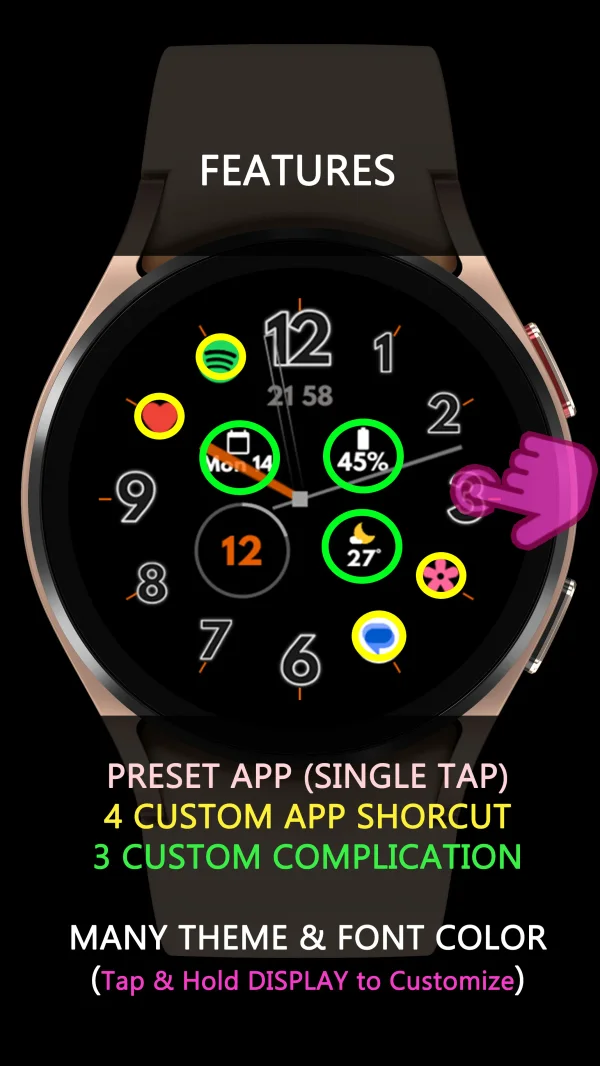
CARACTÉRISTIQUES
*4 RACCOURCIS POUR APPLICATIONS PERSONNALISÉES
*3 COMPLICATIONS PERSONNALISÉES
*TOUJOURS À L'AFFICHAGE
*12/24 HEURES COMMUTABLES
* DE NOMBREUSES COMBINAISONS DE COULEURS DE THÈME (APPUYEZ ET MAINTENEZ L'AFFICHAGE POUR PERSONNALISER)
*Certaines fonctionnalités peuvent ne pas être disponibles sur certaines montres.
Merci pour votre soutien.
**************
Collection complète : cadrans Rens
Contactez-nous à : renswatchface@gmail.com
Page Facebook : https://www.facebook.com/renswatchfaces
Afficher le texte d’origine
IMPORTANT NOTE
**If "This app is not available for your device" appears, use the Play Store on a WEB browser (CHROME) from a PC or Laptop or Phone Web Browser instead of the Play Store app on your phone. Copy and paste the watch face link into a WEB browser (CHROME), then install.
Rens Watchfaces goal is to provide you with the best watch face so you can enjoy it. Contact us at renswatchface@gmail.com before giving a bad rating and request refund. We'll provide screenshots and instructions on how to install the watch face.
Several ways to install a Wear OS watch face are shown in this helpful video from Samsung Developers: https://youtu.be/vMM4Q2-rqoM
INSTALLATION GUIDE
1.) LOG IN TO YOUR GOOGLE ACCOUNT "ON WATCH" and ensure that the watch is strongly connected to your phone via BLUETOOTH and is using the SAME WIFI.
2.) After downloading, WAIT a short while for the watch face to appear on the device. (There will be a notification on your watch if the watch face was successfully transferred.)
3.) If there is no notice, go to PLAYSTORE ON YOUR WATCH and type on the SEARCH BOX "rens watchface91".
4.) After the watch face show up, click the install button.
5.) After a successful installation, watch faces do not immediately change. Return to the home screen, tap and hold display and then swipe all the way to the end to add the watch face. Rotate Bezel to find the watch face.
**Remember that the installation issue is beyond our control and exercise patience. Before publishing, our watch face apps are thoroughly tested on a genuine device (the Galaxy Watch 4) and authorized by the Google Play Store team. We want our watch faces to be pleasing to the user.
************************
ALLOW/ENABLE all permissions from Settings > Applications > Permissions
FEATURES
*4 CUSTOM APP SHORTCUTS
*3 CUSTOM COMPLICATION
*ALWAYS ON DISPLAY
*12/24 HR SWITCHABLE
*MANY THEME COLOR COMBINATIONS (TAP & HOLD DISPLAY TO CUSTOMIZE)
*some features may not be available on some watches.
Thank you for your support.
**************
Full Collection: rens watchfaces
Contact us at: renswatchface@gmail.com
Facebook Page: https://www.facebook.com/renswatchfaces
Sécurité des données
Ce que rens watchfaces déclare sur Google Play au sujet des données que cette application collecte et partage.
- Aucune donnée partagée avec des tiersEn savoir plus sur la manière dont les développeurs déclarent le partage
- Aucune donnée collectéeEn savoir plus sur la manière dont les développeurs déclarent la collecte
Coordonnées du développeur
- E-mailrenswatchface@gmail.com
- Politique de confidentialitésites.google.com
- Adresse0003 Blk 1 0 Lot Block BLK Dulo-Balon Batia Pantoc Meycauayan 3019 Philippines
Informations
- Proposée par
- rens watchfaces
- Catégorie
- Personnalisation
- Mis à jour
- 18/10/2026
- Publié
- 14/10/2024
- Classification d’âge
- PEGI 3
- Prix
- 0,69 €
- Nom du package
- com.watchfacestudio.rens_watchface91