rens watchface91
rens watchfaces- Rating 3+Batasan usia
- PersonalisasiKategori
- 18/10/2026Diperbarui
- Rp 11.000Harga
Tertaut ke halaman resmi com.watchfacestudio.rens_watchface91 di Google Play. Terakhir diperiksa pada 14/11/2026.

Tangkapan layar



Tentang aplikasi ini
Terjemahan otomatis oleh Google. Bahasa asli: Inggris (Amerika Serikat).
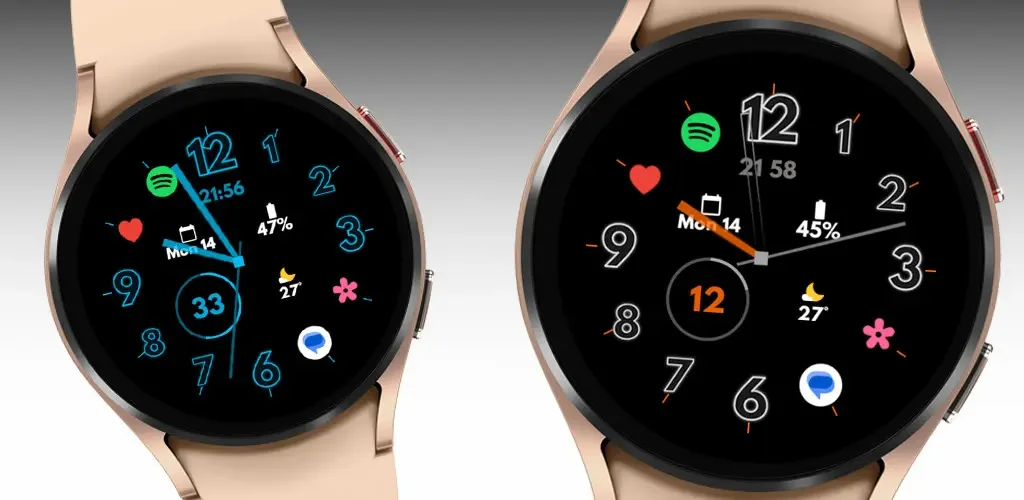
Tampilan Jam Hibrid
CATATAN PENTING
**Jika "Aplikasi ini tidak tersedia untuk perangkat Anda" muncul, gunakan Play Store di browser WEB (CHROME) dari PC atau Laptop atau Browser Web Ponsel, bukan aplikasi Play Store di ponsel Anda. Salin dan tempel tautan tampilan jam ke browser WEB (CHROME), lalu instal.
Tujuan Rens Watchfaces adalah memberi Anda tampilan jam terbaik sehingga Anda dapat menikmatinya. Hubungi kami di renswatchface@gmail.com sebelum memberikan peringkat buruk dan meminta pengembalian dana. Kami akan memberikan tangkapan layar dan petunjuk tentang cara memasang tampilan jam.
Beberapa cara memasang tampilan jam Wear OS ditampilkan dalam video bermanfaat dari Pengembang Samsung ini: https://youtu.be/vMM4Q2-rqoM
PANDUAN INSTALASI
1.) MASUK KE AKUN GOOGLE ANDA "ON WATCH" dan pastikan jam tangan terhubung kuat ke ponsel Anda melalui BLUETOOTH dan menggunakan WIFI yang SAMA.
2.) Setelah mengunduh, TUNGGU sebentar hingga tampilan jam muncul di perangkat. (Akan ada notifikasi di jam tangan Anda jika tampilan jam berhasil ditransfer.)
3.) Jika tidak ada pemberitahuan, buka PLAYSTORE DI JAM TANGAN ANDA dan ketik di KOTAK PENCARIAN "rens watchface91".
4.) Setelah tampilan jam muncul, klik tombol install.
5.) Setelah instalasi berhasil, tampilan jam tidak langsung berubah. Kembali ke layar beranda, ketuk dan tahan tampilan lalu geser hingga akhir untuk menambahkan tampilan jam. Putar Bezel untuk menemukan tampilan jam.
**Ingat bahwa masalah instalasi berada di luar kendali kami dan bersabarlah. Sebelum dipublikasikan, aplikasi tampilan jam kami diuji secara menyeluruh pada perangkat asli (Galaxy Watch 4) dan disahkan oleh tim Google Play Store. Kami ingin tampilan jam kami menyenangkan pengguna.
************************
IZINKAN/AKTIFKAN semua izin dari Setelan > Aplikasi > Izin
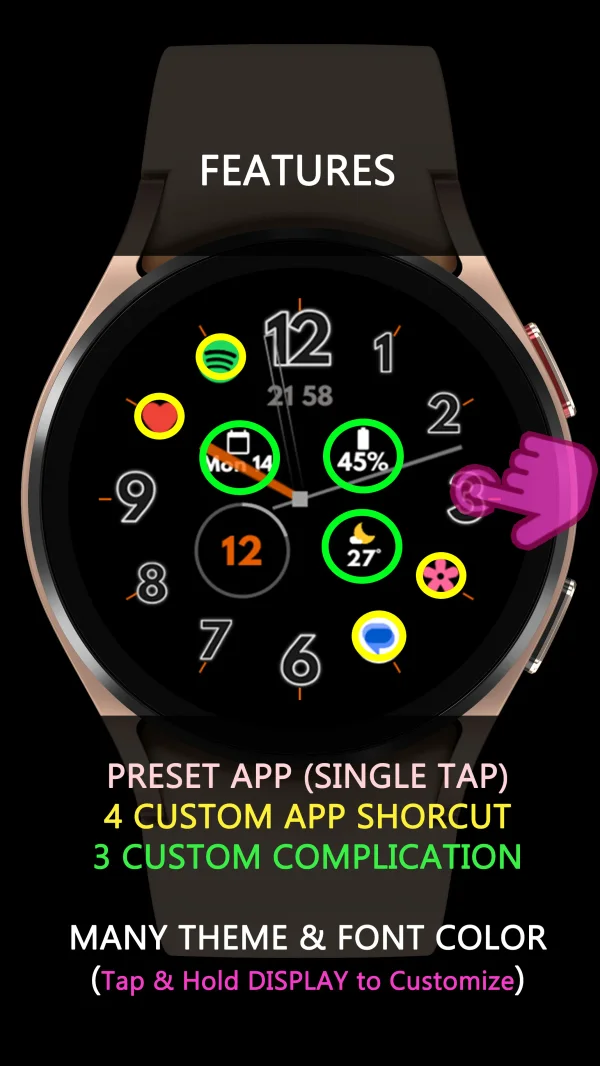
FITUR
*4 PINTASAN APLIKASI KUSTOM
*3 KOMPLIKASI KHUSUS
* SELALU DI TAMPILKAN
*12/24 JAM DAPAT DIGANTI
*BANYAK KOMBINASI WARNA TEMA (TAP & TAHAN TAMPILAN UNTUK MENYESUAIKAN)
*beberapa fitur mungkin tidak tersedia di beberapa jam tangan.
Terima kasih atas dukungan Anda.
**************
Koleksi Lengkap: rens tampilan jam
Hubungi kami di: renswatchface@gmail.com
Halaman Facebook: https://www.facebook.com/renswatchfaces
Tampilkan teks asli
IMPORTANT NOTE
**If "This app is not available for your device" appears, use the Play Store on a WEB browser (CHROME) from a PC or Laptop or Phone Web Browser instead of the Play Store app on your phone. Copy and paste the watch face link into a WEB browser (CHROME), then install.
Rens Watchfaces goal is to provide you with the best watch face so you can enjoy it. Contact us at renswatchface@gmail.com before giving a bad rating and request refund. We'll provide screenshots and instructions on how to install the watch face.
Several ways to install a Wear OS watch face are shown in this helpful video from Samsung Developers: https://youtu.be/vMM4Q2-rqoM
INSTALLATION GUIDE
1.) LOG IN TO YOUR GOOGLE ACCOUNT "ON WATCH" and ensure that the watch is strongly connected to your phone via BLUETOOTH and is using the SAME WIFI.
2.) After downloading, WAIT a short while for the watch face to appear on the device. (There will be a notification on your watch if the watch face was successfully transferred.)
3.) If there is no notice, go to PLAYSTORE ON YOUR WATCH and type on the SEARCH BOX "rens watchface91".
4.) After the watch face show up, click the install button.
5.) After a successful installation, watch faces do not immediately change. Return to the home screen, tap and hold display and then swipe all the way to the end to add the watch face. Rotate Bezel to find the watch face.
**Remember that the installation issue is beyond our control and exercise patience. Before publishing, our watch face apps are thoroughly tested on a genuine device (the Galaxy Watch 4) and authorized by the Google Play Store team. We want our watch faces to be pleasing to the user.
************************
ALLOW/ENABLE all permissions from Settings > Applications > Permissions
FEATURES
*4 CUSTOM APP SHORTCUTS
*3 CUSTOM COMPLICATION
*ALWAYS ON DISPLAY
*12/24 HR SWITCHABLE
*MANY THEME COLOR COMBINATIONS (TAP & HOLD DISPLAY TO CUSTOMIZE)
*some features may not be available on some watches.
Thank you for your support.
**************
Full Collection: rens watchfaces
Contact us at: renswatchface@gmail.com
Facebook Page: https://www.facebook.com/renswatchfaces
Keamanan data
Yang dinyatakan rens watchfaces di Google Play tentang data yang dikumpulkan dan dibagikan aplikasi ini.
- Tidak ada data yang dibagikan kepada pihak ketigaPelajari lebih lanjut cara developer menyatakan pembagian data
- Tidak ada data yang dikumpulkanPelajari lebih lanjut cara developer menyatakan pengumpulan data
Kontak pengembang
- Emailrenswatchface@gmail.com
- Kebijakan Privasisites.google.com
- Alamat0003 Blk 1 0 Lot Block BLK Dulo-Balon Batia Pantoc Meycauayan 3019 Philippines
Informasi
- Ditawarkan oleh
- rens watchfaces
- Kategori
- Personalisasi
- Diperbarui
- 18/10/2026
- Dirilis
- 14/10/2024
- Batasan usia
- Rating 3+
- Harga
- Rp 11.000
- Nama paket
- com.watchfacestudio.rens_watchface91