rens watchface91
rens watchfaces- 3 歳以上対象年齢
- カスタマイズカテゴリ
- 2026/10/18更新日
- ¥110価格
com.watchfacestudio.rens_watchface91のGoogle Play公式ページにリンクしています。最終確認:2026/11/14。

スクリーンショット



このアプリについて
Googleによる英語 (アメリカ合衆国)からの自動翻訳です。
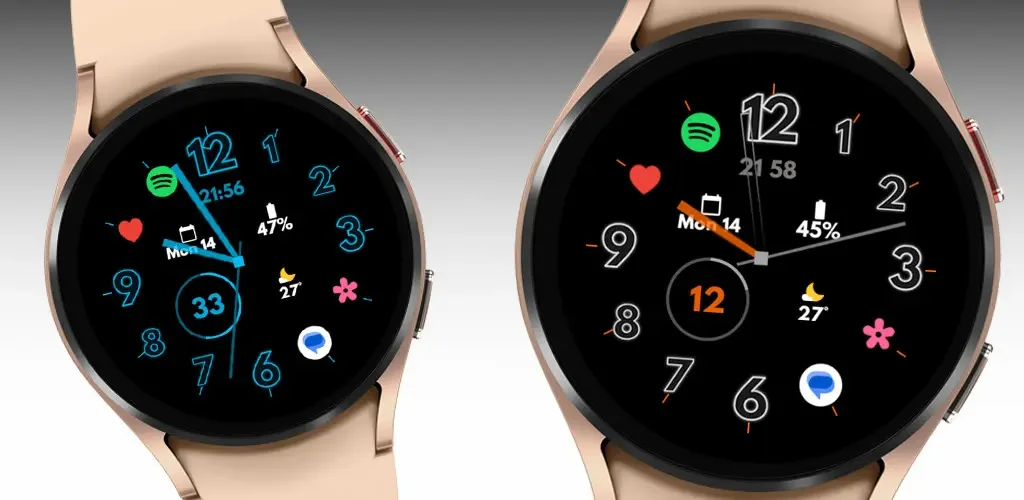
ハイブリッドウォッチフェイス
重要な注意
**「このアプリはお使いのデバイスでは利用できません」が表示される場合は、代わりに PC、ラップトップ、または携帯電話の Web ブラウザから Web ブラウザ (CHROME) で Play ストアを使用してください。携帯電話の Play ストア アプリ。ウォッチフェイスのリンクをコピーしてWEBブラウザ(CHROME)に貼り付けてインストールします。
Rens ウォッチフェイスの目標は、楽しんでいただける最高のウォッチフェイスを提供することです。悪い評価を付けて返金をリクエストする前に、renswatchface@gmail.com までご連絡ください。 スクリーンショットとウォッチフェイスのインストール方法を提供します。
Wear OS ウォッチフェイスをインストールするいくつかの方法は、Samsung Developers の役立つビデオで説明されています: https://youtu.be/vMM4Q2-rqoM
インストールガイド
1.) 「ON WATCH」で Google アカウントにログインし、時計が Bluetooth 経由で携帯電話に強力に接続され、同じ WIFI を使用していることを確認します。
2.) ダウンロード後、ウォッチフェイスがデバイスに表示されるまでしばらく待ちます。 (ウォッチフェイスが正常に転送されると、ウォッチに通知が表示されます。)
3.) 通知がない場合は、PLAYSTORE ON YOUR WATCH に移動し、 検索ボックスに「rens watchface91」と入力します。
4.) ウォッチフェイスが表示されたら、インストールボタンをクリックします。
5.) インストールが成功しても、ウォッチフェイスはすぐには変わりません。ホーム画面に戻り、ディスプレイをタップしたまま最後までスワイプして文字盤を追加します。ベゼルを回転させて文字盤を見つけます。
**インストールの問題は私たちにはどうすることもできないことを忘れずに、忍耐強く取り組んでください。公開前に、当社のウォッチフェイス アプリは正規のデバイス (Galaxy Watch 4) で徹底的にテストされ、Google Play ストア チームによって承認されています。私たちは、ユーザーにとって満足のいく文字盤を目指しています。
************************
[設定] > [アプリケーション] > [権限] からすべての権限を許可/有効にします
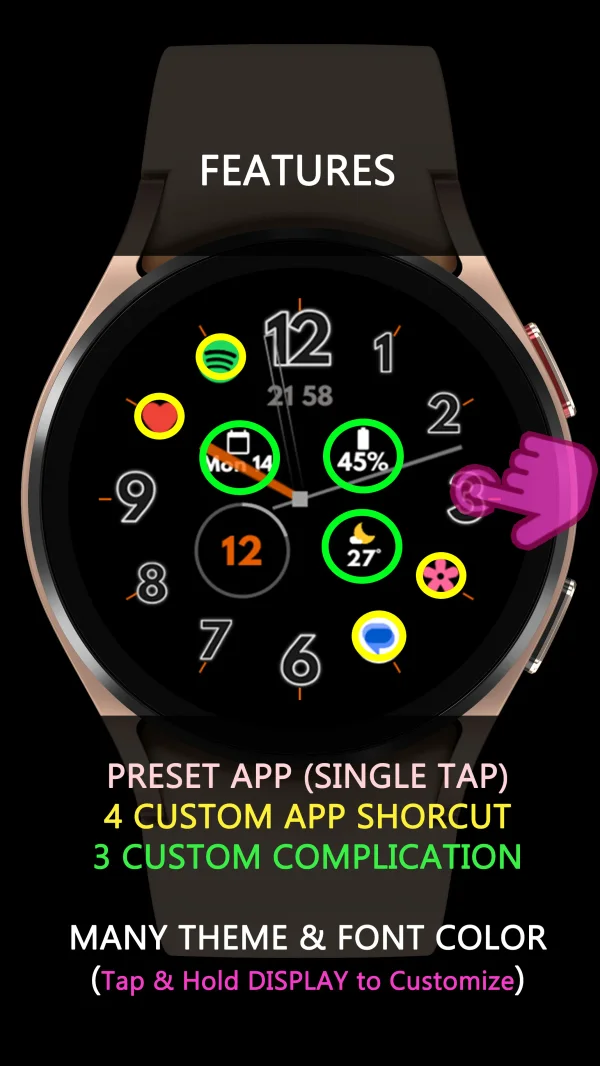
特徴
*4 カスタムアプリのショートカット
※3 カスタムコンプリケーション
*常時表示
*12/24時間切り替え可能
*多くのテーマカラーの組み合わせ (表示をタップアンドホールドしてカスタマイズ)
*一部の時計では一部の機能が利用できない場合があります。
ご支援ありがとうございます。
**************
全コレクション: レンズ ウォッチフェイス
連絡先: renswatchface@gmail.com
Facebook ページ: https://www.facebook.com/renswatchfaces
原文を表示
IMPORTANT NOTE
**If "This app is not available for your device" appears, use the Play Store on a WEB browser (CHROME) from a PC or Laptop or Phone Web Browser instead of the Play Store app on your phone. Copy and paste the watch face link into a WEB browser (CHROME), then install.
Rens Watchfaces goal is to provide you with the best watch face so you can enjoy it. Contact us at renswatchface@gmail.com before giving a bad rating and request refund. We'll provide screenshots and instructions on how to install the watch face.
Several ways to install a Wear OS watch face are shown in this helpful video from Samsung Developers: https://youtu.be/vMM4Q2-rqoM
INSTALLATION GUIDE
1.) LOG IN TO YOUR GOOGLE ACCOUNT "ON WATCH" and ensure that the watch is strongly connected to your phone via BLUETOOTH and is using the SAME WIFI.
2.) After downloading, WAIT a short while for the watch face to appear on the device. (There will be a notification on your watch if the watch face was successfully transferred.)
3.) If there is no notice, go to PLAYSTORE ON YOUR WATCH and type on the SEARCH BOX "rens watchface91".
4.) After the watch face show up, click the install button.
5.) After a successful installation, watch faces do not immediately change. Return to the home screen, tap and hold display and then swipe all the way to the end to add the watch face. Rotate Bezel to find the watch face.
**Remember that the installation issue is beyond our control and exercise patience. Before publishing, our watch face apps are thoroughly tested on a genuine device (the Galaxy Watch 4) and authorized by the Google Play Store team. We want our watch faces to be pleasing to the user.
************************
ALLOW/ENABLE all permissions from Settings > Applications > Permissions
FEATURES
*4 CUSTOM APP SHORTCUTS
*3 CUSTOM COMPLICATION
*ALWAYS ON DISPLAY
*12/24 HR SWITCHABLE
*MANY THEME COLOR COMBINATIONS (TAP & HOLD DISPLAY TO CUSTOMIZE)
*some features may not be available on some watches.
Thank you for your support.
**************
Full Collection: rens watchfaces
Contact us at: renswatchface@gmail.com
Facebook Page: https://www.facebook.com/renswatchfaces
データ セーフティ
このアプリが収集・共有するデータについて、rens watchfacesがGoogle Playで申告している内容です。
- 第三者と共有されるデータはありません詳しくは、デベロッパーが共有を申告する方法についての説明をご覧ください
- データは収集されません詳しくは、デベロッパーが収集を申告する方法についての説明をご覧ください
開発元の連絡先
- メールrenswatchface@gmail.com
- プライバシーポリシーsites.google.com
- 住所0003 Blk 1 0 Lot Block BLK Dulo-Balon Batia Pantoc Meycauayan 3019 Philippines
情報
- 提供元
- rens watchfaces
- カテゴリ
- カスタマイズ
- 更新日
- 2026/10/18
- リリース
- 2024/10/14
- 対象年齢
- 3 歳以上
- 価格
- ¥110
- パッケージ名
- com.watchfacestudio.rens_watchface91