- Classification d’âge4+
- CatégorieUtilitaires
- Développeur克 王
- LanguesAnglais+ 2 de plus
- Taille27,9 Mo
Big Face Clock n’est peut-être pas disponible sur App Store pour le moment
La fiche de la boutique était inaccessible lors de notre dernière vérification. Le lien mène toujours à la page App Store officielle.
Captures d’écran


À propos
Le développeur n’a pas fourni ce texte dans votre langue.
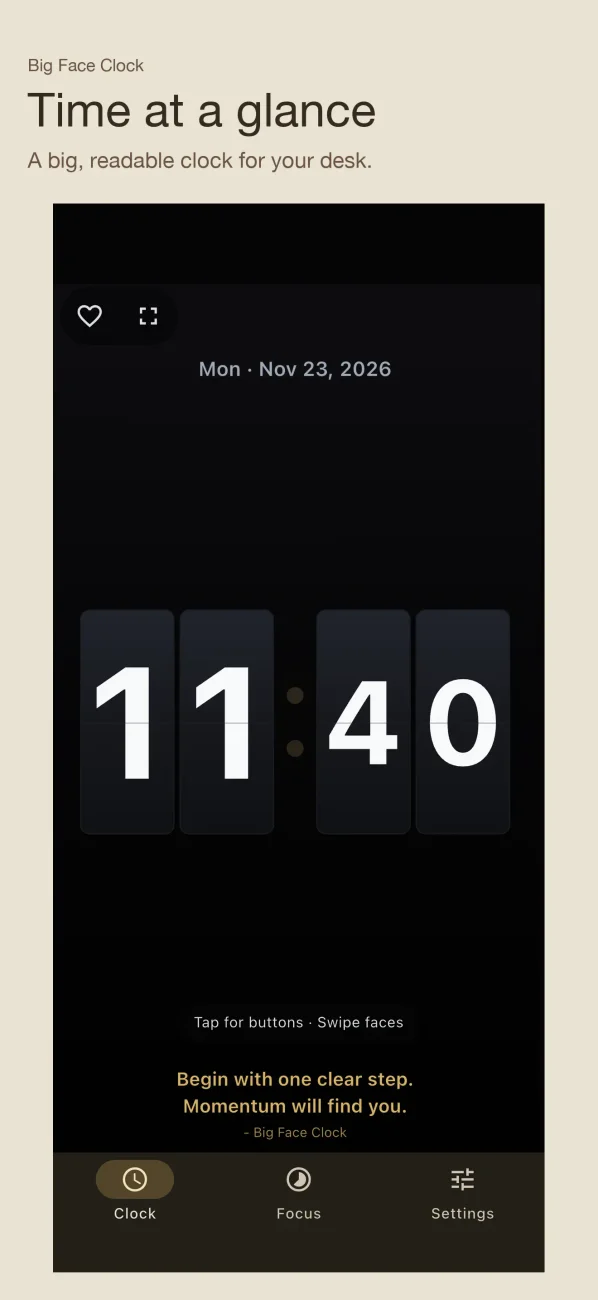
Set your iPhone beside a book or stand your iPad at the far end of your desk. Big Face Clock is a large-digit desk clock and a focus timer you can start with a tap. Switch among Clock, Focus and Settings at the bottom of the screen.
A clock you can read across the desk
Choose from 16 faces, including a classic flip clock, LCD digits and dot-matrix designs. Show the date, battery level, a quote or your own text. In Clock, menus hide by default after 10 seconds of inactivity. Tap the screen to bring them back. In Settings > Clock, choose 5, 10 or 30 seconds, 1 or 3 minutes, or keep the menus visible. Focus and Settings keep the tab bar visible.
Give the task in front of you half an hour
In Focus mode, choose Read, Study, Work or Meditate. Tap Start focus to start with 30 minutes on first use. Choose 15, 30 or 45 minutes, or set a custom countdown from 1 to 180 minutes. Choose Count up if you'd rather finish the chapter at your own pace. The app remembers your last countdown duration. Both modes share one appearance, with separate preferences for Clock and Focus.
Pick up where you left off
Pause and resume anytime, and check elapsed time before ending early. Your session continues across tabs and restores its progress when you return after locking the screen or switching apps. Optional countdown end reminders require notification permission and follow your system settings. Use iPhone or iPad in portrait or landscape. On iPhone Duo, follow the same session on the outer display or unfold to use the inner display.
See where your time went
Focus history shows each session by date, activity, time, duration and status. A finished countdown or a count-up session ended after at least one minute adds to your streak. Ending a countdown early or stopping count-up before one minute resets the streak. Total time is added when a session ends and includes early stops, with paused time excluded. Count-up sessions can last up to 24 hours.
No account required. Focus history stays on this device and can be cleared from Focus history. Your existing clock faces, preferences and focus history carry over. In-app Focus mode is a timer. Other apps and notifications are managed through your device settings.
Nouveautés
Version 2.0.1 · 24/11/2026
• Switch among Clock, Focus and Settings using the new bottom tabs while your timer keeps running.
• Clock menus hide after 10 seconds by default. Choose 5, 10 or 30 seconds, 1 or 3 minutes, or keep them visible. Tap the clock to bring them back.
• Focus now offers 15-, 30- and 45-minute presets, with 30 minutes on first use. Custom timers, count-up and your history carry over. The custom duration picker and session history are easier to read.
• Clock and Focus share one appearance, with separate preferences for each mode.
Confidentialité de l’application
Ce que 克 王 déclare sur l’App Store au sujet du traitement des données par cette application.
-
Données non collectées
Le développeur ne collecte aucune donnée à partir de cette application.
Les pratiques en matière de confidentialité peuvent varier, notamment en fonction des fonctionnalités que vous utilisez ou de votre âge.
Informations
- Vendeur
- 克 王
- Catégorie
- Utilitaires
- Version
- 2.0.1
- Mis à jour
- 24/11/2026
- Publié
- 28/10/2026
- Taille
- 27,9 Mo
- Nécessite
- iOS 15.0 ou version ultérieure
- Classification d’âge
- 4+
- Langues
- Anglais, Chinois simplifié, Chinois traditionnel
- Copyright
- © Kevin
Vous aimerez peut-être aussi
-
 Adhoro: Your Flexible TimerUtilitaires
-
 Binary Clock by Logical LabsUtilitaires
-
 QuietClockUtilitaires
-
 KolkmannenUtilitaires
-
 Flip Clock: Bedside ClockUtilitaires
-
 CatClock MonoUtilitaires
-
 StyleClock: Focus TimerUtilitaires
-
 Custom Clock WidgetUtilitaires
-
 SleepyLight: Night LightUtilitaires
-
 Strange Clocks15 drôles d'horloges, décodées