- Classification d’âge4+
- CatégorieUtilitaires
- DéveloppeurSAFE TREES, s.r.o.
- LanguesAnglais+ 3 de plus
- Taille9,1 Mo
Renvoie vers la page App Store officielle
Download.org n’héberge aucun fichier de IArek Commander. Le bouton ouvre la page de l’application sur App Store, où SAFE TREES, s.r.o. la publie. Fiche vérifiée pour la dernière fois le 23/11/2026.
Captures d’écran
À propos
Le développeur n’a pas fourni ce texte dans votre langue.
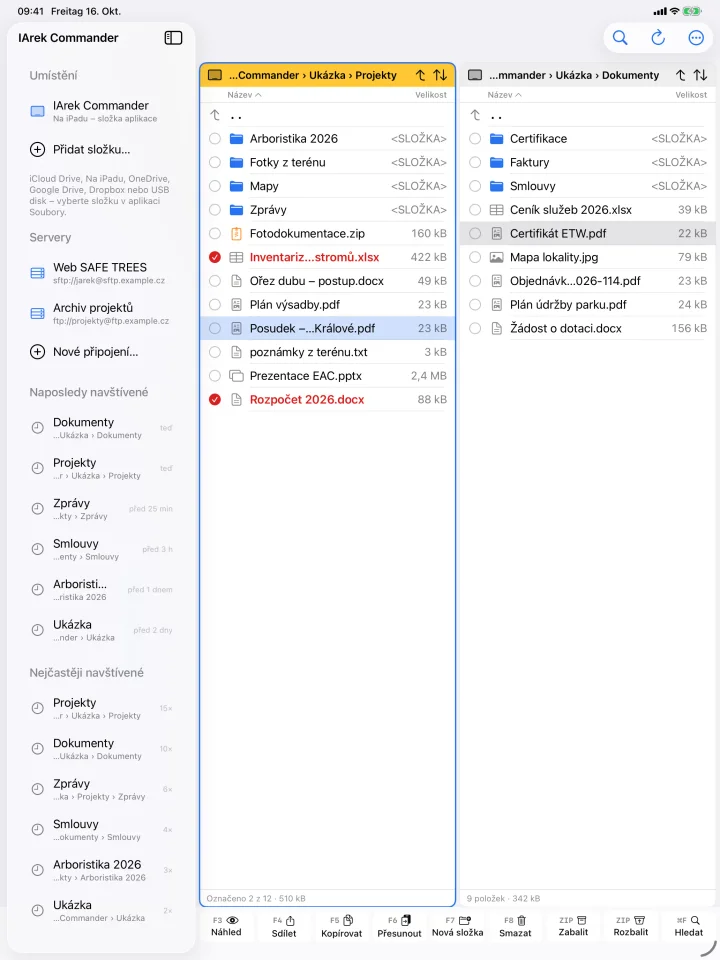
IArek Commander is a classic dual-pane file manager for iPad. With a keyboard it works just like the popular commanders from Windows – and it is just as easy to use by touch.
• Two panes side by side; on narrow screens switch between Left and Right
• Copy, move, rename, delete and create folders with F5–F8 (or ⌘3–⌘8)
• Folders from the Files app: iCloud Drive, On My iPad, OneDrive, Google Drive, Dropbox and USB drives
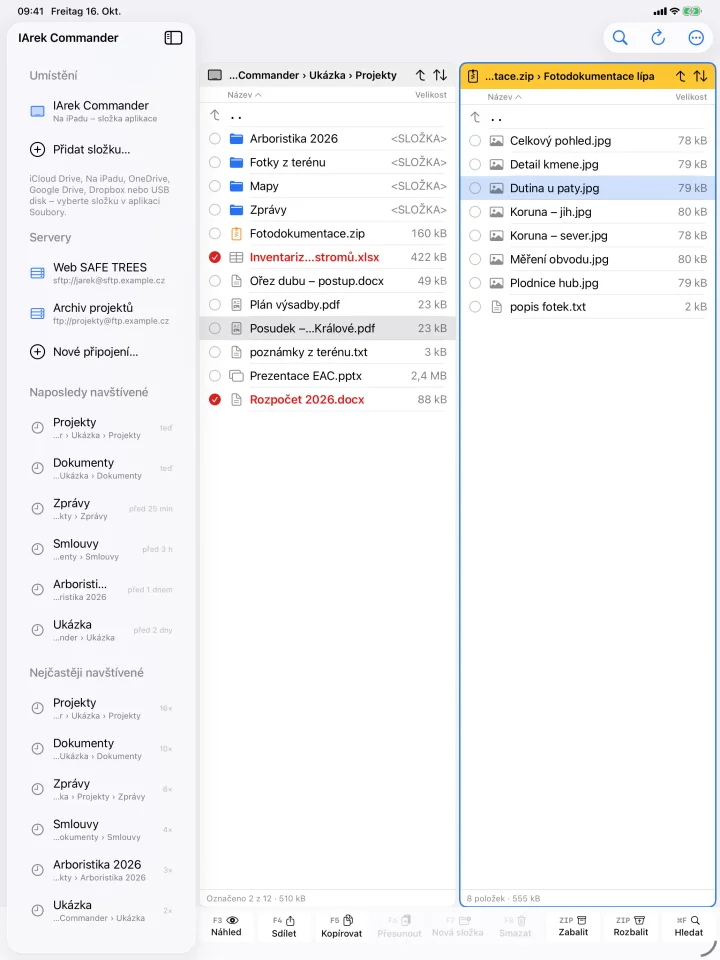
• Open ZIP archives as folders, extract them to the other pane or zip selected files
• Connect to FTP and SFTP servers, passwords stored securely in the Keychain
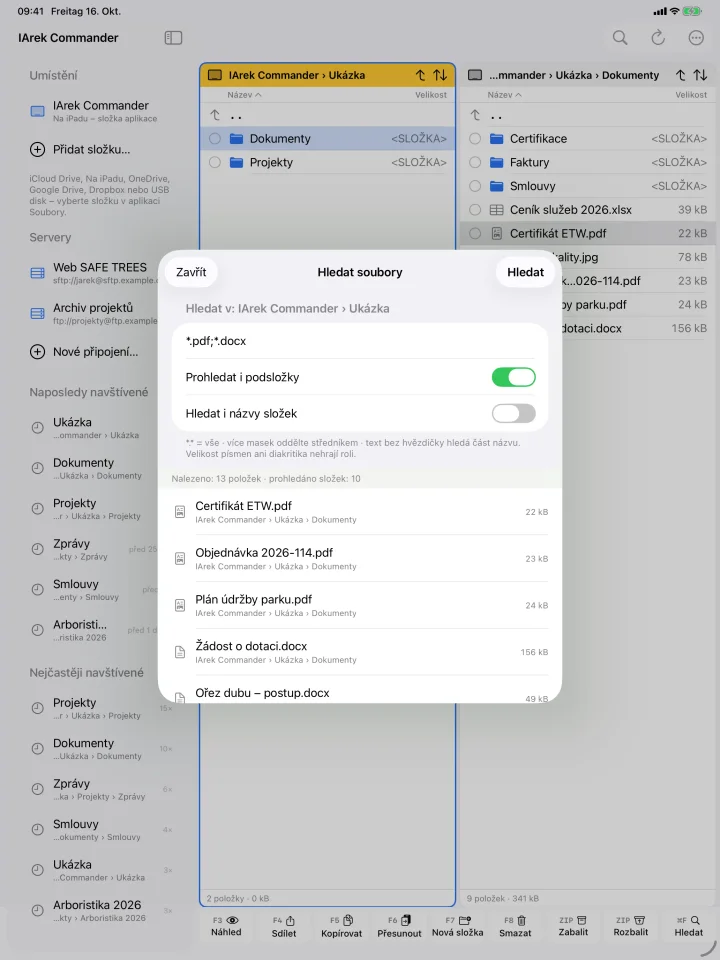
• Find files by mask (*.pdf;*.docx) across the whole folder tree
• Quick Look preview and sharing
• Recent and most visited folders in the sidebar
• Czech, English, German and Spanish
One purchase covers both iPad and Mac.
Nouveautés
Version 1.3 · 21/11/2026
• Connect to SMB shared folders (Windows, NAS): “Connect SMB…” in the sidebar – enter smb://server/share, the Files app connects the server and then you choose the shared folder. It stays under Locations and you work with it like with any other folder.
• Long copy, move, delete, compress and extract operations can keep running with the “In Background” button while you work with the panels. Progress and Cancel are in the top bar.
• New “Extract Here” when you touch and hold a file – extracts an archive into the folder it is in, not into the other panel.
• New “New Folder…” when you touch and hold.
Confidentialité de l’application
Ce que SAFE TREES, s.r.o. déclare sur l’App Store au sujet du traitement des données par cette application.
-
Données non collectées
Le développeur ne collecte aucune donnée à partir de cette application.
Les pratiques en matière de confidentialité peuvent varier, notamment en fonction des fonctionnalités que vous utilisez ou de votre âge.
Informations
- Vendeur
- SAFE TREES, s.r.o.
- Catégorie
- Utilitaires
- Version
- 1.3
- Mis à jour
- 21/11/2026
- Publié
- 23/10/2026
- Taille
- 9,1 Mo
- Nécessite
- iOS 17.0 ou version ultérieure
- Classification d’âge
- 4+
- Prix
- Gratuit
- Langues
- Anglais, Tchèque, Allemand, Espagnol
- Copyright
- © 2026 SAFE TREES, s.r.o.
Vous aimerez peut-être aussi
-
 DrawAlive: Animate DrawingsUtilitaires
-
 Unfold – Archive ExtractorUtilitaires
-
 ComicPDFReaderUtilitaires
-
 Filio - Gestionnaire fichiersNAS et cloud, tout en un
-
 Twin CommanderUtilitaires
-
 Unpack - DécompresseurDécompressez ZIP, RAR et 7Z
-
 sHomeCentralUtilitaires
-
 PSKReporter Client: FT8 MapUtilitaires
-
 FT Ham – FT8/FT4 transceiverDecode & send FT8/FT4 signals
-
 UnFox: Décompresser ZIP & RAROuvrir et dézipper un fichier