
- Classification d’âge4+
- CatégorieProductivité
- LanguesAnglais
- Taille33,0 Mo
Renvoie vers la page App Store officielle
Download.org n’héberge aucun fichier de LogiScan. Le bouton ouvre la page de l’application sur App Store, où la publie. Fiche vérifiée pour la dernière fois le 11/11/2026.
Captures d’écran




À propos
Le développeur n’a pas fourni ce texte dans votre langue.
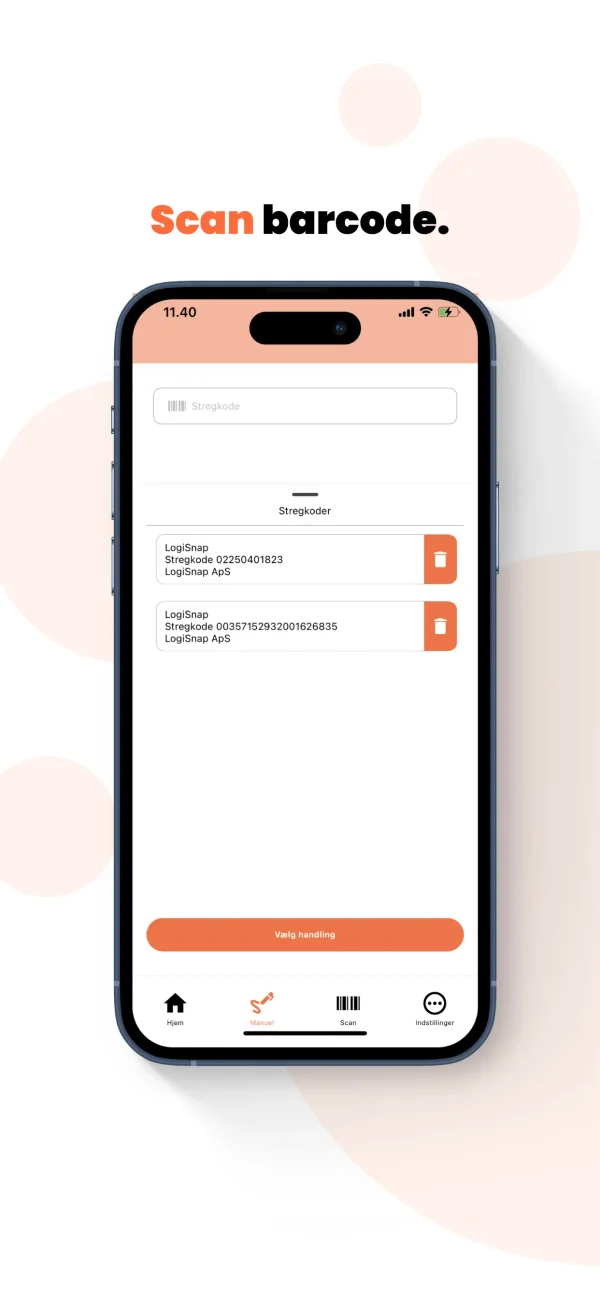
LogiScan is your solution when you want it to be easy to keep track of shipments that are either driven with own trucks, or simply want to perform Click'n Collect.
The shipment is created in the LogiSnap booking platform, in the same way as with, for example, a shipment with PostNord, Deutsche Post etc. When you scan the barcode on the shipment with your smartphone, you get the option to assign a status to the scanned packages. The status is immediately uploaded to the LogiSnap booking platform, whereby other users can follow the package's current status.
With LogiScan you can add pictures, signature, notes, GPS location etc. As soon as the package is scanned, the user will immediately be able to see who the receiver of the package is, as all data is retrieved from the LogiSnap booking platform, which ensures delivery to the correct receiver.
LogiScan is a very efficient way of managing shipments that are delivered from your own store/warehouse. Create a collection label in the LogiSnap booking platform, after which the package is scanned and given the status for instance - Ready for Pickup.
The customer will be notified that the package can be picked up, this is done either via email or SMS. The entire process can be followed in LogiSnap booking platform.
How to get started:
1. Download the app
2. Type your LogiSnap credentials and sign in*
3. Select your company from our LogiSnap system
4. You’re ready to go!
*If you have an account and company setup already in LogiSnap, you can immediately sign in.
Otherwise please visit https://app.logisnap.com/, sign up and complete our on boarding process.
Additional explanatory steps:
- Go to ‘Scan’ for one or multiple barcodes to be scanned
- Go to ‘Home page’, apply and save actions into the system like photos, signatures etc.
Attention: When using LogiScan, GPS is used, which can lead to higher power consumption and reduce battery life.
Nouveautés
Version 1.4.3 · 17/08/2026
- Companies are sorted alphabetically
- Images and signatures are not saved in the phone's gallery
Confidentialité de l’application
Ce que déclare sur l’App Store au sujet du traitement des données par cette application.
-
Données n’établissant aucun lien avec vous
Peuvent être collectées, mais ne sont pas liées à votre identité.
- Emplacement
- Coordonnées
- Contenu utilisateur
- Identifiants
- Diagnostic
Les pratiques en matière de confidentialité peuvent varier, notamment en fonction des fonctionnalités que vous utilisez ou de votre âge.
Informations
- Vendeur
- LogiSnap ApS
- Catégorie
- Productivité
- Version
- 1.4.3
- Mis à jour
- 17/08/2026
- Publié
- 16/11/2022
- Taille
- 33,0 Mo
- Nécessite
- iOS 15.1 ou version ultérieure
- Classification d’âge
- 4+
- Prix
- Gratuit
- Langues
- Anglais
- Copyright
- © LogiSnap
Vous aimerez peut-être aussi
-
 PDC ScanProductivité
-
 ScannurProductivité
-
 Timer with SectionsProductivité
-
 Scan to Sheets: Scan & ExportScan QR/Barcode to Excel
-
 bloq: App Blocker & FocusBloque sites adultes et paris
-
 Relay Shortcut TriggerProductivité
-
 BoxLynk: QR Inventory TrackerProductivité
-
 Reduce Screen Time: ScreenoProductivité
-
 QR 2 CSVProductivité
-
 Scan AppProductivité