
- Độ tuổi4+
- Danh mụcHiệu Suất
- Ngôn ngữTiếng Anh
- Kích thước33,0 MB
Liên kết đến trang App Store chính thức
Download.org không lưu trữ tệp nào của LogiScan. Nút này mở trang ứng dụng trên App Store, nơi phát hành ứng dụng. Trang được kiểm tra lần cuối: 11/11/2026.
Ảnh chụp màn hình




Giới thiệu
Nhà phát triển chưa cung cấp nội dung này bằng ngôn ngữ của bạn.
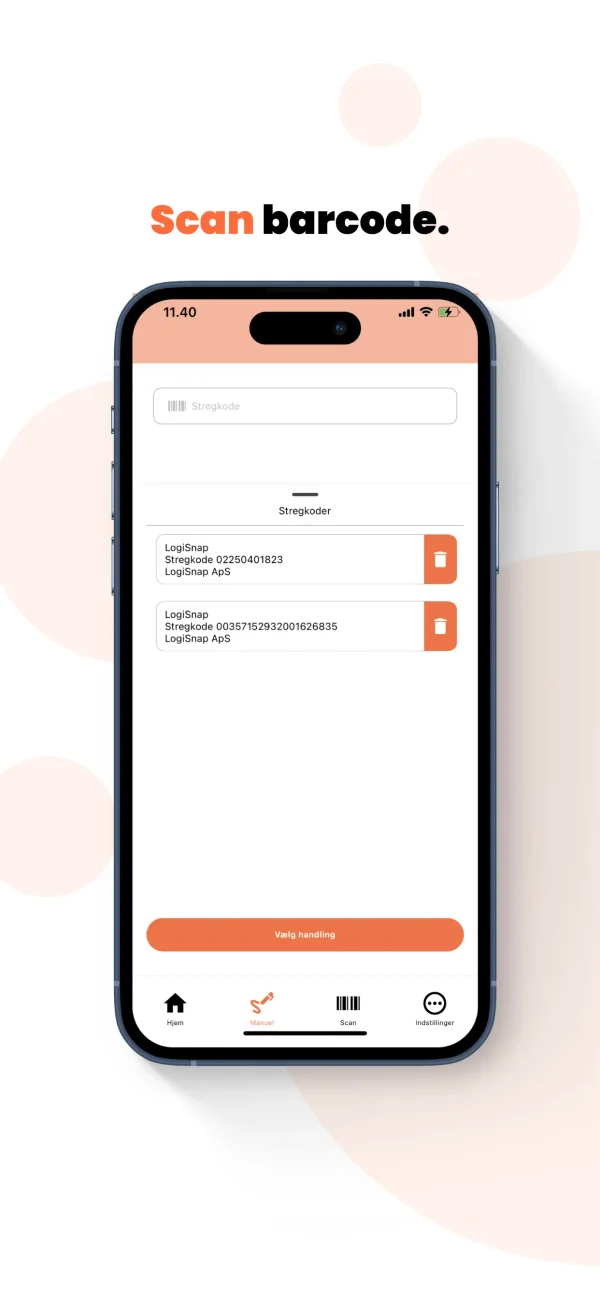
LogiScan is your solution when you want it to be easy to keep track of shipments that are either driven with own trucks, or simply want to perform Click'n Collect.
The shipment is created in the LogiSnap booking platform, in the same way as with, for example, a shipment with PostNord, Deutsche Post etc. When you scan the barcode on the shipment with your smartphone, you get the option to assign a status to the scanned packages. The status is immediately uploaded to the LogiSnap booking platform, whereby other users can follow the package's current status.
With LogiScan you can add pictures, signature, notes, GPS location etc. As soon as the package is scanned, the user will immediately be able to see who the receiver of the package is, as all data is retrieved from the LogiSnap booking platform, which ensures delivery to the correct receiver.
LogiScan is a very efficient way of managing shipments that are delivered from your own store/warehouse. Create a collection label in the LogiSnap booking platform, after which the package is scanned and given the status for instance - Ready for Pickup.
The customer will be notified that the package can be picked up, this is done either via email or SMS. The entire process can be followed in LogiSnap booking platform.
How to get started:
1. Download the app
2. Type your LogiSnap credentials and sign in*
3. Select your company from our LogiSnap system
4. You’re ready to go!
*If you have an account and company setup already in LogiSnap, you can immediately sign in.
Otherwise please visit https://app.logisnap.com/, sign up and complete our on boarding process.
Additional explanatory steps:
- Go to ‘Scan’ for one or multiple barcodes to be scanned
- Go to ‘Home page’, apply and save actions into the system like photos, signatures etc.
Attention: When using LogiScan, GPS is used, which can lead to higher power consumption and reduce battery life.
Có gì mới
Phiên bản 1.4.3 · 17/08/2026
- Companies are sorted alphabetically
- Images and signatures are not saved in the phone's gallery
Quyền riêng tư của ứng dụng
Những gì khai báo trên App Store về cách ứng dụng này xử lý dữ liệu.
-
Dữ liệu không liên kết với bạn
Có thể được thu thập nhưng không liên kết với danh tính của bạn.
- Vị trí
- Thông tin liên hệ
- Nội dung của người dùng
- Mã định danh
- Chẩn đoán
Phương thức đảm bảo quyền riêng tư có thể khác nhau, chẳng hạn như tuỳ theo các tính năng bạn sử dụng hoặc độ tuổi của bạn.
Thông tin
- Người bán
- LogiSnap ApS
- Danh mục
- Hiệu Suất
- Phiên bản
- 1.4.3
- Cập nhật
- 17/08/2026
- Phát hành
- 16/11/2022
- Kích thước
- 33,0 MB
- Yêu cầu
- iOS 15.1 trở lên
- Độ tuổi
- 4+
- Giá
- Miễn phí
- Ngôn ngữ
- Tiếng Anh
- Bản quyền
- © LogiSnap
Có thể bạn cũng thích
-
 PDC ScanHiệu Suất
-
 ScannurHiệu Suất
-
 Timer with SectionsHiệu Suất
-
 Scan to Sheets: Scan & ExportScan QR/Barcode to MS Excel
-
 bloq: Chặn Ứng DụngChặn ứng dụng, không lối thoát
-
 Relay Shortcut TriggerHiệu Suất
-
 BoxLynk: QR Inventory TrackerHiệu Suất
-
 Reduce Screen Time: ScreenoHiệu Suất
-
 QR 2 CSVHiệu Suất
-
 Scan AppHiệu Suất