
Palmote
Mac mouse, keyboard & control
Conçue pour iPhone, iPad, iPod touch
Gratuit
- Classification d’âge4+
- CatégorieUtilitaires
- Développeurzehao li
- LanguesAnglais+ 2 de plus
- Taille2,2 Mo
Renvoie vers la page App Store officielle
Download.org n’héberge aucun fichier de Palmote. Le bouton ouvre la page de l’application sur App Store, où zehao li la publie. Fiche vérifiée pour la dernière fois le 13/11/2026.
Captures d’écran

À propos
Le développeur n’a pas fourni ce texte dans votre langue.
Turn your iPhone or iPad into a trackpad, keyboard and customizable controller for your Mac.
TRACKPAD
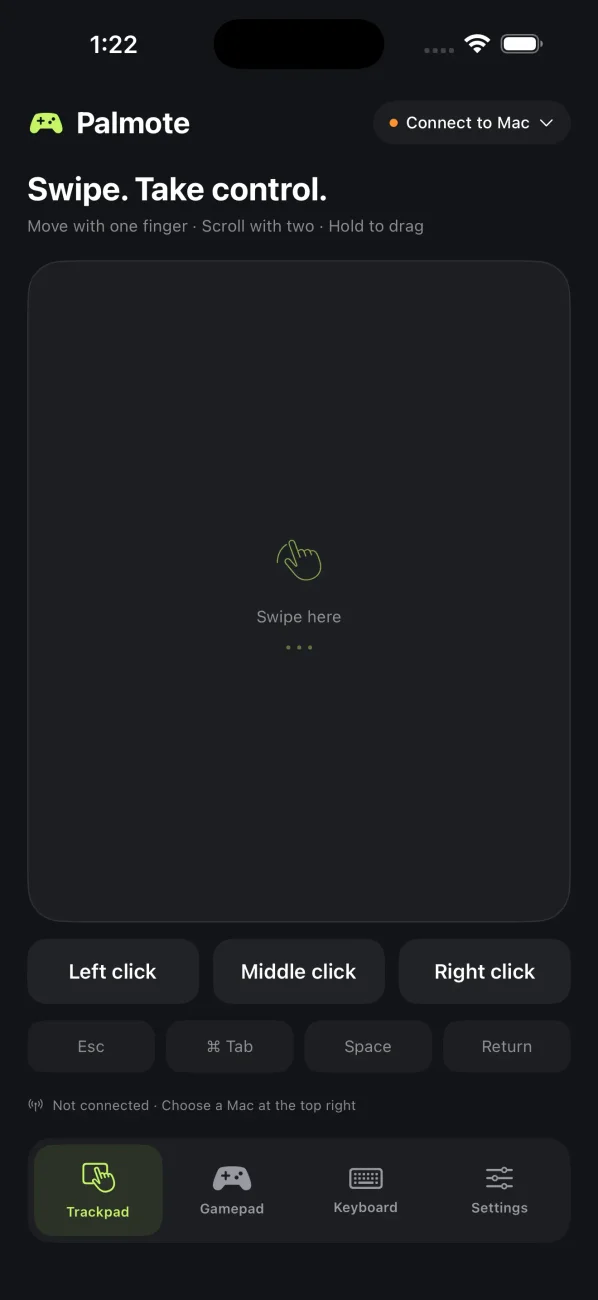
Move the pointer, tap, scroll with two fingers and drag with a long press. Dedicated left, middle and right mouse buttons and common shortcuts stay within reach.
KEYBOARD
Send text and use modifier keys, arrow keys and shortcuts. Bluetooth typing uses a US keyboard layout: select the ABC input source on your Mac. Chinese, Japanese and other Unicode text are supported through the optional Mac receiver over your local network.
GAME CONTROLS
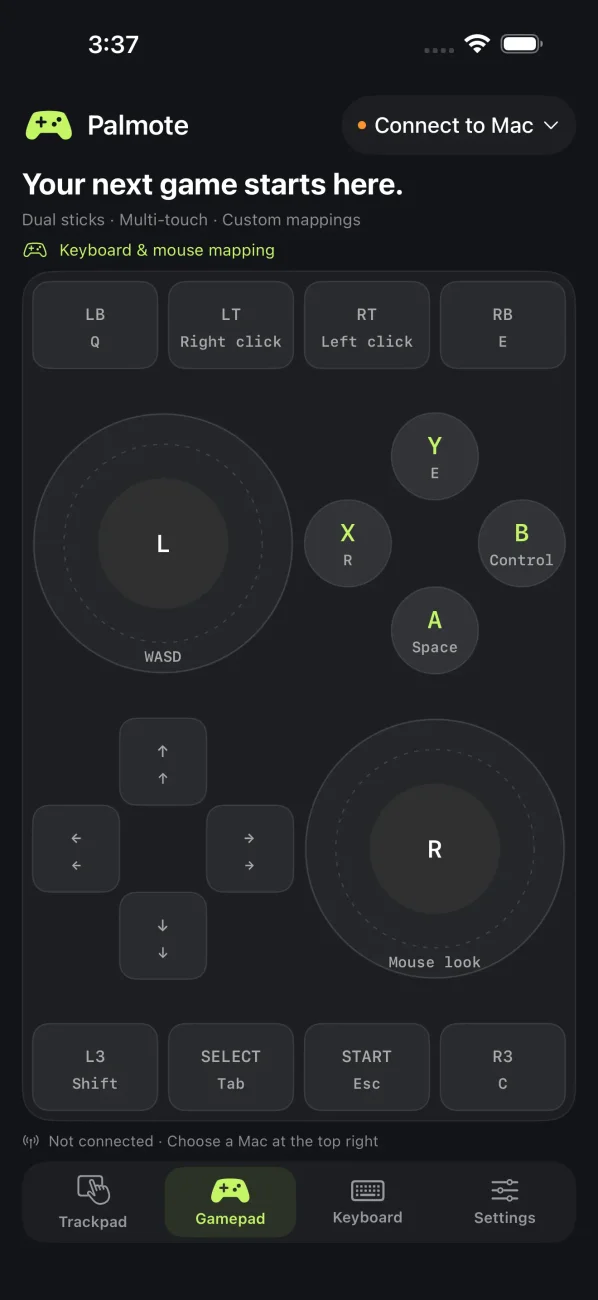
Use dual sticks, a directional pad, ABXY and shoulder buttons. Customize keyboard mappings, dead zone and sensitivity, and enable motion aiming on supported devices. Keyboard-and-mouse mapping works with games that accept those inputs. The controller interface sends keyboard and mouse input, including configurable mouse buttons. It does not register as a native gamepad or provide analog movement. Games continue to show keyboard and mouse prompts.
TWO CONNECTION OPTIONS
Bluetooth direct connection uses the Mac's built-in Bluetooth input support without a Mac receiver. Keep Palmote open in the foreground and your Mac awake. You can search for your Mac inside Palmote when the phone does not appear in macOS Bluetooth settings. Discovery and initial pairing depend on the devices and existing pairing state.
Local network mode requires the Palmote Mac receiver and a six-digit pairing code. It uses an encrypted connection on your trusted local network.
No account, advertising or cloud service is required. Available in English, Simplified Chinese and Japanese.
Nouveautés
Version 0.1.2 · 25/09/2026
• Game controls now clearly use keyboard and mouse mapping over Bluetooth.
• See the actual key or mouse button on each controller button.
• Assign mouse buttons, including middle-click, to game controls.
• Added a standard keyboard preset for Where Winds Meet.
• Added optional precision aiming for finer right-stick mouse control.
• Added a World of Warcraft Classic keyboard preset with strafing, right-stick camera control and action slots 1–0.
• Mouse look and trigger bindings can now be configured independently.
Confidentialité de l’application
Ce que zehao li déclare sur l’App Store au sujet du traitement des données par cette application.
-
Données non collectées
Le développeur ne collecte aucune donnée à partir de cette application.
Les pratiques en matière de confidentialité peuvent varier, notamment en fonction des fonctionnalités que vous utilisez ou de votre âge.
Informations
- Vendeur
- zehao li
- Catégorie
- Utilitaires
- Version
- 0.1.2
- Mis à jour
- 25/09/2026
- Publié
- 18/09/2026
- Taille
- 2,2 Mo
- Nécessite
- iOS 15.0 ou version ultérieure
- Classification d’âge
- 4+
- Prix
- Gratuit
- Langues
- Anglais, Japonais, Chinois simplifié
- Copyright
- © 2026 zehao li
Vous aimerez peut-être aussi
-
 TouchNow - Bureau à distanceTrackpad, clavier, manette Mac
-
 CouchMCUtilitaires
-
 TabletHIDUtilitaires
-
 Lose Control: PC ControllerUtilitaires
-
 Pocket Board Clavier mobileSouris et trackpad Bluetooth
-
 PadLink RemoteUtilitaires
-
 V-Pad: Virtual GamepadUtilitaires
-
 操控手柄Utilitaires
-
 Gamepad - Controller TestingUtilitaires
-
 奥义Control · 大招控制器|体感游戏控制器Utilitaires