
Palmote
Mac mouse, keyboard & control
iPhone, iPad, iPod touch için tasarlandı
Ücretsiz
- Yaş sınırı4+
- KategoriYardımcılar
- Geliştiricizehao li
- Dillerİngilizce+ 2 dil daha
- Boyut2,2 MB
Resmi App Store sayfasına bağlanır
Download.org, Palmote için hiçbir dosya barındırmaz. Düğme, uygulamanın App Store üzerindeki sayfasını açar; uygulamayı orada zehao li yayınlar. Sayfanın son kontrolü: 13.11.2026.
Ekran görüntüleri

Hakkında
Geliştirici bu metni dilinizde sunmamış.
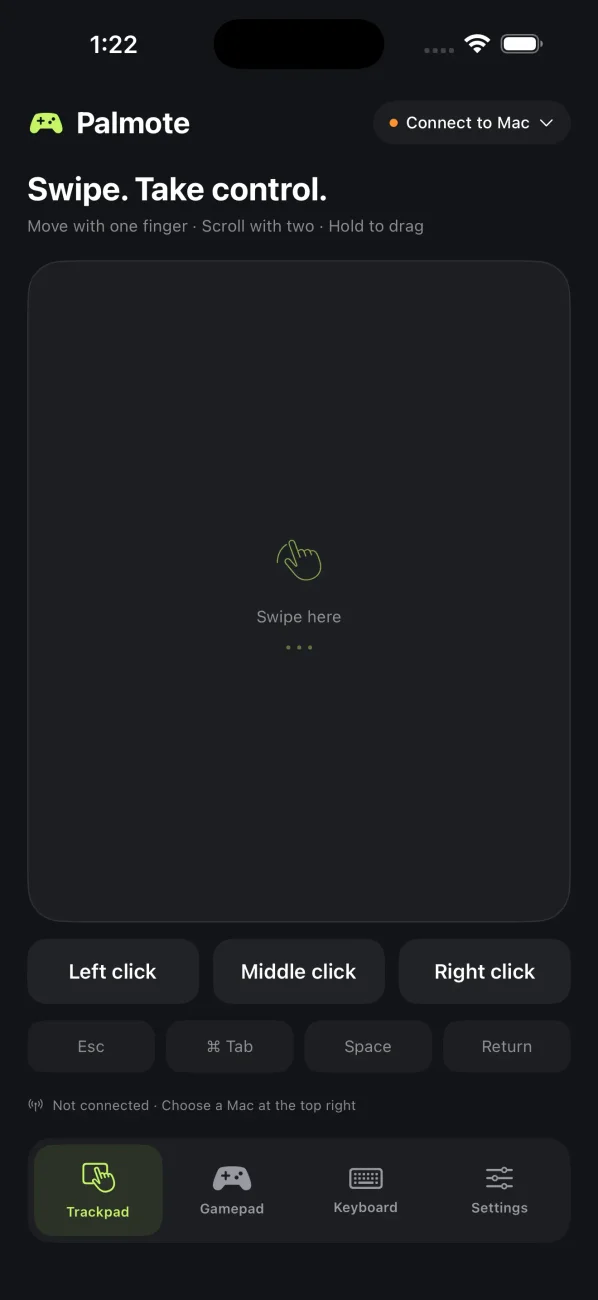
Turn your iPhone or iPad into a trackpad, keyboard and customizable controller for your Mac.
TRACKPAD
Move the pointer, tap, scroll with two fingers and drag with a long press. Dedicated left, middle and right mouse buttons and common shortcuts stay within reach.
KEYBOARD
Send text and use modifier keys, arrow keys and shortcuts. Bluetooth typing uses a US keyboard layout: select the ABC input source on your Mac. Chinese, Japanese and other Unicode text are supported through the optional Mac receiver over your local network.
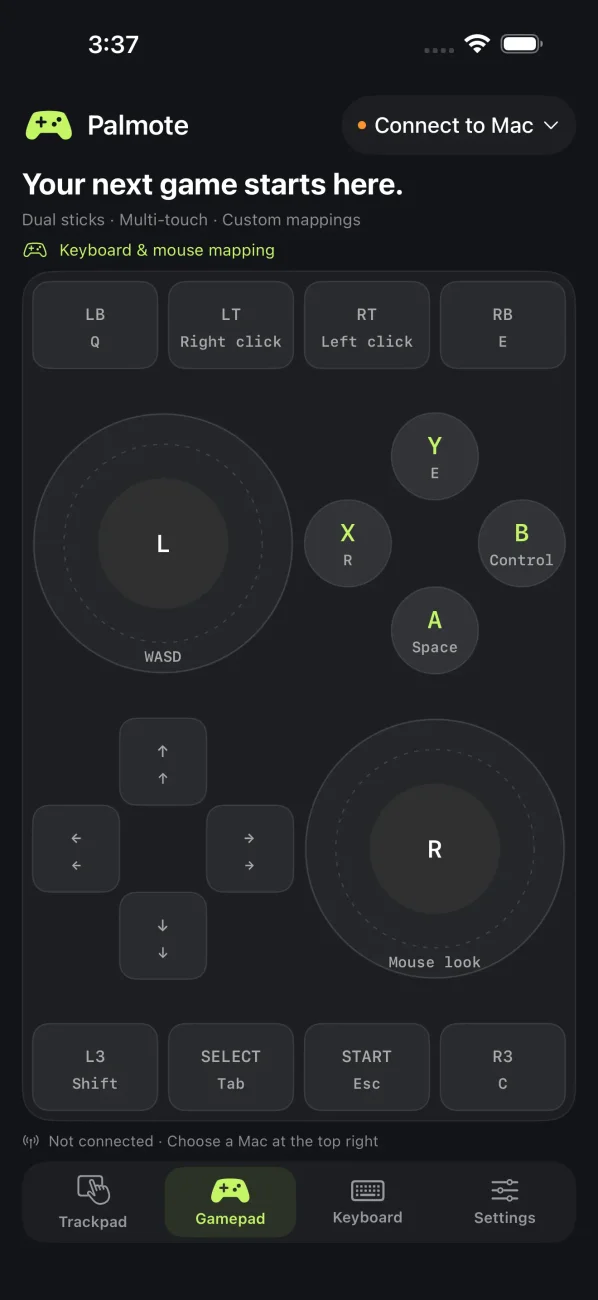
GAME CONTROLS
Use dual sticks, a directional pad, ABXY and shoulder buttons. Customize keyboard mappings, dead zone and sensitivity, and enable motion aiming on supported devices. Keyboard-and-mouse mapping works with games that accept those inputs. The controller interface sends keyboard and mouse input, including configurable mouse buttons. It does not register as a native gamepad or provide analog movement. Games continue to show keyboard and mouse prompts.
TWO CONNECTION OPTIONS
Bluetooth direct connection uses the Mac's built-in Bluetooth input support without a Mac receiver. Keep Palmote open in the foreground and your Mac awake. You can search for your Mac inside Palmote when the phone does not appear in macOS Bluetooth settings. Discovery and initial pairing depend on the devices and existing pairing state.
Local network mode requires the Palmote Mac receiver and a six-digit pairing code. It uses an encrypted connection on your trusted local network.
No account, advertising or cloud service is required. Available in English, Simplified Chinese and Japanese.
Yenilikler
Sürüm 0.1.2 · 25.09.2026
• Game controls now clearly use keyboard and mouse mapping over Bluetooth.
• See the actual key or mouse button on each controller button.
• Assign mouse buttons, including middle-click, to game controls.
• Added a standard keyboard preset for Where Winds Meet.
• Added optional precision aiming for finer right-stick mouse control.
• Added a World of Warcraft Classic keyboard preset with strafing, right-stick camera control and action slots 1–0.
• Mouse look and trigger bindings can now be configured independently.
Uygulama gizliliği
Bu uygulamanın verileri nasıl işlediği hakkında zehao li tarafından App Store üzerinde yapılan beyan.
-
Veri toplanmıyor
Geliştirici bu uygulamadan hiçbir veri toplamıyor.
Gizlilik uygulamaları, örneğin kullandığınız özelliklere veya yaşınıza göre değişiklik gösterebilir.
Bilgiler
- Satıcı
- zehao li
- Kategori
- Yardımcılar
- Sürüm
- 0.1.2
- Güncellendi
- 25.09.2026
- Yayın tarihi
- 18.09.2026
- Boyut
- 2,2 MB
- Gereksinim
- iOS 15.0 veya sonrası
- Yaş sınırı
- 4+
- Fiyat
- Ücretsiz
- Diller
- İngilizce, Japonca, Basitleştirilmiş Çince
- Telif hakkı
- © 2026 zehao li
Bunları da beğenebilirsiniz
-
 TouchNow RemoteYardımcılar
-
 CouchMCYardımcılar
-
 TabletHIDYardımcılar
-
 Lose Control: PC ControllerYardımcılar
-
 Pocket Board Klavye ve FareBluetooth touchpad ve kumanda
-
 PadLink RemoteYardımcılar
-
 V-Pad: Sanal GamepadTelefonun artık gamepad
-
 操控手柄Yardımcılar
-
 Gamepad - Controller TestingYardımcılar
-
 奥义Control · 大招控制器|体感游戏控制器Yardımcılar