PPI Guru - Calc PPI Easily
Pixel Density & Retina Check
Conçue pour iPhone, iPad, Mac, iPod touch
Gratuit
- Classification d’âge4+
- CatégorieUtilitaires
- Développeur基伟 徐
- LanguesAnglais+ 9 de plus
- Taille1,8 Mo
Renvoie vers la page App Store officielle
Download.org n’héberge aucun fichier de PPI Guru - Calc PPI Easily. Le bouton ouvre la page de l’application sur App Store, où 基伟 徐 la publie. Fiche vérifiée pour la dernière fois le 29/11/2026.
Captures d’écran


À propos
Le développeur n’a pas fourni ce texte dans votre langue.
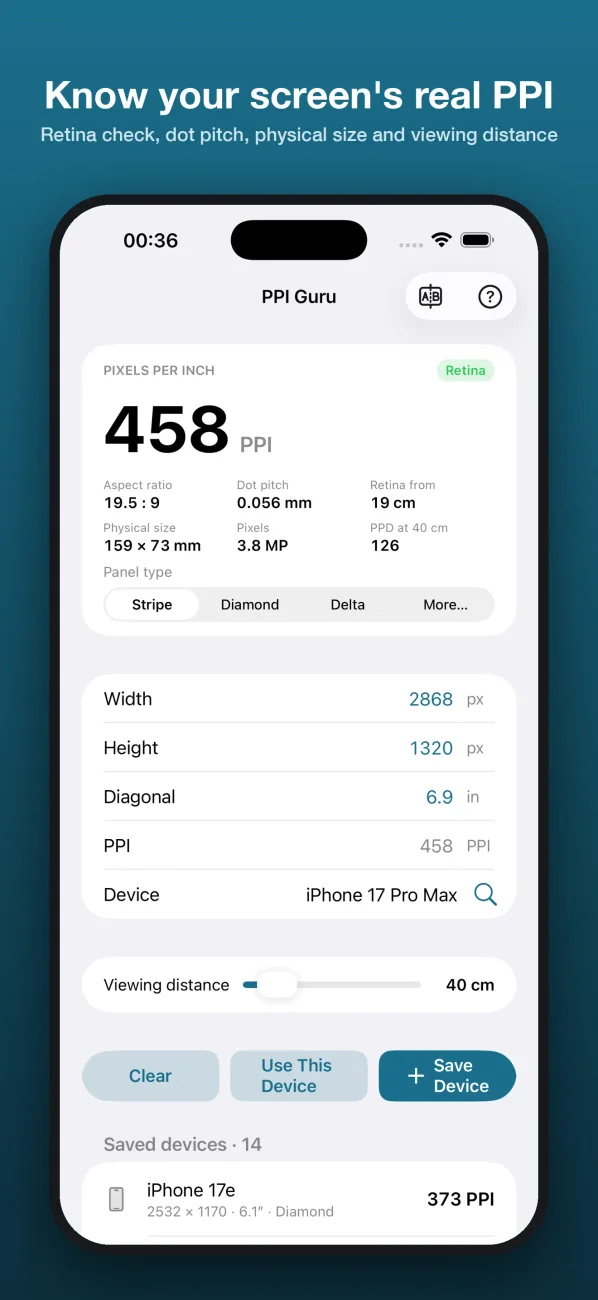
PPI Guru is a utility to calculate a display's PPI (Pixels Per Inch) for phones, tablets, laptops, monitors and TVs.
To calculate the PPI of a display, just enter the screen width and height in pixels and the diagonal size in inches. The PPI is calculated automatically, and PPI Guru indicates whether the display is a Retina Display (size 10″ or larger with PPI of 200 or more, or size under 10″ with PPI of 300 or more).
Key Features:
• Calculating PPI automatically, with Retina Display indicator
• Starts with your own device's screen already filled in
• Aspect ratio, dot pitch, physical size and total pixels
• Retina distance and pixels per degree at your viewing distance
• Subpixel layouts: RGB stripe, Diamond Pentile, RG-BG Pentile, Delta and RGBW, illustrated, with effective PPI
• Reverse calculation: enter a PPI to get the diagonal size
• Compare two displays side by side, drawn to scale
• Built-in offline library of about 250 devices: every iPhone, iPad and Mac, Apple displays, plus Samsung, Google, OnePlus, Xiaomi, monitors, TVs and handhelds
• Search device information from the internet
• Save device information for later reference
• English, Simplified Chinese, Traditional Chinese and Japanese
For devices on sale, you can just enter the device name and tap Search: PPI Guru looks it up in the built-in library first, then on the web, and fills in the display's information.
PS. Online search may not return accurate information, and it depends on network access to the search engine. Effective PPI figures for OLED layouts are approximations.
Device information is saved locally for further reference.
Nouveautés
Version 2.0.1 · 27/11/2026
Performance and stability improvements.
Confidentialité de l’application
Ce que 基伟 徐 déclare sur l’App Store au sujet du traitement des données par cette application.
-
Données non collectées
Le développeur ne collecte aucune donnée à partir de cette application.
Les pratiques en matière de confidentialité peuvent varier, notamment en fonction des fonctionnalités que vous utilisez ou de votre âge.
Informations
- Vendeur
- 基伟 徐
- Catégorie
- Utilitaires
- Version
- 2.0.1
- Mis à jour
- 27/11/2026
- Publié
- 20/05/2020
- Taille
- 1,8 Mo
- Nécessite
- iOS 15.0 ou version ultérieure
- Classification d’âge
- 4+
- Prix
- Gratuit
- Langues
- Anglais, Japonais, Malais, Portugais, Chinois simplifié, Espagnol, Tamoul, Thaï, Chinois traditionnel, Vietnamien
- Copyright
- © 2026 TickPlant.com
Vous aimerez peut-être aussi
-
 Sensi MasterUtilitaires
-
 Goxit FF - Sensi ProUtilitaires
-
 Game Aim Converter: Sensi DPIFreestyle Sensitivity Panel
-
 Sensi EliteUtilitaires
-
 SenXit External FF PanelUtilitaires
-
 Mouse EasyUtilitaires
-
 Freestyle FF PanelUtilitaires
-
 FFH QuatroUtilitaires
-
 ExitLag: Réduisez votre pingJouez sans lag, partout
-
 ZArchiver: UnZip, UnRar, 7ZUtilitaires