PPI Guru - Calc PPI Easily
Pixel Density & Retina Check
Được thiết kế cho iPhone, iPad, Mac, iPod touch
Miễn phí
- Độ tuổi4+
- Danh mụcTiện Ích
- Nhà phát triển基伟 徐
- Ngôn ngữTiếng Anh+ 9 ngôn ngữ khác
- Kích thước1,8 MB
Liên kết đến trang App Store chính thức
Download.org không lưu trữ tệp nào của PPI Guru - Calc PPI Easily. Nút này mở trang ứng dụng trên App Store, nơi 基伟 徐 phát hành ứng dụng. Trang được kiểm tra lần cuối: 29/11/2026.
Ảnh chụp màn hình


Giới thiệu
Nhà phát triển chưa cung cấp nội dung này bằng ngôn ngữ của bạn.
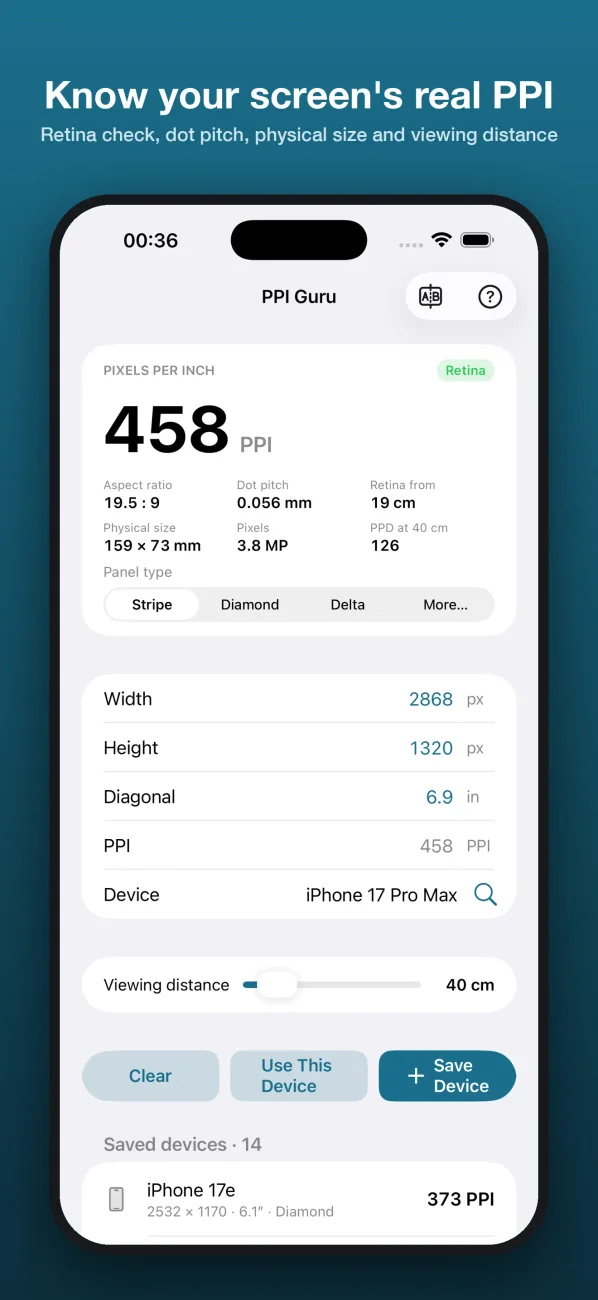
PPI Guru is a utility to calculate a display's PPI (Pixels Per Inch) for phones, tablets, laptops, monitors and TVs.
To calculate the PPI of a display, just enter the screen width and height in pixels and the diagonal size in inches. The PPI is calculated automatically, and PPI Guru indicates whether the display is a Retina Display (size 10″ or larger with PPI of 200 or more, or size under 10″ with PPI of 300 or more).
Key Features:
• Calculating PPI automatically, with Retina Display indicator
• Starts with your own device's screen already filled in
• Aspect ratio, dot pitch, physical size and total pixels
• Retina distance and pixels per degree at your viewing distance
• Subpixel layouts: RGB stripe, Diamond Pentile, RG-BG Pentile, Delta and RGBW, illustrated, with effective PPI
• Reverse calculation: enter a PPI to get the diagonal size
• Compare two displays side by side, drawn to scale
• Built-in offline library of about 250 devices: every iPhone, iPad and Mac, Apple displays, plus Samsung, Google, OnePlus, Xiaomi, monitors, TVs and handhelds
• Search device information from the internet
• Save device information for later reference
• English, Simplified Chinese, Traditional Chinese and Japanese
For devices on sale, you can just enter the device name and tap Search: PPI Guru looks it up in the built-in library first, then on the web, and fills in the display's information.
PS. Online search may not return accurate information, and it depends on network access to the search engine. Effective PPI figures for OLED layouts are approximations.
Device information is saved locally for further reference.
Có gì mới
Phiên bản 2.0.1 · 27/11/2026
Performance and stability improvements.
Quyền riêng tư của ứng dụng
Những gì 基伟 徐 khai báo trên App Store về cách ứng dụng này xử lý dữ liệu.
-
Dữ liệu không được thu thập
Nhà phát triển không thu thập bất kỳ dữ liệu nào từ ứng dụng này.
Phương thức đảm bảo quyền riêng tư có thể khác nhau, chẳng hạn như tuỳ theo các tính năng bạn sử dụng hoặc độ tuổi của bạn.
Thông tin
- Người bán
- 基伟 徐
- Danh mục
- Tiện Ích
- Phiên bản
- 2.0.1
- Cập nhật
- 27/11/2026
- Phát hành
- 20/05/2020
- Kích thước
- 1,8 MB
- Yêu cầu
- iOS 15.0 trở lên
- Độ tuổi
- 4+
- Giá
- Miễn phí
- Ngôn ngữ
- Tiếng Anh, Tiếng Nhật, Tiếng Mã Lai, Tiếng Bồ Đào Nha, Tiếng Trung Giản thể, Tiếng Tây Ban Nha, Tiếng Tamil, Tiếng Thái, Tiếng Trung Phồn thể, Vietnamese
- Bản quyền
- © 2026 TickPlant.com
Có thể bạn cũng thích
-
 Sensi MasterTiện Ích
-
 Goxit FF - Sensi ProTiện Ích
-
 Game Aim Converter: Sensi DPIFreestyle Sensitivity Panel
-
 Sensi EliteTiện Ích
-
 SenXit External FF PanelTiện Ích
-
 Mouse EasyTiện Ích
-
 Freestyle FF PanelTiện Ích
-
 FFH QuatroTiện Ích
-
 ExitLag: Lower your PingPlay anywhere, master anything
-
 ZArchiver: UnZip, UnRar, 7Z7Z, Zip, Rar, Chỉnh sửa PDF