- Batasan usia4+
- KategoriKegunaan
- Pengembang基伟 徐
- BahasaInggris+ 9 lainnya
- Ukuran1,8 MB
Tertaut ke halaman resmi App Store
Download.org tidak menyimpan file PPI Guru apa pun. Tombol ini membuka halaman aplikasi di App Store, tempat 基伟 徐 menerbitkannya. Halaman terakhir diperiksa pada 24/11/2026.
Tangkapan layar


Tentang
Pengembang belum menyediakan teks ini dalam bahasa Anda.
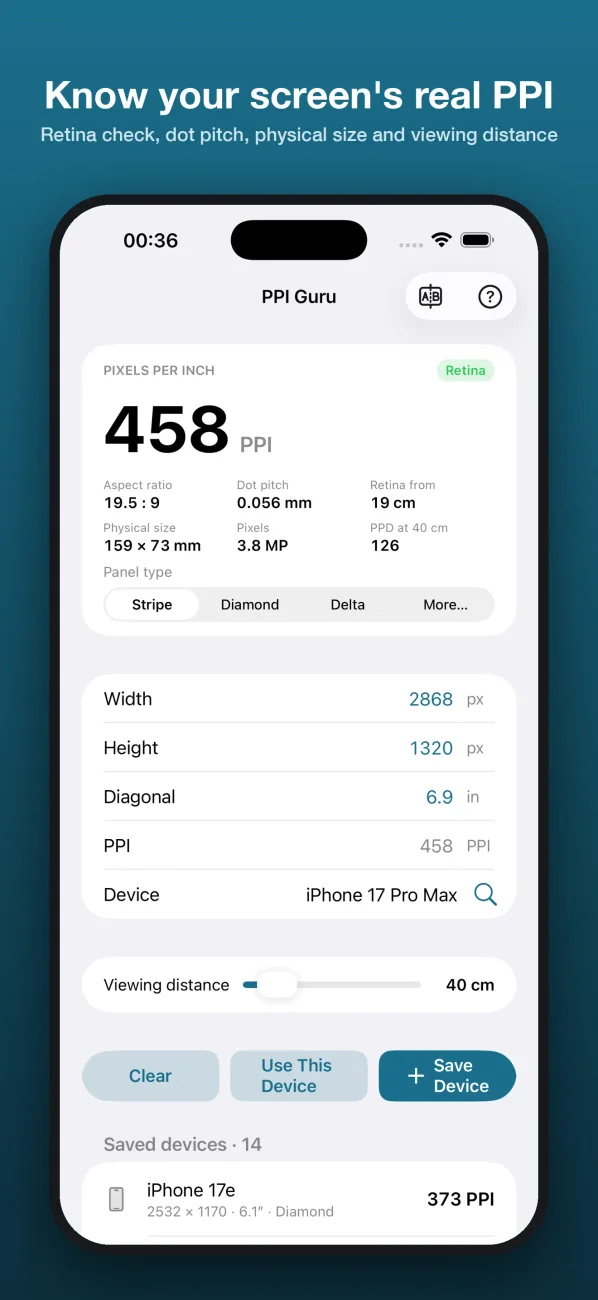
PPI Guru is a utility to calculate a display's PPI (Pixels Per Inch) for phones, tablets, laptops, monitors and TVs.
To calculate the PPI of a display, just enter the screen width and height in pixels and the diagonal size in inches. The PPI is calculated automatically, and PPI Guru indicates whether the display is a Retina Display (size 10″ or larger with PPI of 200 or more, or size under 10″ with PPI of 300 or more).
Key Features:
• Calculating PPI automatically, with Retina Display indicator
• Starts with your own device's screen already filled in
• Aspect ratio, dot pitch, physical size and total pixels
• Retina distance and pixels per degree at your viewing distance
• Subpixel layouts: RGB stripe, Diamond Pentile, RG-BG Pentile, Delta and RGBW, illustrated, with effective PPI
• Reverse calculation: enter a PPI to get the diagonal size
• Compare two displays side by side, drawn to scale
• Built-in offline library of about 250 devices: every iPhone, iPad and Mac, Apple displays, plus Samsung, Google, OnePlus, Xiaomi, monitors, TVs and handhelds
• Search device information from the internet
• Save device information for later reference
• English, Simplified Chinese, Traditional Chinese and Japanese
For devices on sale, you can just enter the device name and tap Search: PPI Guru looks it up in the built-in library first, then on the web, and fills in the display's information.
PS. Online search may not return accurate information, and it depends on network access to the search engine. Effective PPI figures for OLED layouts are approximations.
Device information is saved locally for further reference.
Yang baru
Versi 2.0.0 · 13/11/2026
PPI Guru 2.0 is a new, native app for iPhone, iPad, Mac and Apple TV.
• Your own device is recognised and filled in at launch
• Aspect ratio, dot pitch, physical size, total pixels and Retina distance
• Five subpixel layouts with illustrations and effective PPI
• Reverse calculation from PPI to diagonal size
• Compare two displays to scale
• Built-in offline library of about 250 devices
• iPad split view and iPhone Duo support
• Simplified Chinese, Traditional Chinese and Japanese
Privasi aplikasi
Yang dinyatakan 基伟 徐 di App Store tentang cara aplikasi ini menangani data.
-
Data tidak dikumpulkan
Pengembang tidak mengumpulkan data apa pun dari aplikasi ini.
Praktik privasi dapat bervariasi, misalnya berdasarkan fitur yang Anda gunakan atau usia Anda.
Informasi
- Penjual
- 基伟 徐
- Kategori
- Kegunaan
- Versi
- 2.0.0
- Diperbarui
- 13/11/2026
- Dirilis
- 20/5/2020
- Ukuran
- 1,8 MB
- Memerlukan
- iOS 15.0 atau yang lebih baru
- Batasan usia
- 4+
- Harga
- Gratis
- Bahasa
- Inggris, Jepang, Bahasa Melayu, Portugis, Tionghoa Sederhana, Spanyol, Tamil, Thai, Tionghoa Tradisional, Vietnamese
- Hak cipta
- © 2026 TickPlant.com
Mungkin Anda juga suka
-
 Sensi MasterSensi yang pas untuk ponselmu
-
 Goxit FF - Sensi ProKegunaan
-
 Game Aim Converter: Sensi DPIFreestyle Sensitivity Panel
-
 Sensi EliteKegunaan
-
 SenXit External FF PanelKegunaan
-
 Mouse EasyKegunaan
-
 Freestyle FF PanelKegunaan
-
 FFH QuatroKegunaan
-
 ExitLag: Turunkan ping AndaMain tanpa lag di mana saja
-
 ZArchiverPDF Editor, Zip, Rar,7Z