GIMP
UserLAnd Technologies- Rating 3+Batasan usia
- Seni & DesainKategori
- 17/11/2026Diperbarui
- Rp 29.000Harga
Tertaut ke halaman resmi tech.ula.gimp di Google Play. Terakhir diperiksa pada 19/11/2026.

Tangkapan layar
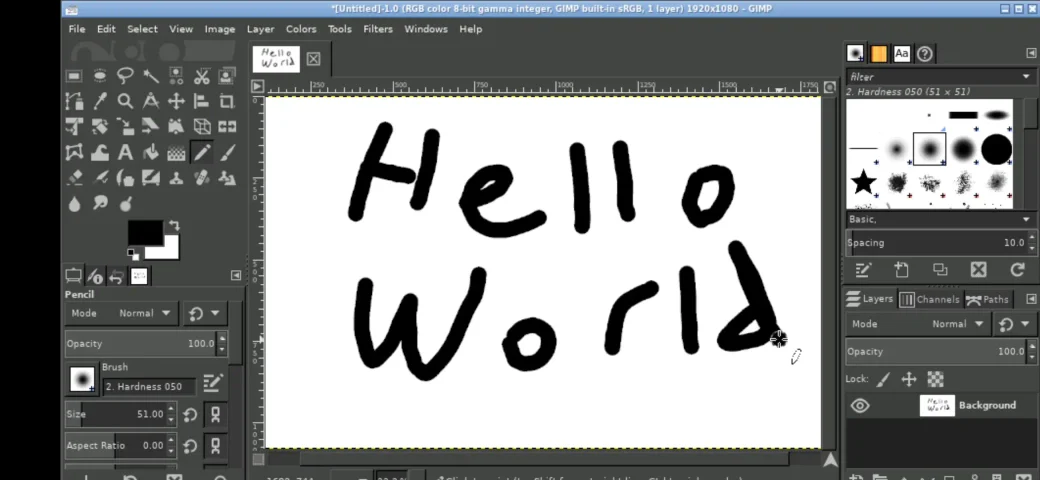
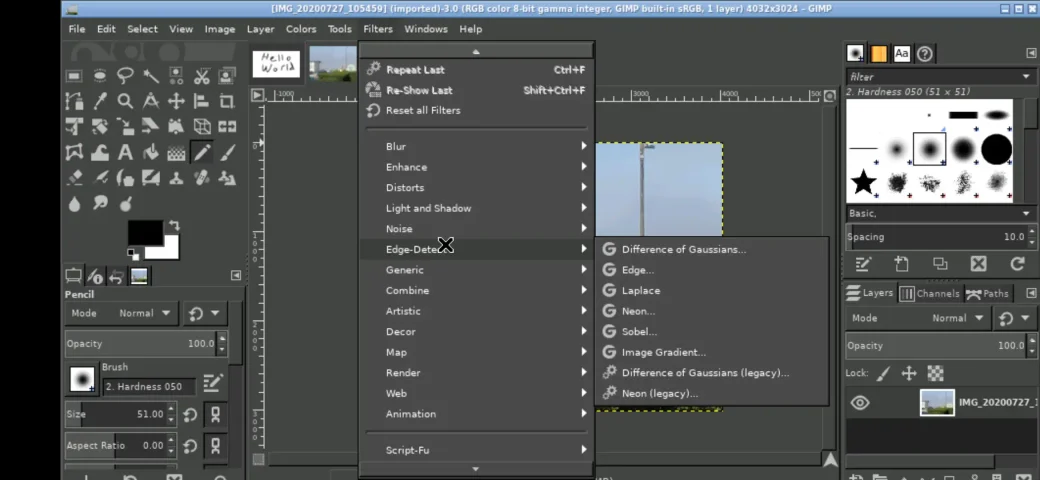
Tentang aplikasi ini
Terjemahan otomatis oleh Google. Bahasa asli: Inggris (Amerika Serikat).
Perbaiki foto. Membuat atau mengedit gambar. Kemampuan tanpa akhir.
Ini benar-benar GIMP, Program Manipulasi Gambar GNU yang sangat mumpuni, berjalan di perangkat Anda. Program ini memiliki fitur lengkap dan didukung secara profesional.
Fitur-fitur GIMP:
GIMP memiliki terlalu banyak fitur untuk disebutkan di sini. Silakan kunjungi situs GIMP: https://www.gimp.org/about/introduction.html
Singkatnya, GIMP memiliki semua yang Anda inginkan dari program pengeditan dan pembuatan foto dan gambar profesional.
Cara menggunakan aplikasi GIMP Android ini:
Gunakan seperti biasa. Tetapi berikut beberapa hal khusus untuk antarmuka Android.
* Ketuk dengan satu jari untuk klik kiri.
* Gerakkan mouse dengan menggeser satu jari.
* Cubit untuk memperbesar.
* Tekan dan tahan lalu geser satu jari untuk menggeser (berguna saat diperbesar).
* Geser dua jari ke atas dan ke bawah untuk menggulir.
* Jika Anda ingin menampilkan papan ketik, ketuk layar untuk memunculkan serangkaian ikon lalu klik ikon papan ketik.
* Jika Anda ingin melakukan hal yang setara dengan klik kanan, ketuk dengan dua jari.
* Jika Anda ingin mengubah skala desktop, temukan notifikasi layanan Android dan klik pengaturan. Anda harus menghentikan dan memulai ulang aplikasi setelah mengubah pengaturan ini agar perubahan berlaku.
Semua ini lebih mudah dilakukan di tablet dan dengan stylus, tetapi juga dapat dilakukan di ponsel atau menggunakan jari Anda.
Untuk mengakses file dari Android lainnya, terdapat banyak tautan bermanfaat di direktori beranda Anda (/home/userland) ke tempat-tempat seperti Dokumen, Gambar, dll. Tidak perlu mengimpor atau mengekspor file.
Jika Anda tidak ingin, atau tidak mampu membayar biaya aplikasi ini, Anda dapat menjalankan GIMP melalui aplikasi UserLAnd.
Ikon, Wilber, maskot GIMP, berasal dari sumber gambar vektor (SVG) yang disediakan oleh Jakub Steiner, tersedia sebagai Creative Commons by-sa 3.0.
Aplikasi ini tidak dibuat oleh tim pengembangan utama GIMP. Sebaliknya, ini adalah adaptasi yang memungkinkan versi Linux untuk berjalan di Android.
Tampilkan teks asli
This really is GIMP, the amazingly capable GNU Image Manipulation Program, running on your device. It is full featured and professionally supported.
Features of GIMP:
GIMP has too many feature to list here. Please checkout the GIMP site: https://www.gimp.org/about/introduction.html
The short version of this, is that it has everything you would want from a professional photo and image editing and authoring program.
How to use this GIMP Android app:
Use it just like normal. But here are some specifics to the Android interface.
* Tap with one figure to left click.
* Move mouse by sliding around one finger.
* Pinch to zoom.
* Press and hold and then slide one finger to pan (useful when zoomed in).
* Slide two fingers up and down to scroll.
* If you want to bring up a keyboard, tap on the screen to get a set of icons to appear and then click the keyboard icon.
* If you want to do the equivalent to a right click, tap with two fingers.
* If you want to change the desktop scaling, find the service android notification and click the settings. You have to stop and restart the app after changing this settings for it to take effect.
This is all easier to do on a tablet and with a stylus, but it can be done on a phone or using your finger as well.
To access files from the rest of Android, there are many useful links in your home directory (/home/userland) to places like your Documents, Pictures, etc. No need to import or export files.
If you don't want to, or cannot pay the cost of this app, you can run GIMP via the UserLAnd app.
The icon, Wilber, the GIMP mascot, comes from a vector image source (SVG) made available by Jakub Steiner, available as Creative Commons by-sa 3.0.
This app is not created by the main GIMP development team. Instead it is an adaptation that allows the Linux version to run on Android.
Keamanan data
Yang dinyatakan UserLAnd Technologies di Google Play tentang data yang dikumpulkan dan dibagikan aplikasi ini.
- Tidak ada data yang dibagikan kepada pihak ketigaPelajari lebih lanjut cara developer menyatakan pembagian data
- Tidak ada data yang dikumpulkanPelajari lebih lanjut cara developer menyatakan pengumpulan data
Yang baru
Versi 26.11.17 · 17/11/2026
Your app's Linux system is now built fresh from our new image pipeline, with up-to-date packages and a faster, more reliable download. Opening files in your phone's shared storage no longer fails the first time, and more programs run correctly. Already installed? Your existing setup is kept; reinstall to get the new system.
Kontak pengembang
- Situs webuserland.tech
- Emailsupport@userland.tech
- Kebijakan Privasiuserland.tech
- Alamat10258 SW 67th Ave Portland, OR 97223 United States
Informasi
- Ditawarkan oleh
- UserLAnd Technologies
- Kategori
- Seni & Desain
- Versi
- 26.11.17
- Diperbarui
- 17/11/2026
- Dirilis
- 7/4/2022
- Memerlukan
- Android 7.0 atau yang lebih baru
- Batasan usia
- Rating 3+
- Harga
- Rp 29.000
- Nama paket
- tech.ula.gimp
Aplikasi serupa
-
 Sketch Pro: Cipta Seni Cat
Seni & Desain
-
 Pixilart - Make Pixel Art
Seni & Desain
-
 Sketchar AR Drawing Sketchpad
Seni & Desain
-
 Picture Scan App by Photomyne
Fotografi
-
 Moblo - Desain Furniture 3D
Seni & Desain
-
 Likcut
Seni & Desain
-
 Thingiverse MakerWorld | 3Drop
Alat
-
 Figma: view. comment. mirror.
Seni & Desain
-
 Nomad Sculpt
Seni & Desain
-
 Posters: templat foto video
Seni & Desain
-
 DesignEvo - Logo Maker
Bisnis
-
 Coding Python
Alat