Air Printer App: Smart PDF
Scan Photos, Docs & AirPrint
Designed for iPhone, iPad
Free · In-app purchases
- Age rating4+
- CategoryBusiness
- Developer汇杭 钟
- LanguagesEnglish+ 10 more
- Size26.0 MB
Links to the official App Store page
Download.org hosts no file of Air Printer App: Smart PDF. The button opens its official App Store page, published by 汇杭 钟. Listing last checked on Nov 12, 2026.
Screenshots


About
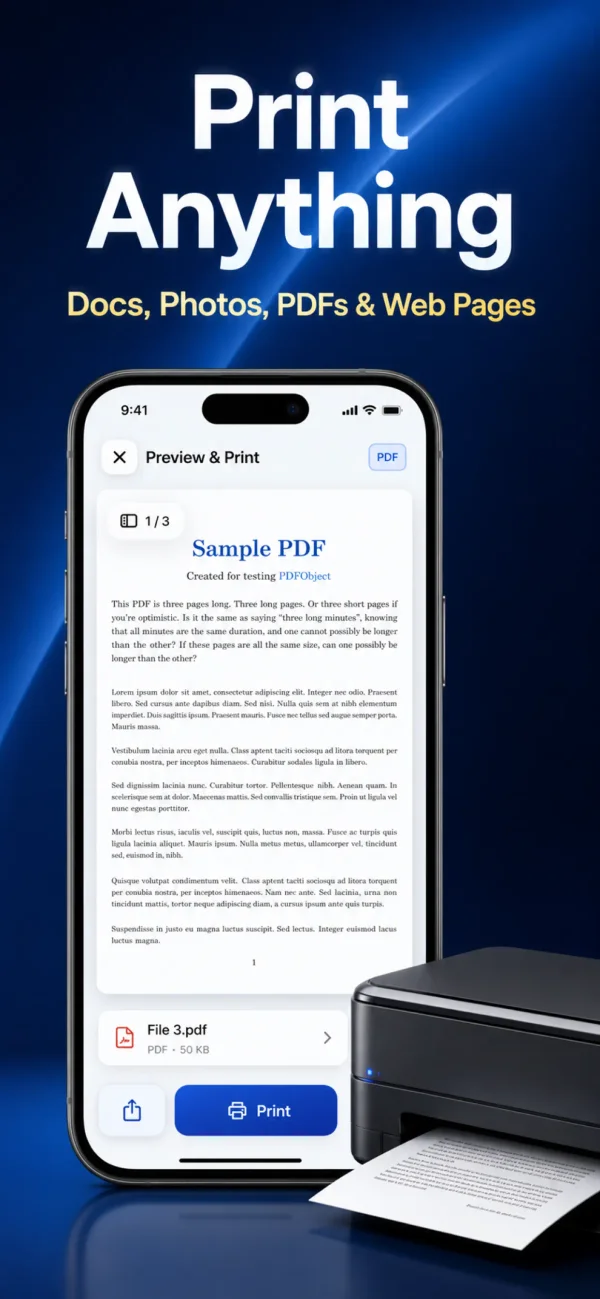
The all-in-one printing app for iPhone and iPad. Print documents, photos, PDFs, web pages, and more wirelessly to over 5,000 AirPrint-compatible printers from HP, Canon, Epson, Brother, Samsung, Xerox, and many other brands.
PRINT ANYTHING FROM YOUR IPHONE & IPAD
Print photos, documents, PDFs, web pages, emails, and contacts in seconds. Supports 20+ file formats including PDF, DOCX, XLSX, PPTX, JPG, PNG, and more. Choose color or black & white, adjust paper size, select number of copies, and customize print settings for perfect results every time.
BUILT-IN DOCUMENT SCANNER
Use your device camera to scan documents instantly. The smart scanner automatically detects edges, corrects perspective, and enhances quality. Scan receipts, contracts, IDs, notes, and any paper document. Save as PDF or print directly.
ADVANCED PDF EDITOR & ANNOTATION
More than just a printer -- annotate PDFs with highlights, notes, and drawings. Add text, signatures, and stamps to any PDF. Edit and organize pages before printing. A complete PDF toolkit right on your device.
OCR TEXT RECOGNITION
Extract editable text from scanned documents and images using powerful OCR technology. Convert paper documents into searchable, editable digital text. Copy, share, or print the extracted text with one tap.
PRINT PHOTOS LIKE A PRO
Print photos directly from your photo library or iCloud. Resize, crop, rotate, and enhance images before printing. Print multiple photos per page, create collages, or print borderless photos in stunning quality.
PRINT FROM ANYWHERE
- Print files from iCloud Drive
- Print web pages by entering any URL
- Print directly from the camera
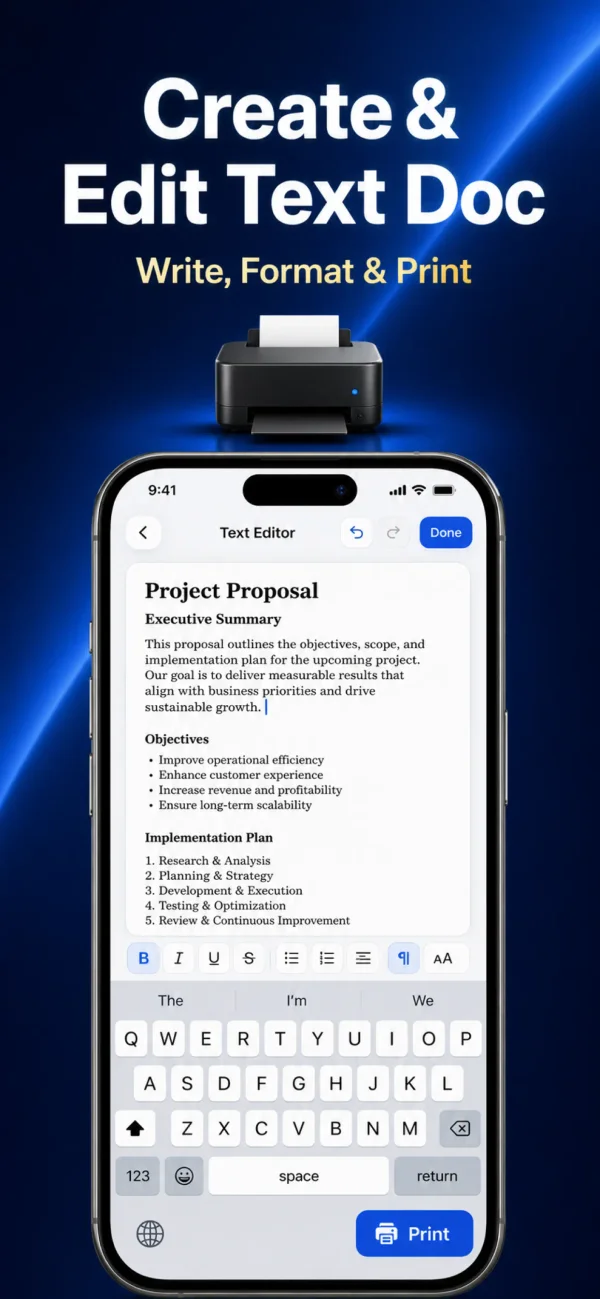
DOCUMENT CREATION & EDITING
Create and edit text documents right in the app. Use the built-in text editor to write, format, and print documents without needing a computer. Perfect for notes, letters, and quick documents.
WHITEBOARD & DRAWING TOOLS
Sketch ideas, annotate images, and create drawings with the built-in whiteboard. Print your creative work or save it for later. A unique feature you will not find in most printer apps.
SUPPORTED PRINTERS
Compatible with 5,000+ AirPrint-enabled printers from all major brands:
- HP (LaserJet, OfficeJet, DeskJet, ENVY)
- Canon (PIXMA, MAXIFY, imageCLASS)
- Epson (EcoTank, WorkForce, Expression)
- Brother (MFC, HL, DCP series)
- Samsung, Xerox, Lexmark, Ricoh, and more
For the full list of AirPrint-compatible printers, visit: https://support.apple.com/en-us/HT201311
WHY CHOOSE MOBILE PRINT?
- No drivers or additional software needed
- Works with any AirPrint-compatible printer
- All-in-one: print, scan, edit, annotate, OCR
- Clean, intuitive interface designed for everyone
- Regular updates with new features and improvements
Disclaimer
This is an independent app and is not affiliated with any printer manufacturer. AirPrint is a trademark of Apple Inc.
Subscription
Printer App is free to download. Access premium features through a subscription that auto-renews each term, which you can manage via your iTunes account. To prevent auto-renewal, update your settings at least 24 hours before the end of the current term.
We love hearing from our users! Send feedback to: andychung.cc@gmail.com
Terms & Privacy
Terms of Use: https://airprinter.andyrgb.com/terms
Privacy Policy: https://airprinter.andyrgb.com/privacy
What’s new
Version 2.9 · Jun 8, 2026
What's New
- Share Extension: Print files directly from any app via the Share menu
- Email Printing: Import and print email attachments with ease
- Redesigned Home: New category filters for faster navigation
- Bug fixes and performance improvements
App privacy
What 汇杭 钟 declares on the App Store about how this app handles data.
-
Data used to track you
May be used to track you across apps and websites owned by other companies.
- Identifiers
-
Data linked to you
May be collected and linked to your identity.
- Identifiers
-
Data not linked to you
May be collected but is not linked to your identity.
- Usage data
- Diagnostics
Privacy practices may vary, for example with the features you use or your age.
Information
- Seller
- 汇杭 钟
- Category
- Business
- Version
- 2.9
- Updated
- Jun 8, 2026
- Released
- Jan 30, 2022
- Size
- 26.0 MB
- Requires
- iOS 16.6 or later
- Age rating
- 4+
- Price
- Free
- In-app purchases
- Yes
- Languages
- English, French, German, Italian, Japanese, Korean, Portuguese, Russian, Simplified Chinese, Spanish, Traditional Chinese
- Copyright
- © PrinterApp@AppStudio
You might also like
-
 Smart Printer App: PDF & PhotoPrint Documents & Photos
-
 iPrint: Smart Printer AppPrint Photos, ePrint, Scanner
-
 Smart Printer - Print AppScan, Print Photos & Documents
-
 Easy Print : Smart Printer AppPDF, Photos, Scan for Printers
-
 Air Printer: Scan & Print PDFMobile Printing, Smart Scanner
-
 Air Printer App:Scan to PDFSmart print for HP,Canon,Epson
-
 print photos .printer app smart printer scan
-
 Cloud Ready printerPrint to canon, brother, HP ..
-
 Printer App: Smart WiFi PrintFax, Scan, Photo & Document
-
 Air Printer App Smart PrintPrint Photos, PDF & Scan Docs