
- Age rating4+
- CategoryUtilities
- DeveloperAstro HQ
- LanguagesEnglish
- Size48.6 MB
Links to the official App Store page
Download.org hosts no file of Astropad Workbench. The button opens its official App Store page, published by Astro HQ. Listing last checked on Nov 21, 2026.
Screenshots


About
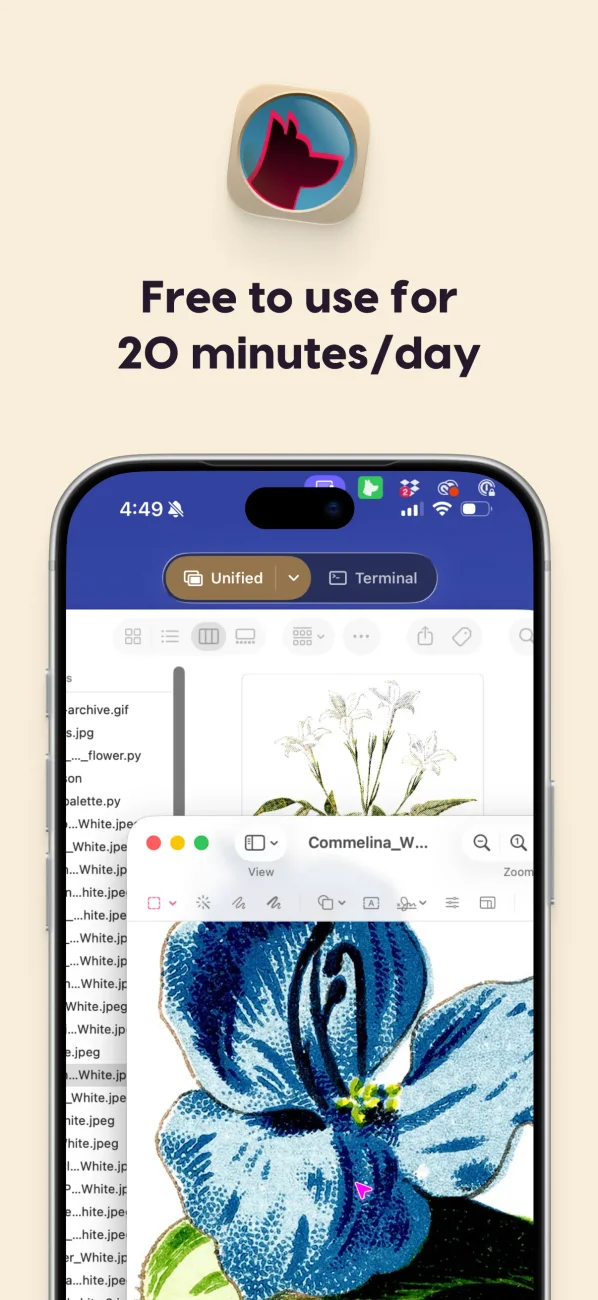
Access and control your Mac from anywhere, with full remote desktop and built-in terminal.
Workbench connects you to your Mac from your iPhone, iPad, or another Mac. Check in on AI agents and long-running jobs, run desktop apps, or drop into the command line without being tethered to your desk.
———
KEY FEATURES
Desktop and terminal: Switch between your Mac's full desktop and a terminal right from the toolbar. Terminal sessions keep running after you disconnect, so you can pick up where you left off on another device.
Unified display: Combine your Mac's displays into one screen that matches your device's resolution.
Headless Mac support: Run a Mac mini with no monitor attached. Workbench gives it a virtual display and manages sleep settings so it's always reachable.
Voice input: Dictate prompts and commands from your iPhone or iPad, on the desktop or in the terminal.
Apple Pencil and keyboard support: Use your Apple Pencil for precise cursor control in Mac apps, and your keyboard to type and trigger shortcuts.
No-hassle connections: Connect instantly without port forwarding, VPNs, or router configuration.
Fast, high-fidelity streaming: Interact with your Mac in real time with responsive controls and sharp visuals.
Secure by design: Sessions are protected with end-to-end AES-256 encryption, and Astropad can't see your screen or activity.
Built for Apple devices: Workbench uses fully native apps built specifically for Mac, iPad, and iPhone.
———
DESIGNED FOR AI AGENT WORKFLOWS
Your agents don't stop when you leave your desk. Workbench lets you monitor progress, fix issues, and restart jobs from wherever you are.
It's just as useful for checking on tools and software that don't have a mobile app.
———
BUILT BY EX-APPLE ENGINEERS
From the team behind Astropad Studio and Luna Display, Workbench delivers fast, responsive control with crisp visuals and reliable performance on any network.
———
PRICING
Workbench includes a Free plan with 20 minutes of access per day. Upgrade to Unlimited for uninterrupted access (subscription required).
———
SYSTEM REQUIREMENTS
Mac: macOS 15 or later
iPhone: iOS 26 or later
iPad: iPadOS 26 or later
What’s new
Version 1.4.1 · Nov 12, 2026
This 1.4.1 updates includes misc iPhone Duo and login fixes.
New in Workbench 1.4: Remote terminal, iPhone Duo support, and Mac-to-Mac file transfer.
REMOTE TERMINAL
Switch between your Mac’s desktop and terminal without reconnecting. Dictate prompts and commands with voice input, and pick up your terminal session across devices.
IPHONE DUO SUPPORT
Workbench runs natively on iPhone Duo from day one. Keep tabs on an agent in one pane without it taking over your whole phone.
MAC-TO-MAC FILE TRANSFER
Drag and drop files between Macs during terminal sessions.
Stay connected to your Mac and keep your AI agents moving, wherever you are.
App privacy
What Astro HQ declares on the App Store about how this app handles data.
-
Data linked to you
May be collected and linked to your identity.
- Contact info
- User content
- Identifiers
-
Data not linked to you
May be collected but is not linked to your identity.
- Usage data
- Diagnostics
Privacy practices may vary, for example with the features you use or your age.
Information
- Seller
- Astro HQ LLC
- Category
- Utilities
- Version
- 1.4.1
- Updated
- Nov 12, 2026
- Released
- Mar 24, 2026
- Size
- 48.6 MB
- Requires
- iOS 26.0 or later
- Age rating
- 4+
- Price
- Free
- Languages
- English
- Copyright
- © 2026
You might also like
-
 Mirage – Remote DisplayRemote display for computers
-
 Sill – Mac StreamingRemote Mac window management
-
 Wider - Fullscreen BrowsingMore room for the internet
-
 Screens 5: VNC Remote DesktopFast & Secure Computer Access
-
 Remio Remote DesktopAccess & Control PC or Laptop
-
 Lens: Simple, Private BrowserThe web, without the noise
-
 Deflector ◇Shortcuts Everywhere
-
 QuillCuePrompt library & keyboard
-
 Litterbox - Post PeekerRead the post, skip the site
-
 Liquid ApolloFast, private, and reliable AI