
ClipboardClear - Auto
Display and automatic deletion
Designed for iPhone, iPad, iPod touch
Free
- Age rating4+
- CategoryUtilities
- DeveloperAtsushi Ezaki
- LanguagesEnglish+ 8 more
- Size5.1 MB
Links to the official App Store page
Download.org hosts no file of ClipboardClear - Auto. The button opens its official App Store page, published by Atsushi Ezaki. Listing last checked on Nov 15, 2026.
Screenshots
About
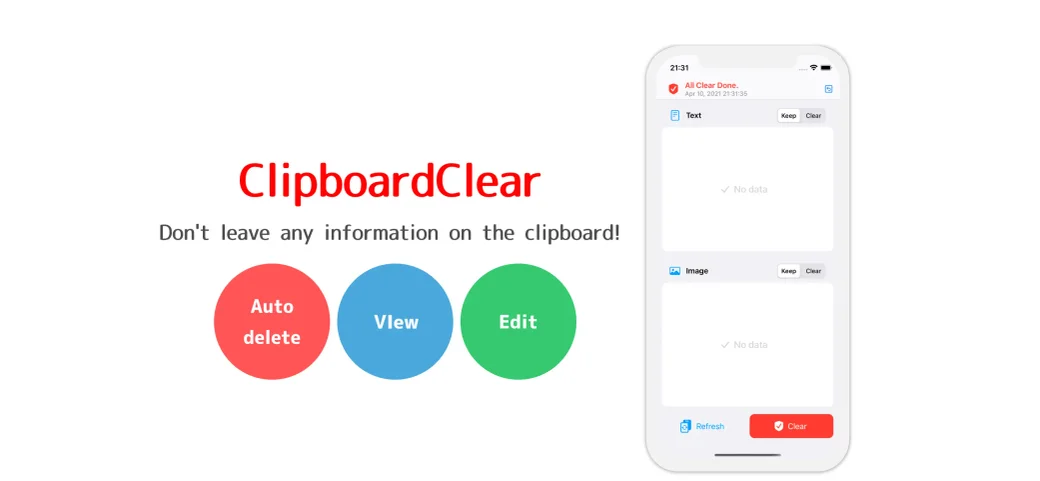
This application is "ClipboardClear" which deletes and displays the clipboard contents.
You can choose between "Delete", "Show", and "None" for automatic execution at startup.
On the screen, you can also delete only text or only images.
If there are multiple items, you can also delete a specific item.
I'd better be careful not to let anyone read the contents of my clipboard!
What’s new
Version 1.1.19 · Oct 9, 2026
Adjusting the UI
App privacy
What Atsushi Ezaki declares on the App Store about how this app handles data.
-
Data used to track you
May be used to track you across apps and websites owned by other companies.
- Location
- Identifiers
- Usage data
- Diagnostics
-
Data linked to you
May be collected and linked to your identity.
- Location
- Identifiers
- Usage data
- Diagnostics
-
Data not linked to you
May be collected but is not linked to your identity.
- Diagnostics
Privacy practices may vary, for example with the features you use or your age.
Information
- Seller
- Atsushi Ezaki
- Category
- Utilities
- Version
- 1.1.19
- Updated
- Oct 9, 2026
- Released
- Apr 10, 2021
- Size
- 5.1 MB
- Requires
- iOS 14.0 or later
- Age rating
- 4+
- Price
- Free
- Languages
- English, French, German, Hindi, Japanese, Polish, Portuguese, Russian, Spanish
- Copyright
- © 2021 Atsushi Ezaki
You might also like
-
 Erase CopyClipboard Check & 1-Tap Clear
-
 Copyboard-quickly enter toolMake your input more efficient
-
 Simple Pasteboard widgetUtilities
-
 AI Text Scanner: Copy PasteClipboard Helper, Scan Pages
-
 CloudClipClipboard history and sync
-
 Clipboard: Keyboard ShortcutsCopy, Paste, Share and Manage
-
 Clipboard PRO: Paste AnywhereOrganize Docs, Links, Photos
-
 Paste Keyboard : Text ShortcutAuto Copy Paste fast clipboard
-
 Clipboard Manager - PycopasteCopy History & Paste Keyboard
-
 Clipboard : ClipboxAuto copy and paste keyboard