OpenScribe: Notes & PDF Markup
Handwriting, PDF & Audio Notes
Designed for iPhone, iPad
Free · In-app purchases
- Age rating4+
- CategoryProductivity
- DeveloperVidOpt LLC
- LanguagesEnglish
- Size11.1 MB
Links to the official App Store page
Download.org hosts no file of OpenScribe: Notes & PDF Markup. The button opens its official App Store page, published by VidOpt LLC. Listing last checked on Nov 17, 2026.
Screenshots
About
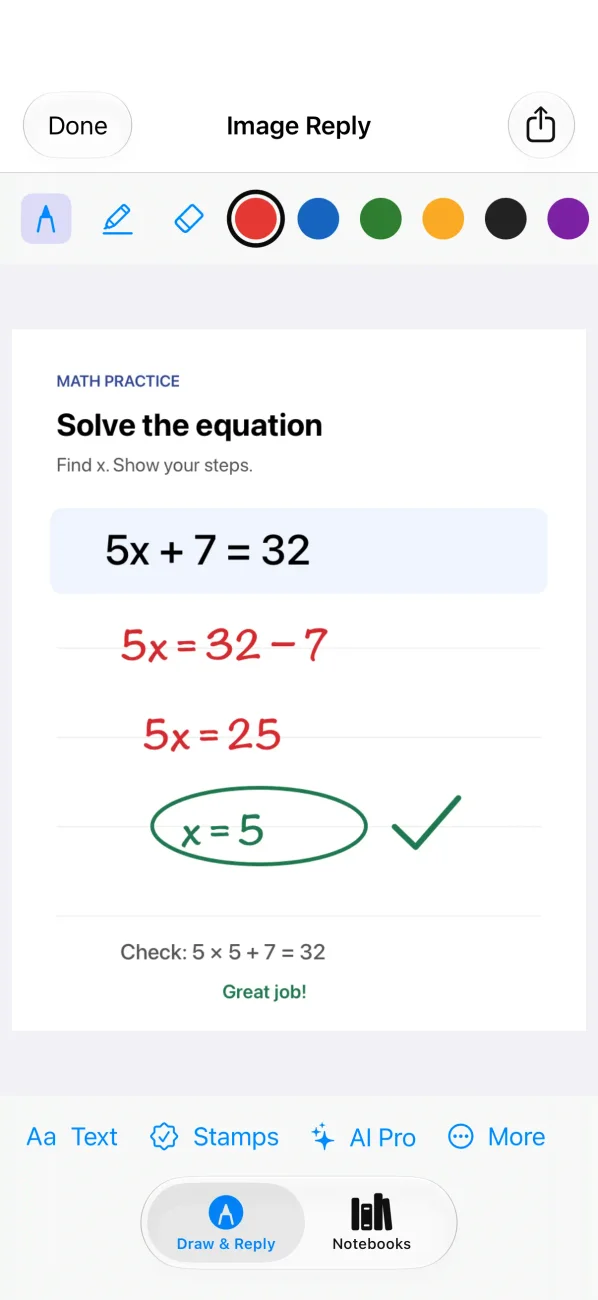
OpenScribe turns handwriting, PDFs, and audio into searchable, organized notes—fast, reliable, and private. Capture ideas in class, meetings, or on the go, then find anything instantly with powerful OCR and search. Annotate PDFs, record while you write, and export in formats that fit your workflow. iCloud keeps your library in sync across devices.
What you can do
- Capture handwriting: Write or sketch and convert ink to text with OCR.
- Annotate PDFs: Import handouts, highlight, comment, sign, and export.
- Record and transcribe: Take audio notes; transcriptions make everything searchable.
- Search everything: Instantly find text in handwriting, PDFs, and transcripts.
- Organize your library: Notebooks, pages, and quick actions for tidy projects.
- Export and share: Send PDFs or text and keep your edits intact.
- Work offline: Capture and edit without a connection; sync when you’re back online.
- iCloud sync: Keep notes up to date across your Apple devices.
Why OpenScribe
- Focused and fast: A clean workspace built for study, research, and meetings.
- Accurate OCR: Turn handwriting and scans into searchable text.
- Private by design: Your data stays yours; iCloud sync and secure networking.
- Built for iOS 17: Modern performance, smooth canvas, and system integration.
Great for
- Students: Lecture notes, scanned handouts, and quick study packs.
- Professionals: Meeting minutes, whiteboard photos, and annotated briefs.
- Researchers: Paper markup, audio interviews, and cross‑document search.
Get started by importing a PDF, creating a notebook, or tapping record. OpenScribe helps you capture, understand, and share your work—without friction.
******************* Terms of Use **********************
Please read the terms of use under: https://openscribe.app/terms.html
******************* Privacy Policy **********************
Please read our privacy policy under: https://openscribe.app/privacy.html
What’s new
Version 1.3.2 · Oct 29, 2026
Updated App Store information for handwriting, PDF annotation, and searchable audio notes.
App privacy
What VidOpt LLC declares on the App Store about how this app handles data.
-
Data not collected
The developer does not collect any data from this app.
Privacy practices may vary, for example with the features you use or your age.
Information
- Seller
- VidOpt LLC
- Category
- Productivity
- Version
- 1.3.2
- Updated
- Oct 29, 2026
- Released
- Oct 23, 2025
- Size
- 11.1 MB
- Requires
- iOS 17.6 or later
- Age rating
- 4+
- Price
- Free
- In-app purchases
- Yes
- Languages
- English
- Copyright
- © VidOpt LLC
You might also like
-
 ModexeLocal Notes & Relational Data
-
 Noterat: STEM & AI NotesHandwriting, Math & Drawing
-
 InkelleHandwriting notes for iPad
-
 Nexo PDFSign, scan, convert. No ads.
-
 ForNoteHandwrite Notes, Annotate PDFs
-
 Cloudless NotesMultilingual Hand Writing App
-
 TaskNote - AI Notes, Docs, PDFAI Note-Taking and Study Help
-
 Pronotes: Notes & PDFWrite, record & replay notes
-
 Print Calendar MakerPrintable Monthly & Blank PDF
-
 Scribbl: Notes & PDF MarkupHandwriting, math and markup