- Age rating4+
- CategoryProductivity
- DeveloperRanbijay SinghDeo
- LanguagesEnglish+ 3 more
- Size4.0 MB
Links to the official App Store page
Download.org hosts no file of Pextro. The button opens its official App Store page, published by Ranbijay SinghDeo. Listing last checked on Nov 15, 2026.
Screenshots


About
Pextro — Professional PDF Compression for iOS
Compress PDF files quickly while keeping your documents private. Pextro processes your files entirely on your iPhone or iPad, so your documents never need to leave your device.
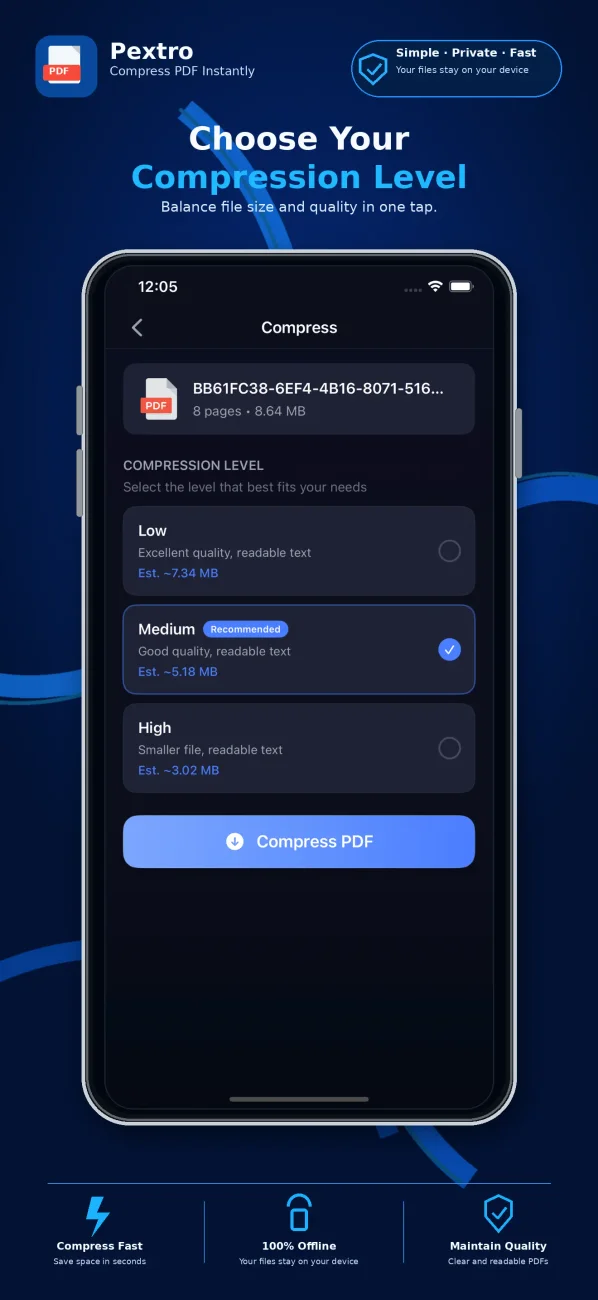
Choose from Low, Medium, or High compression depending on whether you want maximum quality, a balanced result, or a smaller file size.
KEY FEATURES
100% PRIVATE & SECURE
• All compression happens on your device - no cloud uploads, no servers
• Your files never leave your iPhone or iPad
• Complete privacy guaranteed - we can't see your documents
• No internet connection required - works completely offline
MULTIPLE COMPRESSION LEVELS
• Low Compression: Maximum quality, moderate size reduction
• Medium Compression: Balanced quality and file size (recommended)
• High Compression: Maximum size reduction, optimized quality
• Choose the perfect balance for your needs
FAST & EFFICIENT
• Compress PDFs in seconds, not minutes
• Smart compression algorithms preserve text readability
• Optimized for iOS performance
• Minimal battery usage
MODERN & INTUITIVE
• Beautiful dark mode interface
• Simple, one-tap compression workflow
• View compression results with detailed statistics
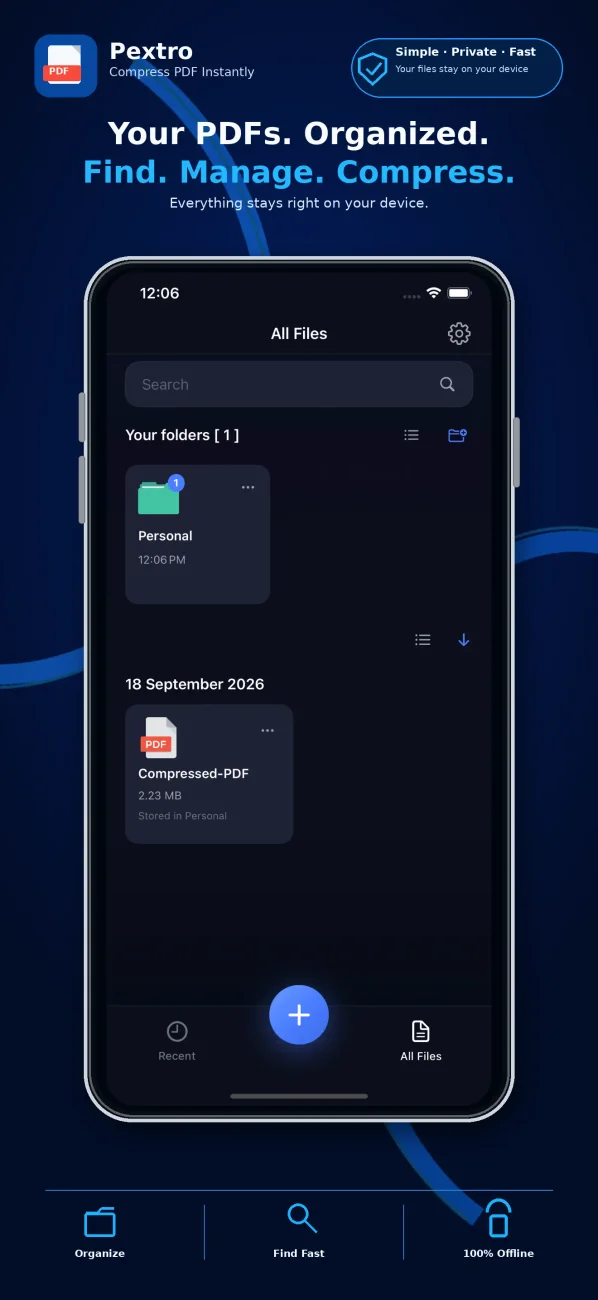
• Easy file management and organization
EASY SHARING
• Share compressed PDFs instantly
• Access your compressed files anytime
• View all recent compressions in one place
• Long-press to preview PDFs before sharing
PERFECT FOR:
• Students compressing lecture notes and assignments
• Professionals reducing document sizes for email
• Businesses optimizing PDF reports and presentations
• Anyone who needs to save storage space
• Users who prioritize privacy and security
PRIVACY FIRST
Pextro is built with privacy at its core. Unlike other PDF tools that upload your files to servers, Pextro processes everything locally on your device. Your sensitive documents, contracts, and personal files remain completely private and secure.
HOW IT WORKS
1. Select your PDF file
2. Choose compression level (Low, Medium, or High)
3. Watch as your file is compressed in seconds
4. Review results and share instantly
All processing happens on-device using advanced compression algorithms that optimize images and content while maintaining document quality and readability.
WHY Pextro?
• No subscriptions or hidden fees
• No ads or tracking
• Works completely offline
• Professional-grade compression
• Beautiful, modern interface
• Regular updates and improvements
Download Pextro today and experience the fastest, most private way to compress PDF files on iOS.
Your privacy matters. Your files stay yours.
What’s new
Version 1.2.0 · Sep 19, 2026
NEW LANGUAGES
• Simplified Chinese (简体中文)
• Japanese (日本語)
• Spanish (Español)
IMPROVED
• Welcome tip for new users
• Accessibility labels for VoiceOver
• Privacy messaging — 100% offline processing
• App follows your device language automatically
All compression still happens locally on your device.
App privacy
What Ranbijay SinghDeo declares on the App Store about how this app handles data.
-
Data not collected
The developer does not collect any data from this app.
Privacy practices may vary, for example with the features you use or your age.
Information
- Seller
- Ranbijay SinghDeo
- Category
- Productivity
- Version
- 1.2.0
- Updated
- Sep 19, 2026
- Released
- Jan 28, 2026
- Size
- 4.0 MB
- Requires
- iOS 17.0 or later
- Age rating
- 4+
- Languages
- English, Japanese, Simplified Chinese, Spanish
- Copyright
- © 2026 Ranbijay SinghDeo
You might also like
-
 PurePDF - Merge & ExtractSplit, Compress & Photo to PDF
-
 Local LLM runnerOn-device AI chat, no network
-
 PDF Compressor - Shrink FilesCompress PDF to Target Size
-
 Zip Rar Extractor - Zip,UnzipUnzipper - Rar Extractor File
-
 PDF Vault - Document AppYour Private PDF Workspace
-
 PDF SqueezerCompress PDFs Offline
-
 PDFix: Edit, Sign, Convert PDFScan Documents & Image to PDF
-
 PDF Compressor : Compress SizeReduce File Size & Merge PDFs
-
 Briefy - AI summary on SafariYour AI knowledge assistant
-
 MindManager GoMobile MindManager Viewer