
- Age rating4+
- CategoryDeveloper Tools
- DeveloperMatthew Oddie
- LanguagesEnglish
- Size4.2 MB
Links to the official App Store page
Download.org hosts no file of Pocketflare DNS. The button opens its official App Store page, published by Matthew Oddie. Listing last checked on Nov 26, 2026.
Screenshots




About
Your domains, in your pocket.
Pocketflare is a Cloudflare app for iPhone, iPhone Duo and iPad. Fix a DNS record, watch a Pages build, switch on an email address, check your tunnels are up and see every domain's traffic, all without reaching for a laptop. Widgets and alerts tell you when something needs a look.
It's the Cloudflare dashboard cut down to fit a phone. The enterprise settings are left out and the everyday jobs are one or two taps away.
HOME
Every domain with today's requests and a 7-day trend, plus the health of your Cloudflare Tunnels, all on one screen.
WIDGETS
Put a domain's traffic or your tunnels' status on the Home Screen or Lock Screen. Tap a widget to jump straight to that domain.
ALERTS
Get a notification when a tunnel goes down, and when it's back, or when a Pages build fails. Pocketflare checks in the background, with no server of ours in between.
UNDER ATTACK? ONE TAP.
Turn on I'm Under Attack mode from the app, Siri, Spotlight, the Action button or Control Center. Turning it off puts back the security level you had before. Development Mode and cache purges are just a tap away too.
SECURITY AND SSL
• See what Cloudflare blocked or challenged in the last 24 hours, by IP, country, path and rule
• Change the SSL/TLS encryption mode, turn on Always Use HTTPS and check your edge certificates
• Purge everything, or just the URLs you list
• See when domains registered with Cloudflare renew
DNS RECORDS
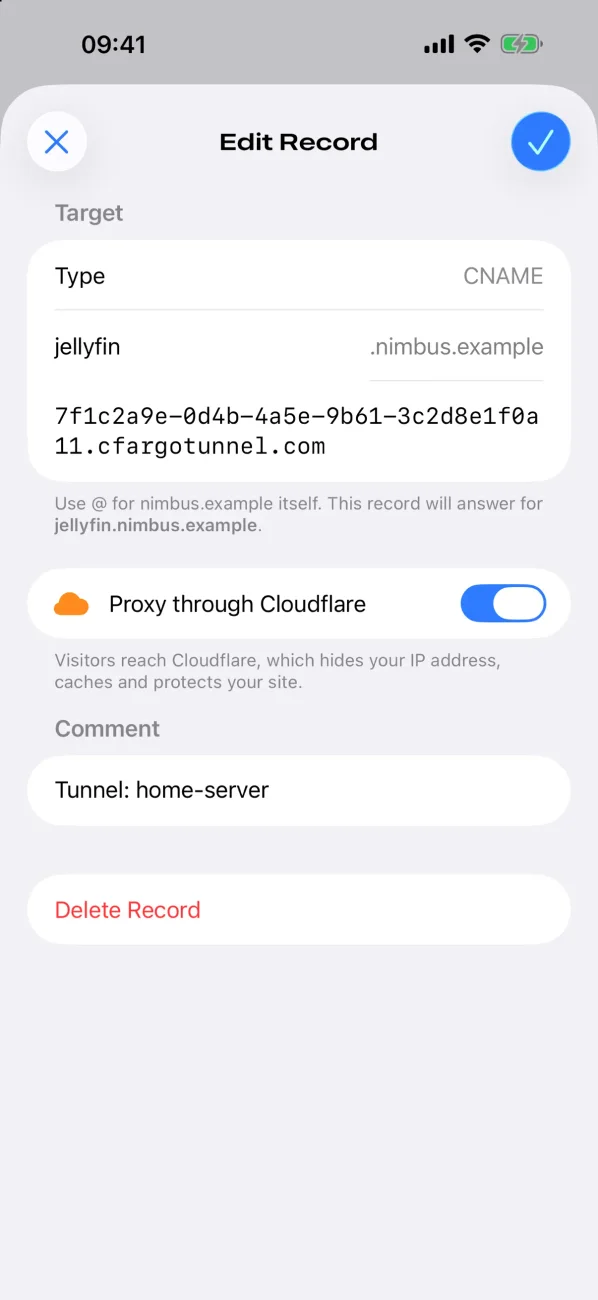
• Search and filter by type, then add, edit or delete A, AAAA, CNAME, MX, TXT and more
• Swipe a record to switch between proxied and DNS only
• Type a name like "jellyfin" and Pocketflare adds the domain for you
• Checks IP addresses and MX priorities before saving
• Long-press to copy a name or value
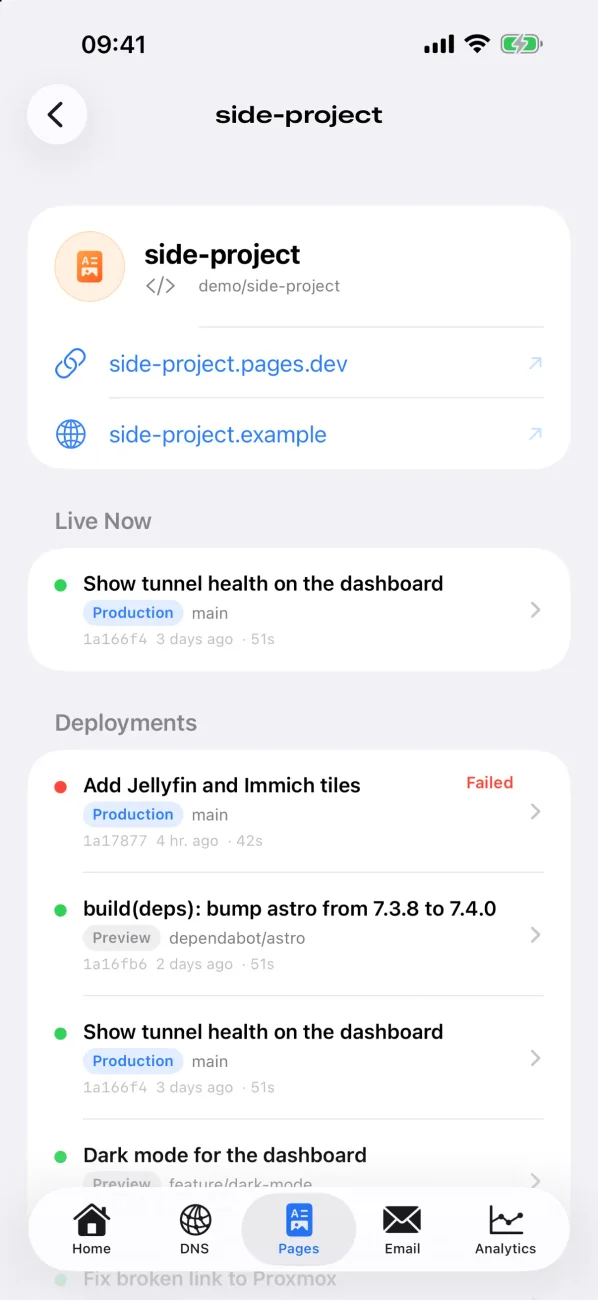
PAGES DEPLOYMENTS
• Every build with its branch, commit and stages, and how long each stage took
• Builds update by themselves while they run
• Open previews, retry a failed build or roll production back to any earlier deployment
EMAIL ROUTING
Turn addresses like hello@ on and off, add new ones, set the catch-all and add destination inboxes.
TUNNEL HEALTH
Know straight away when cloudflared drops. See each tunnel's status, connections and data centers.
ANALYTICS
Requests, bandwidth, unique visitors, page views, threats, errors and cache rate over 24 hours, 7 or 30 days. Includes your top pages, countries and response codes. Drag across a chart to see any hour or day. Works on Cloudflare's Free plan.
SEVERAL ACCOUNTS
Add a token for each Cloudflare account, or one token that covers them all, and switch between them.
PRIVATE BY DESIGN
• No accounts, no servers of ours in the middle, no tracking or analytics
• Use a scoped API token and give Pocketflare only the permissions you want. Screens it can't use just say so
• Your token stays in the iOS Keychain on this device only, never in backups or iCloud. Widgets never see it
• It's only ever sent to api.cloudflare.com, and redirects are refused
• Use Face ID to lock the whole app, or just to confirm before any change
Designed for light and dark mode, on iPhone, iPhone Duo and iPad. Free, with no ads, subscriptions or in-app purchases.
No Cloudflare account handy? Tap Explore the demo account to try every screen with simulated data.
Pocketflare is an independent app and is not affiliated with or endorsed by Cloudflare, Inc. Cloudflare is a registered trademark of Cloudflare, Inc.
What’s new
Version 1.3.0 · Nov 25, 2026
- Made for iPhone Duo. Open it up and Pocketflare uses the whole screen: your domains and Pages projects sit beside the one you're looking at, DNS records become a table you can read at a glance, and Analytics and Email Routing spread across two columns.
- Half-fold iPhone Duo and the two sides split at the crease, so nothing sits across the fold.
- iPad, and big iPhones turned sideways, get the same layouts.
- In the DNS table, tap a record's cloud to switch between proxied and DNS only.
App privacy
What Matthew Oddie declares on the App Store about how this app handles data.
-
Data not collected
The developer does not collect any data from this app.
Privacy practices may vary, for example with the features you use or your age.
Information
- Seller
- Matthew Oddie
- Category
- Developer Tools
- Version
- 1.3.0
- Updated
- Nov 25, 2026
- Released
- Nov 5, 2026
- Size
- 4.2 MB
- Requires
- iOS 26.0 or later
- Age rating
- 4+
- Price
- Free
- Languages
- English
- Copyright
- © 2026 Matt Oddie
You might also like
-
 SQL Studio by IT ServiceAdminister SQL Server anywhere
-
 cronstableyour jobs in your hand
-
 Walnut: Webview Debug & TestAgentic WebView Debugging
-
 Index - SQL ClientDatabase Client
-
 Base64 Image ConverterImage to Base64 & Data URI
-
 ApiCatcher - Capture HTTPSCapture HTTPS from your iPhone
-
 DevInspect BrowserWeb Inspector & DOM Debugger
-
 Eruda Browser ConsoleBrowser console and dev tools
-
 DBConnectMobile Database - SQL, NoSQL
-
 Recipes for SwiftRunnable code and SQL examples