
- Age rating4+
- CategoryProductivity
- DeveloperLuan Cu Xuan
- LanguagesEnglish
- Size2.8 MB
Links to the official App Store page
Download.org hosts no file of Tap PiP. The button opens its official App Store page, published by Luan Cu Xuan. Listing last checked on Nov 13, 2026.
Screenshots

About
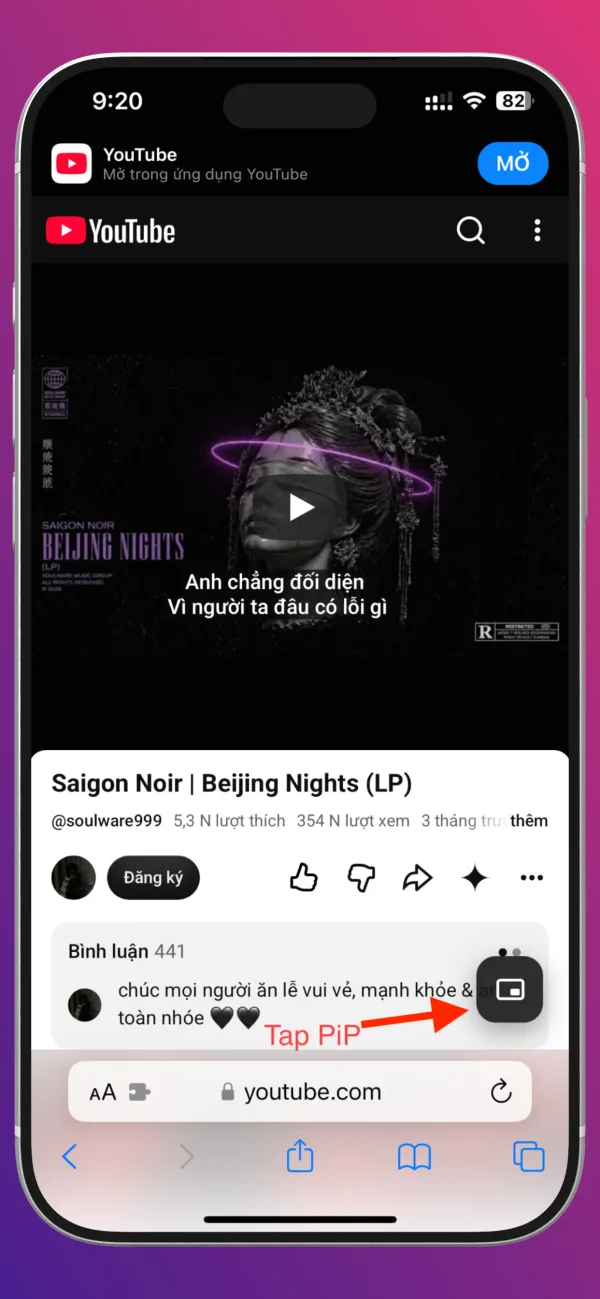
Tap PiP makes it easy to watch supported Safari videos in Picture in Picture mode.
Enable the Safari extension, open a video page, and tap the Tap PiP extension icon to start Picture in Picture. Tap it again to close.
Tap PiP works with standard HTML5 videos on supported websites. A floating PiP button appears when a compatible video is available.
Some protected, DRM, or custom video players may not support Picture in Picture.
What’s new
Version 1.2 · Oct 18, 2026
Support MacOS native.
App privacy
What Luan Cu Xuan declares on the App Store about how this app handles data.
-
Data not collected
The developer does not collect any data from this app.
Privacy practices may vary, for example with the features you use or your age.
Information
- Seller
- Luan Cu Xuan
- Category
- Productivity
- Version
- 1.2
- Updated
- Oct 18, 2026
- Released
- Aug 23, 2026
- Size
- 2.8 MB
- Requires
- iOS 16.0 or later
- Age rating
- 4+
- Languages
- English
- Copyright
- © SoftLighter.com
You might also like
-
 ScanKit: Document & QR ScannerScan, OCR, QR & Create PDFs
-
 SinceyTrack when you last did things
-
 NextNote: Notes & AI WritingCapture ideas. Write with AI.
-
 Clip Keyboard: Paste SnippetsClipboard Manager, Quick Reply
-
 Not Another Twin CalculatorDual Split-Screen Side by Side
-
 ReplyKit - Text ShortcutsText Expander, Saved Messages
-
 Private Writer Markdown EditorOffline Notes. No Cloud. Lock
-
 Habit Tracker Daily Routine+Daily Routine & Goals Planner
-
 OneScan: PDF & ID ScannerScan, Save & Find Documents
-
 DigWords - Image-to-TextOffline Image-to-Text tool