
Tessabyte
Professional network testing
Designed for iPhone, iPad
Free · In-app purchases
- Age rating4+
- CategoryUtilities
- DeveloperNetmantics
- LanguagesEnglish
- Size5.1 MB
Links to the official App Store page
Download.org hosts no file of Tessabyte. The button opens its official App Store page, published by Netmantics. Listing last checked on Nov 13, 2026.
Screenshots


About
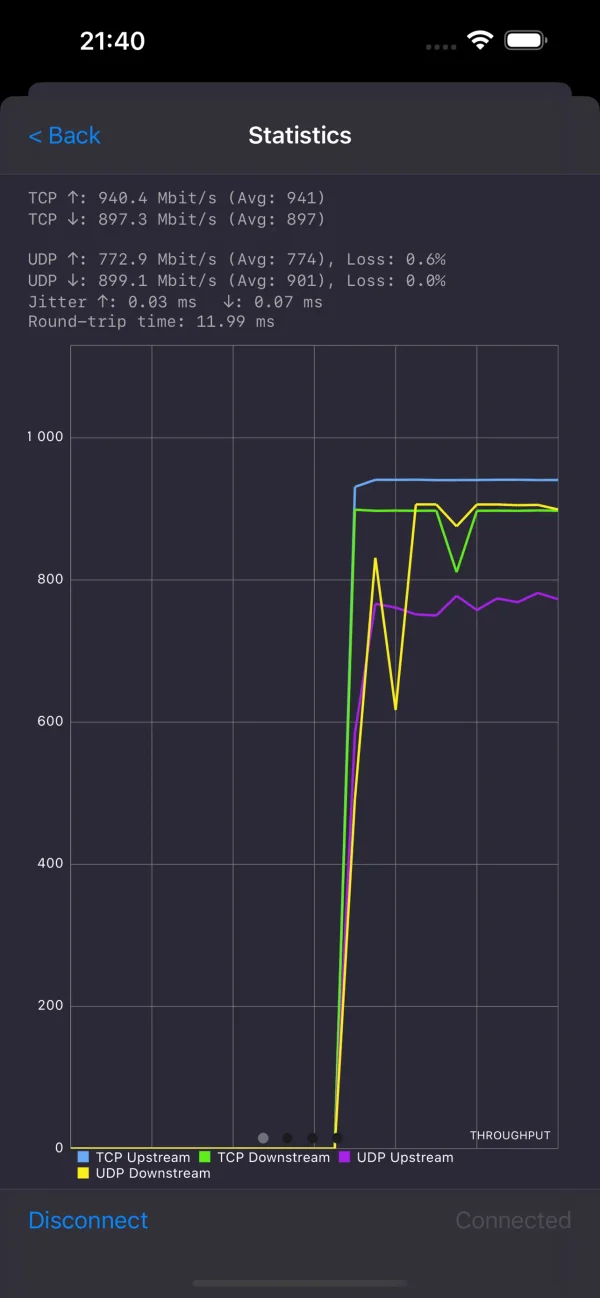
Experience the difference with Tessabyte — a powerful tool for measuring and analyzing network performance. This utility sends TCP and UDP data streams across your network and computes important metrics such as upstream and downstream throughput, packet loss, jitter, and round-trip time, and displays the results in both numeric and chart formats. Whether you're troubleshooting connectivity issues, validating upgrades, or optimizing your network, Tessabyte provides precise insights into its speed and reliability.
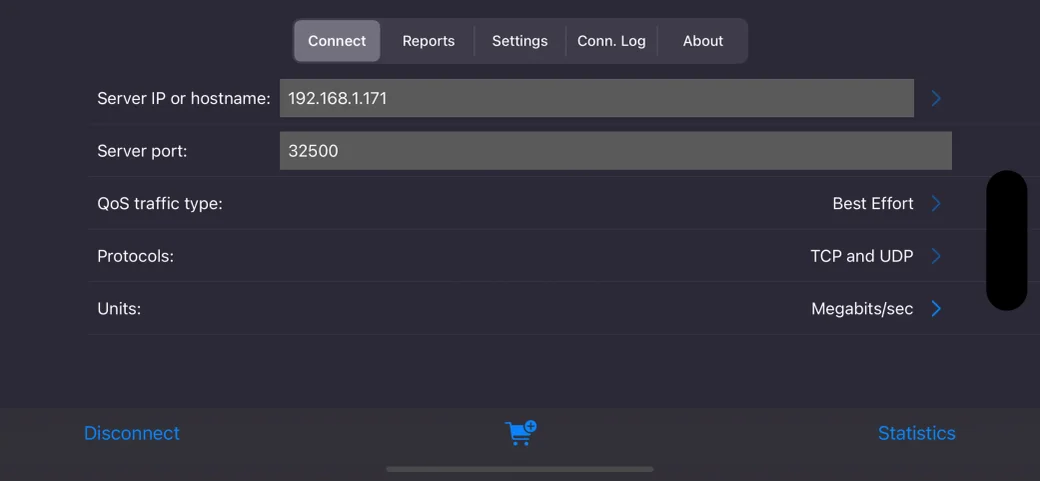
Tessabyte uses a client-server setup to run tests, so a server component (which can be downloaded at https://www.netmantics.com) is highly recommended for local network testing. However, the application also offers access to public test servers.
What can you do with Tessabyte?
• Wi-Fi Speed Tests: Test wireless networks for throughput and reliability.
• Network Capacity Tests: Assess the maximum data transfer rate that a network link can support.
• Link Quality Analysis: Determine the quality of individual network links.
• Stress Tests: Simulate high traffic loads and observe how the network behaves under congestion.
• Quality of Service (QoS) Assessment: Evaluate how different traffic types are prioritized in the network.
• Firmware and Hardware Updates Validation: Verify the impact of network device firmware or hardware upgrades.
• LAN Bandwidth Tests: Don't take your local network speed for granted. Test, verify, and monitor.
• Network Topology Planning: Understand how network design choices impact performance.
• Comparative Benchmarking: Compare the performance of different network components or analyze how your network behaves at various times of the day.
• Security Assessment: Evaluate the impact of security measures on network performance.
• Load Balancing Verification: Test the effectiveness of load balancing in a network.
• SLA Compliance Verification: Ensure that the network meets its Service Level Agreements.
Why Tessabyte:
• Accurate, real-time measurements
• Reports in PDF and CSV formats
• Customizable TCP and UDP traffic parameters
• Support for both IPv4 and IPv6
• Cross-platform compatibility: an iOS/iPadOS client can "talk" to a macOS or Windows server, etc.
App privacy
What Netmantics declares on the App Store about how this app handles data.
-
Data not collected
The developer does not collect any data from this app.
Privacy practices may vary, for example with the features you use or your age.
Information
- Seller
- Netmantics LLC
- Category
- Utilities
- Version
- 2.0.101
- Updated
- Mar 24, 2026
- Released
- Mar 24, 2026
- Size
- 5.1 MB
- Requires
- iOS 17.6 or later
- Age rating
- 4+
- Price
- Free
- In-app purchases
- Yes
- Languages
- English
- Copyright
- Copyright © 2026 Netmantics LLC
You might also like
-
 Airtool PiRemote Wi-Fi Packet Captures
-
 OptiFi AgentFix slow WiFi
-
 Epitiro - Network AgentMeasure internet service
-
 WLAN Pros Toolbox260+ Wi-Fi & network tools
-
 iPerf FalconLAN Testing & SSH Automation
-
 Show IP WidgetIP, Provider & Location Widget
-
 PingyDingyOpen Source network tester
-
 Ping Analyzer: Latency MonitorGraphical Ping Diagnostics
-
 PacketCircleLook at packets from the sofa
-
 OV CaddyUtilities