
Typtic Typst Editor
Offline Typst Compiler
Designed for iPhone, iPad
In-app purchases
- Age rating4+
- CategoryProductivity
- DeveloperVerbosus.com
- LanguagesEnglish
- Size67.6 MB
Links to the official App Store page
Download.org hosts no file of Typtic Typst Editor. The button opens its official App Store page, published by Verbosus.com. Listing last checked on Nov 23, 2026.
Screenshots


About
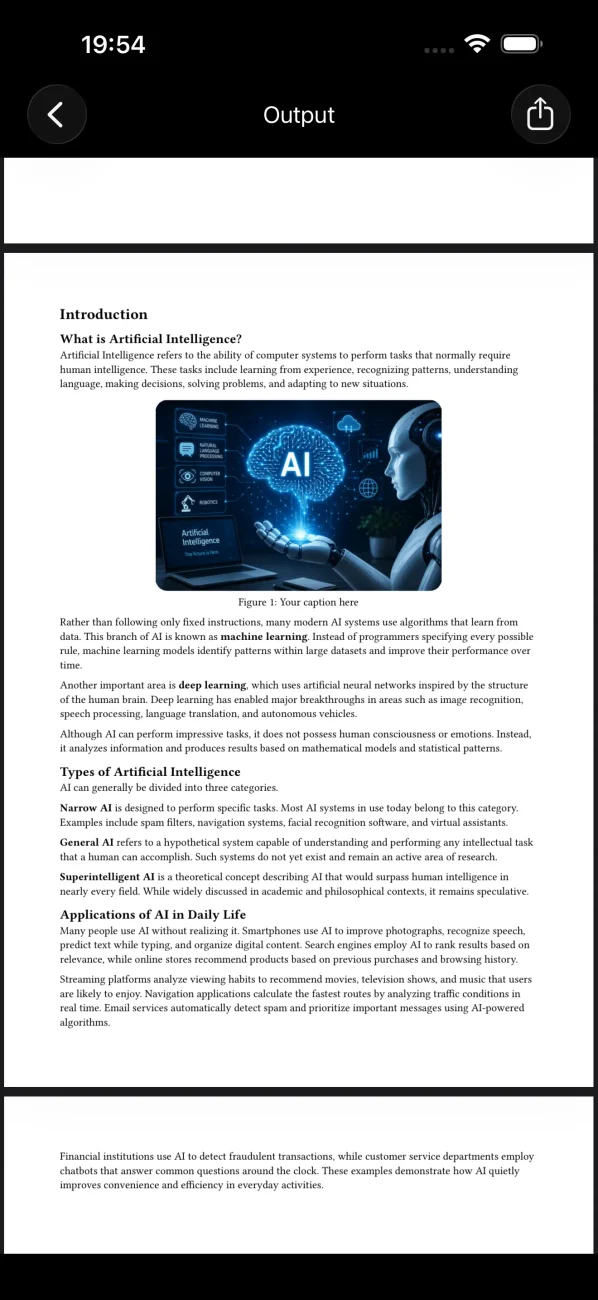
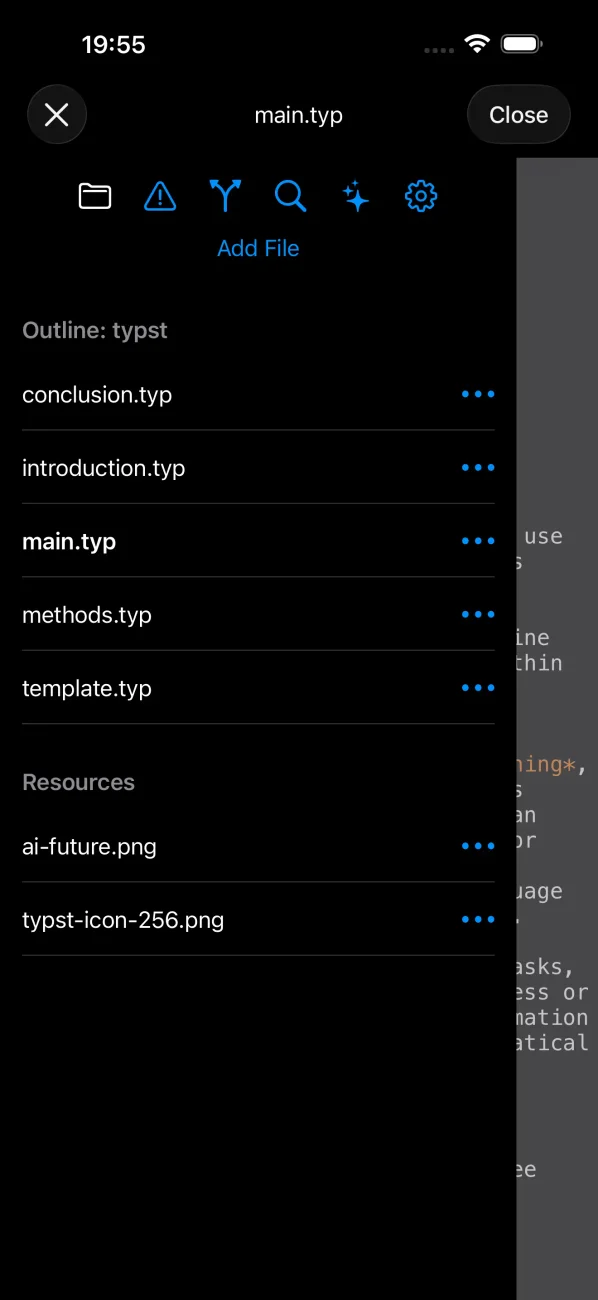
Typtic is a free, collaborative Typst Editor for your iOS device. It allows you to create and manage Typst projects directly on your iOS device and generate a PDF offline (enabled by default) or online (by using Verbosus).
This software is provided "as is" without warranties or conditions of any kind, either expressed or implied.
Features:
* Use Typst to generate a PDF
* Offline compilation (enabled by default)
* Git integration (Local Mode)
* iCloud integration (Local Mode)
* Automatic Dropbox synchronization (Local Mode)
* Automatic Box synchronization (Local Mode)
* AI assistant (available in supported regions)
* Zotero integration (Local Mode)
* Mendeley integration (Local Mode)
* 2 Modes: Local Mode (stores projects on your device) and Cloud Mode (synchronizes your projects with Verbosus)
* No account needed (Local Mode)
* Syntax highlighting
* Hotkeys (see below, can be changed)
* Two factor authentication (Cloud Mode, in combination with Copiosus)
* Autosave (Local Mode)
* No ads
Additional features in Typtic Pro:
* Unlimited number of projects (Local Mode)
* Unlimited number of documents (Local Mode)
* Unlimited number of projects (Cloud Mode)
* Unlimited number of documents (Cloud Mode)
Limitations in free Typtic version:
* Max. number of projects (Local Mode): 2
* Max. number of documents per project (Local Mode): 2
* Max. number of files to upload per project (Local Mode): 2
* Max. number of projects (Cloud Mode): 2
* Max. number of documents per project (Cloud Mode): 2
Import or export existing projects (Local Mode):
* Git integration lets you create a new or clone an existing repository.
* Automatic Dropbox or Box synchronization (App -> Link to Dropbox or Box). Synchronization is done once a minute.
If you experience any performance issues while using the editor please try
* to disable syntax highlighting and line numbers
* to split up your project into multiple .typ files
Hotkeys in editor:
ctrl+,: Settings
ctrl+s: Save
ctrl+g: Generate PDF
ctrl+f: Find and replace
ctrl+p: Toggle preview
ctrl+n: New document
ctrl+d: Delete document
ctrl+.: Next document
Terms of Use: https://www.apple.com/legal/internet-services/itunes/dev/stdeula
What’s new
Version 1.0.8 · Nov 20, 2026
* Add system font picker
* UI improvements
App privacy
What Verbosus.com declares on the App Store about how this app handles data.
-
Data not collected
The developer does not collect any data from this app.
Privacy practices may vary, for example with the features you use or your age.
Information
- Seller
- Daniel Kuster
- Category
- Productivity
- Version
- 1.0.8
- Updated
- Nov 20, 2026
- Released
- Jul 27, 2026
- Size
- 67.6 MB
- Requires
- iOS 18.6 or later
- Age rating
- 4+
- In-app purchases
- Yes
- Languages
- English
- Copyright
- © verbosus.com
You might also like
-
 Typst Editor TypeWrightWrite Compile Typset Locally
-
 Typeset TypstWrite Typst documents
-
 InkPondTypst Editor, Write & Preview
-
 Space DOTDOT and Mermaid rendering
-
 LeaffoldWrite beautifully. For free.
-
 Markdown CardsFlashcards in plain markdown
-
 Tabula StatsRegression Tables Formatting
-
 Epoch NotesLaTeX & Math Handwriting
-
 Joey MCP ClientMCP AI chat with OpenRouter
-
 Relay Voice: Memos into NotesAI Transcribes Speech to Text