WidgetBee
Custom Widgets via Shortcuts
Designed for iPhone
Free · In-app purchases
- Age rating4+
- CategoryUtilities
- DeveloperEaglet Workshop Limited
- LanguagesEnglish
- Size16.1 MB
Links to the official App Store page
Download.org hosts no file of WidgetBee. The button opens its official App Store page, published by Eaglet Workshop Limited. Listing last checked on Nov 21, 2026.
Screenshots
About
### App Description
**WidgetBee: Build Custom, Dynamic iPhone Widgets Without Code**
Transform your Home Screen and Today View into a personalized data dashboard with WidgetBee. Designed for power users, productivity enthusiasts, and aesthetics lovers alike, WidgetBee bridges the gap between raw data and beautiful, highly customizable widgets—all without writing a single line of code.
Whether you want to track daily habits, monitor live data feeds, stay on top of work metrics, or display customized text, WidgetBee gives you full control over how your widgets look, feel, and update.
---
### Key Features
#### 1. Powered by Apple Shortcuts
* **Limitless Data Potential:** Trigger live, automatic updates using Apple Shortcuts. Feed custom text, dynamic numbers, system statistics, external API data, or personal logs directly into your widgets.
* **Flexible Automation:** Set up automated updates that sync seamlessly in the background using native triggers.
* **Target Specific Fields:** Update widgets dynamically by targeting specific data rows or using unique row keys within your shortcuts.
#### 2. Multi-Data Row Display
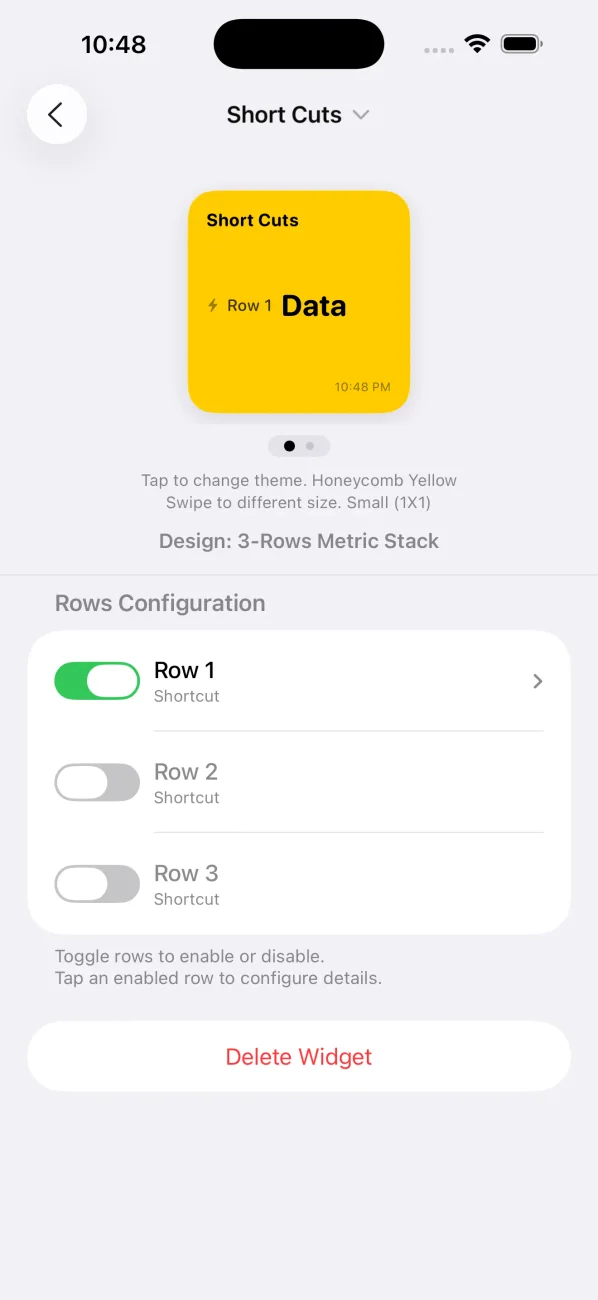
* **3-Row Multi-Data Layout:** Display up to three distinct rows of information within a single widget to maximize space and utility.
* **Custom Topic Headers:** Add dedicated title headers to categorize your data (e.g., "Daily Goals," "System Stats," "Work Dashboard").
* **Granular Formatting Controls:**
* Add custom prefixes and suffixes to your raw values (e.g., adding "$", "kg", "°C", or custom emoji labels).
* Assign fallback/default text to handle missing or null data gracefully.
* Adjust text alignment (Left, Center, or Right) for perfect visual harmony.
#### 3. Tailored Styling & Themes
* **Multiple Theme Options:** Switch between Light, Dark, and Signature Honeycomb themes to fit any aesthetic.
* **App Tint Support:** Match your widgets with your system tint and wallpaper color schemes.
* **Clean & Modern Canvas:** Built specifically for canvas sizes (`.systemSmall` and `.systemMedium`).
* **Optional Timestamps:** Toggle the "Last Updated" timestamp on or off per widget so you always know when your data was last refreshed.
---
### How WidgetBee Works
1. **Create & Design:** Pick your canvas size (`.systemSmall` or `.systemMedium`), select a theme, and set up your topic header.
2. **Configure Rows:** Define up to 3 data rows. Customize row labels, text alignment, and default fallback values.
3. **Connect via Shortcuts:** Use simple, pre-built Apple Shortcuts actions to update your widget rows dynamically whenever events trigger.
4. **Place & Enjoy:** Add WidgetBee to your Home Screen or Today View, link your widget configuration, and enjoy a real-time personalized display.
---
### Privacy First
WidgetBee respects your privacy. Your data stays on your device and inside your own Apple Shortcuts environment. No forced accounts, no hidden server tracking, and full transparency.
**Take control of your iPhone Home Screen today. Download WidgetBee and build the ultimate custom widget setup!**
### Legal Related Footnote
LICENSED APPLICATION END USER LICENSE AGREEMENT:
https://www.apple.com/legal/internet-services/itunes/dev/stdeula/
Privacy Policy for WidgetBee
https://widget-bee-pro.web.app/privacy/
Terms and Conditions for WidgetBee
https://widget-bee-pro.web.app/terms/
Support
hello@eagletworkshop.com
App privacy
What Eaglet Workshop Limited declares on the App Store about how this app handles data.
-
Data not linked to you
May be collected but is not linked to your identity.
- Purchases
- Identifiers
Privacy practices may vary, for example with the features you use or your age.
Information
- Seller
- Eaglet Workshop Limited
- Category
- Utilities
- Version
- 1.0
- Updated
- Sep 8, 2026
- Released
- Sep 8, 2026
- Size
- 16.1 MB
- Requires
- iOS 26.0 or later
- Age rating
- 4+
- Price
- Free
- In-app purchases
- Yes
- Languages
- English
- Copyright
- © Eaglet Workshop Limited
You might also like
-
 Countdown & Interval TimerPomodoro, HIIT & Step Timer
-
 EcoGuardUtilities
-
 API WidgetWidgets from your JSON data
-
 SheetWidget: SpreadsheetsTables on Home & Lock Screens
-
 Aurora: Dark Mode for SafariNight Themes Browser Extension
-
 ScheduledDayUse widget and notification !
-
 Sand Timer - Countdown ClockTrack Time with Ease
-
 AnyMirror: Mirror Screen to PCMirror screen, camera and more
-
 Any Text WidgetsLock Screen Text
-
 Tidur: Multiple TimersKitchen & Tea Countdowns