HUD Digital Animated
WatchBase- 3 歳以上対象年齢
- カスタマイズカテゴリ
- 2026/10/28更新日
- ¥260価格
wb.hud.digitalのGoogle Play公式ページにリンクしています。最終確認:2026/11/14。
スクリーンショット





このアプリについて
Googleによる英語 (アメリカ合衆国)からの自動翻訳です。
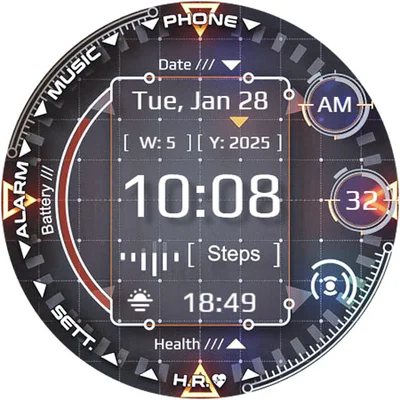
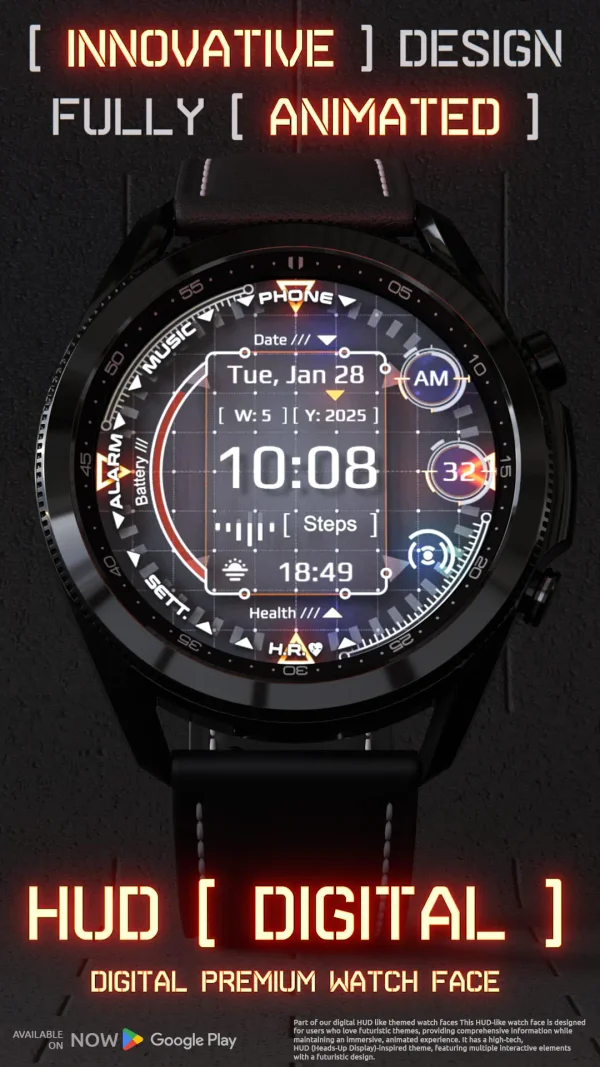
未来的でアニメーション化されたこの文字盤は、印象的なユニークなデザインです。
ユニークなアニメーションの未来的な HUD をテーマにした Wear OS のウォッチフェイスで目立ちましょう
注: 方法セクションとインストールセクションを読み、画像を確認してください。
ⓘ 特徴:
- 完全にアニメーション化されており、ダイナミックな体験が可能です。
- 未来的な HUD スタイルのテーマ。
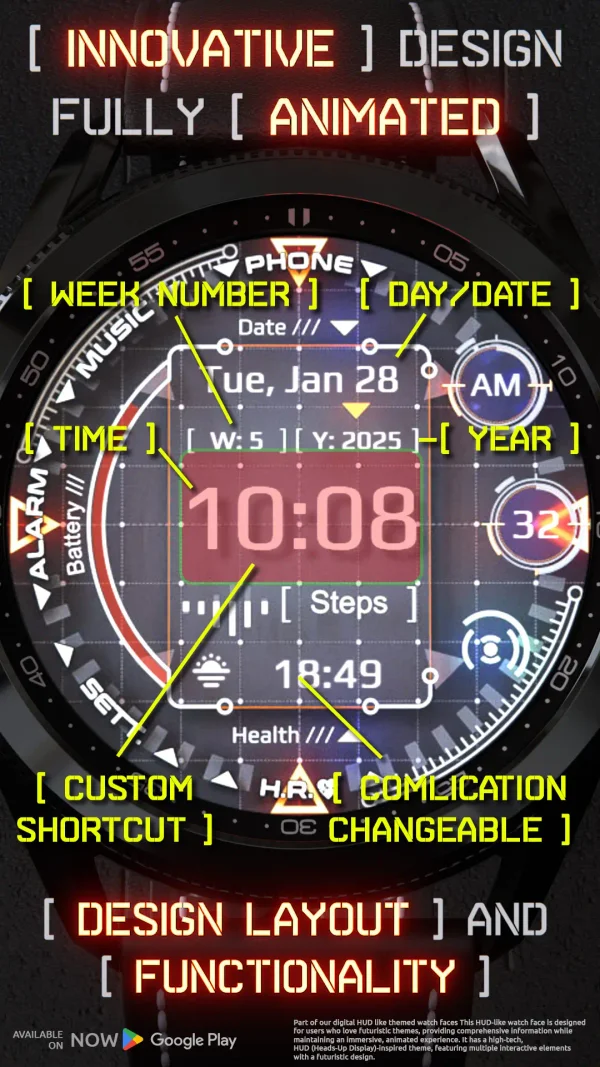
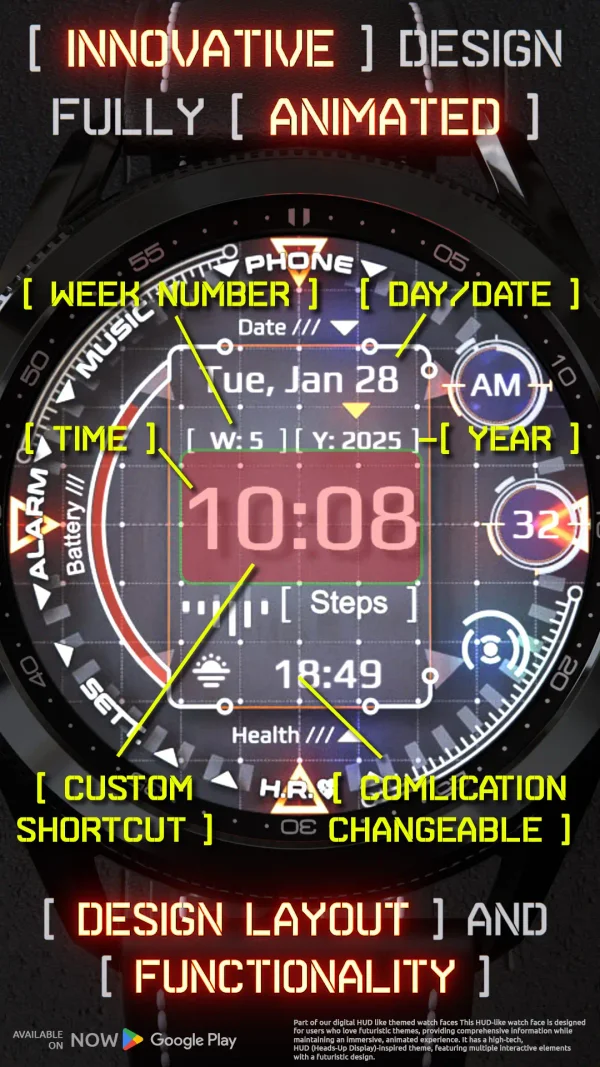
- 曜日、日付。
- バッテリーインジケーター。
- 週番号インダクタ。
- 午前/午後インジケーター。
- 精度を高める秒インジケーター。
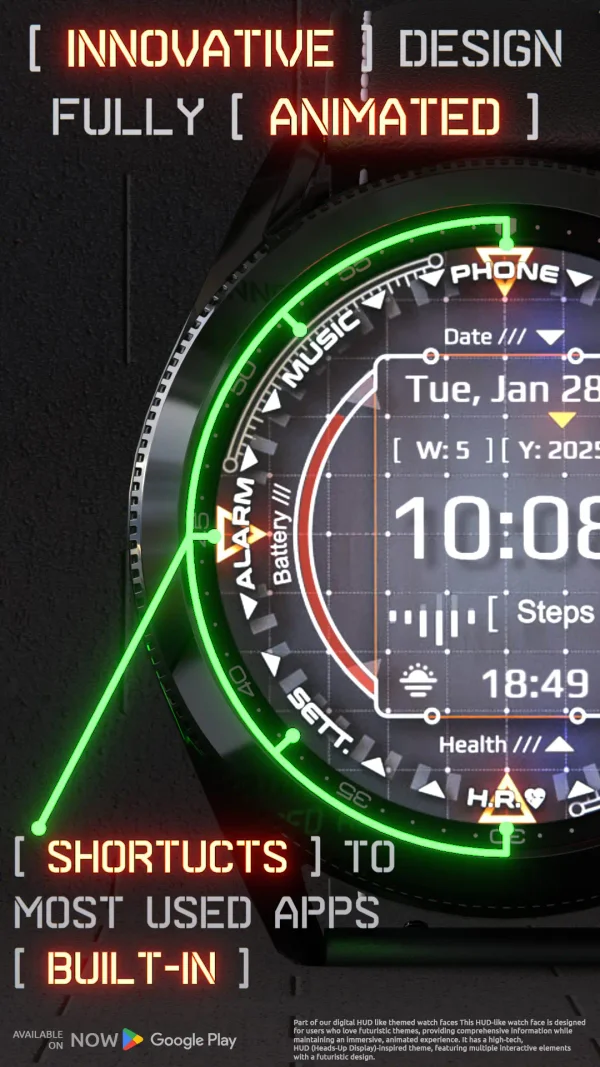
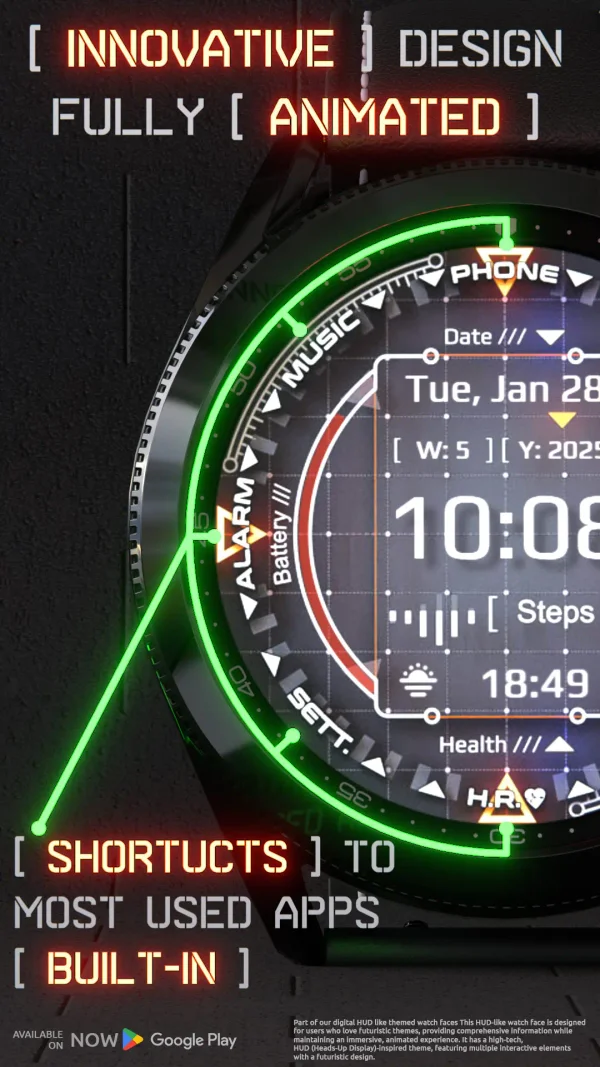
- すぐにアクセスできる 5 つの事前定義されたショートカット!
- カスタマイズ可能な 2 つの変更可能なコンプリケーション*
- あなたのスタイルに合わせた5つのカラーテーマ。
ⓘ 方法:
- ウォッチフェイスをカスタマイズするには、画面を長押しして「カスタマイズ」をタップします。
* この文字盤では 2 つの合併症が利用可能です:
1. 1 つ目は長方形のディスプレイの下部にあり、デフォルトで日没/日の出に設定されています。
2. 秒はデジタル時間に重ねて表示され、テキストやアイコンは表示されません。ショートカットとして機能するように設計されています。デフォルトでは、ショートカット追加機能に設定されています。
2 番目の追加機能を変更するには:
デジタルタイムをタップしてアプリを選択します。あるいは、カスタマイズ メニューを使用して任意のアプリを選択すると、そのアプリを開くためのショートカットとして機能します。
最高の REALISTIC ウォッチフェイスをお見逃しなく:
ILLUMINATOR デジタル - https://play.google.com/store/apps/details?id=wb.illuminator.digital
軍事 ZULU 戦術 - https://play.google.com/store/apps/details?id=wb.military.zulu
ラリーX R.T.デルタ - https://play.google.com/store/apps/details?id=we.rallyx.delta
ムーンマスター プロ - https://play.google.com/store/apps/details?id=wb.moon.master
トゥールビヨン アクアマリン - https://play.google.com/store/apps/details?id=wb.tourbillon.aquamarine
ルナ ベネディクタ - https://play.google.com/store/apps/details?id=wb.luna.benedicta
Harmony GT プレミアム - https://play.google.com/store/apps/details?id=wb.harmony.gt
VOYAGER ワールドタイマー - https://play.google.com/store/apps/details?id=wb.voyager.automatic
アナログマスター - https://play.google.com/store/apps/details?id=wb.analog.master
ⓘ 設置
インストール方法:https://watchbase.store/static/ai/
インストール後: https://watchbase.store/static/ai/ai.html
※Luna Benedicta のウォッチフェイスは「インストール方法」と「インストール後」に表示されています。同じインストール プロセスがすべてのウォッチフェイスに有効です。
ウォッチフェイスのインストールで問題が発生した場合は、インストール プロセスやその他の Google Play / Watch プロセスを当社が制御できないことにご注意ください。人々が直面する最も一般的な問題は、文字盤を購入してインストールした後、文字盤が表示されない、または見つからないことです。
インストール後にウォッチフェイスを適用するには、メイン画面 (現在のウォッチフェイス) をタッチしたまま左にスワイプして探します。表示されない場合は、最後にある「 + 」記号をタップし (ウォッチフェイスを追加)、そこでウォッチフェイスを見つけます。
インストールプロセスを簡単にするために、電話用のコンパニオンアプリを使用します。当社の文字盤を購入した場合は、インストール ボタン (電話アプリ上) をタップして、時計を確認する必要があります。文字盤が表示された画面が表示されます。もう一度 [インストール] をタップし、インストールが完了するまで待ちます。すでにウォッチフェイスを購入していて、ウォッチ上で再度購入するように求められる場合でも、二重請求されることはありませんので、ご安心ください。これは一般的な同期の問題です。少し待つか、時計を再起動してみてください。
ウォッチフェイスをインストールするもう 1 つの解決策は、アカウント (ウォッチで使用している Google Play アカウント) でログインしたブラウザからインストールしてみることです。
ⓘ 注: インストール中に問題が発生した場合は、総合ガイドを参照するか、サポート チームにお問い合わせください。私たちは、ウォッチフェイスの体験がシームレスで楽しいものであることを保証するためにここにいます。
WatchBase に参加します。
Facebook グループ (ウォッチフェイス全般グループ):
https://www.facebook.com/groups/1170256566402887/
フェイスブックページ:
https://www.facebook.com/WatchBase
インスタグラム:
https://www.instagram.com/watch.base/
YouTube チャンネルに登録してください:
https://www.youtube.com/c/WATCHBASE?sub_confirmation=1
https://www.youtube.com/c/WATCHBASE
原文を表示
Stand out with this uniquely animated, futuristic HUD-themed watch face for Wear OS
NOTE: Please read the how to section and installation section and check out the images !!!
ⓘ Features:
- Fully ANIMATED for a dynamic experience.
- Futuristic HUD-style theme.
- Day, Date.
- Battery Indicator.
- Week number indactor.
- AM/PM Indicator.
- Seconds Indicator for precision.
- 5 Predefined Shortcuts for quick access!
- 2 Changeable Complications for customization.*
- 5 Color Themes to suit your style.
ⓘ How to:
- To customize your watch face, touch and hold the screen, then tap "Customize."
* There are 2 complications available on this watch face:
1. The first is located at the bottom of the rectangular display and is set to Sunset/Sunrise by default.
2. The second is overlaid on the digital time and does not display text or an icon. It’s designed to act as a shortcut. By default, it is set to the Shortcut complication.
To change the second complication:
Tap on the digital time and select an app. Alternatively, use the customization menu to choose any app, which will then function as a shortcut to open it.
Don't miss out our top REALISTIC watch faces:
ILLUMINATOR Digital - https://play.google.com/store/apps/details?id=wb.illuminator.digital
Milirary ZULU Tactical - https://play.google.com/store/apps/details?id=wb.military.zulu
Rally-X R.T. Delta - https://play.google.com/store/apps/details?id=we.rallyx.delta
Moon Master PRO - https://play.google.com/store/apps/details?id=wb.moon.master
Tourbillon Aquamarine - https://play.google.com/store/apps/details?id=wb.tourbillon.aquamarine
LUNA BENEDICTA - https://play.google.com/store/apps/details?id=wb.luna.benedicta
Harmony GT Premium - https://play.google.com/store/apps/details?id=wb.harmony.gt
VOYAGER WorldTimer - https://play.google.com/store/apps/details?id=wb.voyager.automatic
Analog Master - https://play.google.com/store/apps/details?id=wb.analog.master
ⓘ Installation
How to install: https://watchbase.store/static/ai/
After installation: https://watchbase.store/static/ai/ai.html
* Luna Benedicta watch face shown in "How to install" and "After installation". The same installation process is valid for all of our watch faces.
If you have any issues installing the watch face, please note that we have no control over the installation process or any other Google Play / Watch processes. The most common issue that people face is after they buy the watch face and install it, they can't see/find it.
In order to apply the watch face after you install it, touch and hold on the main screen (your current watch face) the swipe left to look for it. If you can't see it, tap on the " + " sign at the end (add a watch face) and find our watch face there.
We use a companion app for the phone to make the installation process easier. If you buy our watch face, tap on the install button (on the phone app) you must check your watch.. a screen will appear with the watch face.. tap install again and wait for the installation to finish. If you already bought the watch face and it still asks you to buy it again on the watch, don't worry you will not be charged twice. This is a common synchronization issue, just wait a little or try to restart your watch.
Another solution for installing the watch face is to try to install it from a browser, logged with your account (google play account that you use on the watch).
ⓘ Note: If you encounter any issues during installation, please refer to our comprehensive guide or contact our support team for assistance. We're here to ensure your experience with our watch faces is seamless and enjoyable.
JOIN WatchBase.
Facebook group (General watch faces group):
https://www.facebook.com/groups/1170256566402887/
Facebook page:
https://www.facebook.com/WatchBase
Instagram:
https://www.instagram.com/watch.base/
SUBSCRIBE to our YouTube channel:
https://www.youtube.com/c/WATCHBASE?sub_confirmation=1
https://www.youtube.com/c/WATCHBASE
データ セーフティ
このアプリが収集・共有するデータについて、WatchBaseがGoogle Playで申告している内容です。
- 第三者と共有されるデータはありません詳しくは、デベロッパーが共有を申告する方法についての説明をご覧ください
- データは収集されません詳しくは、デベロッパーが収集を申告する方法についての説明をご覧ください
開発元の連絡先
- メールsupport@belvek.com
- プライバシーポリシーwatchbase.store
- 住所6 Prof. Georgi Bradistilov str./blvd. 1700 Sofia Bulgaria
情報
- 提供元
- WatchBase
- カテゴリ
- カスタマイズ
- 更新日
- 2026/10/28
- リリース
- 2025/1/16
- 対象年齢
- 3 歳以上
- 価格
- ¥260
- パッケージ名
- wb.hud.digital