HUD Digital Animated
WatchBase- PEGI 3Yaş sınırı
- KişiselleştirmeKategori
- 28.10.2026Güncellendi
- ₺61,99Fiyat
wb.hud.digital için resmi Google Play sayfasına bağlanır. Son kontrol: 14.11.2026.
Ekran görüntüleri





Bu uygulama hakkında
Google tarafından otomatik çeviri. Orijinal dil: İngilizce (Amerika Birleşik Devletleri).
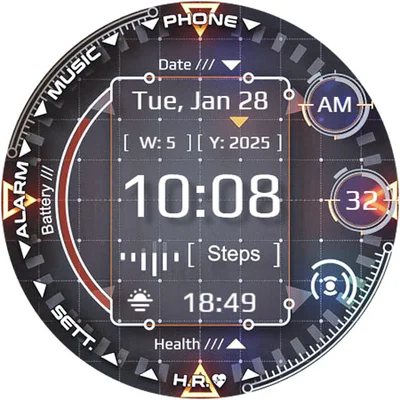
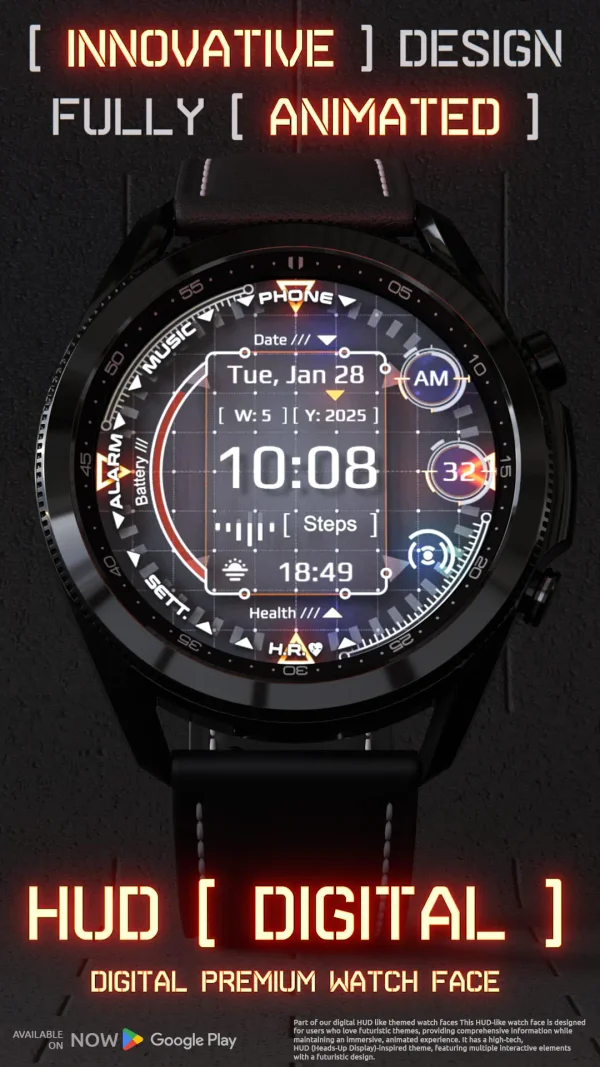
Fütüristik ve animasyonlu bu saat kadranı, etkilemek için benzersiz bir şekilde tasarlandı!
Wear OS için bu benzersiz animasyonlu, fütüristik HUD temalı saat yüzüyle öne çıkın
NOT: Lütfen nasıl yapılır kısmını ve kurulum kısmını okuyup görsellere göz atın!!!
ⓘ Özellikler:
- Dinamik bir deneyim için tamamen ANİMASYONLU.
- Fütüristik HUD tarzı tema.
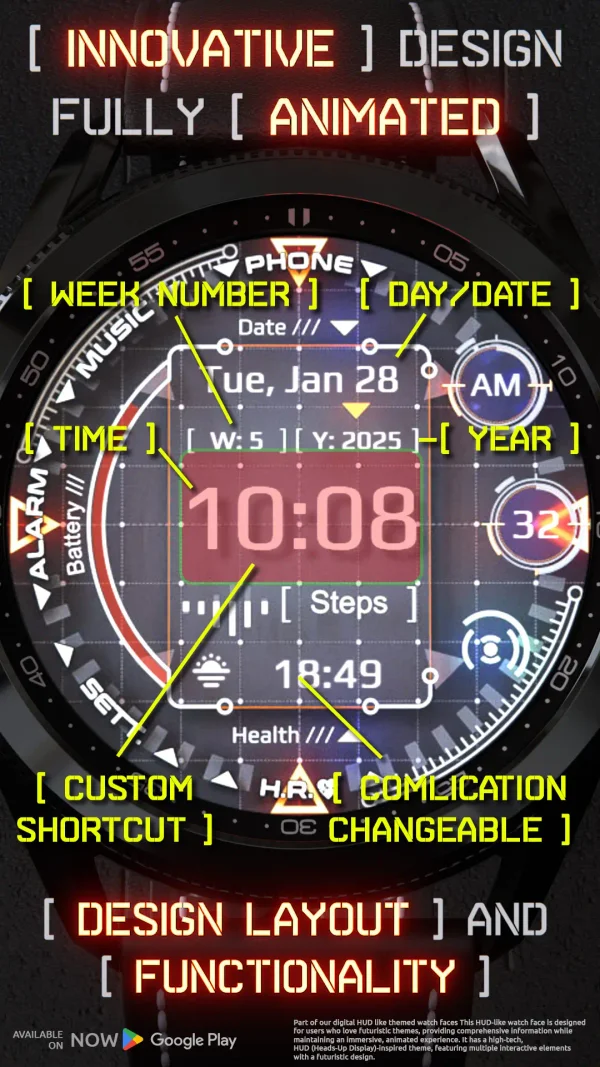
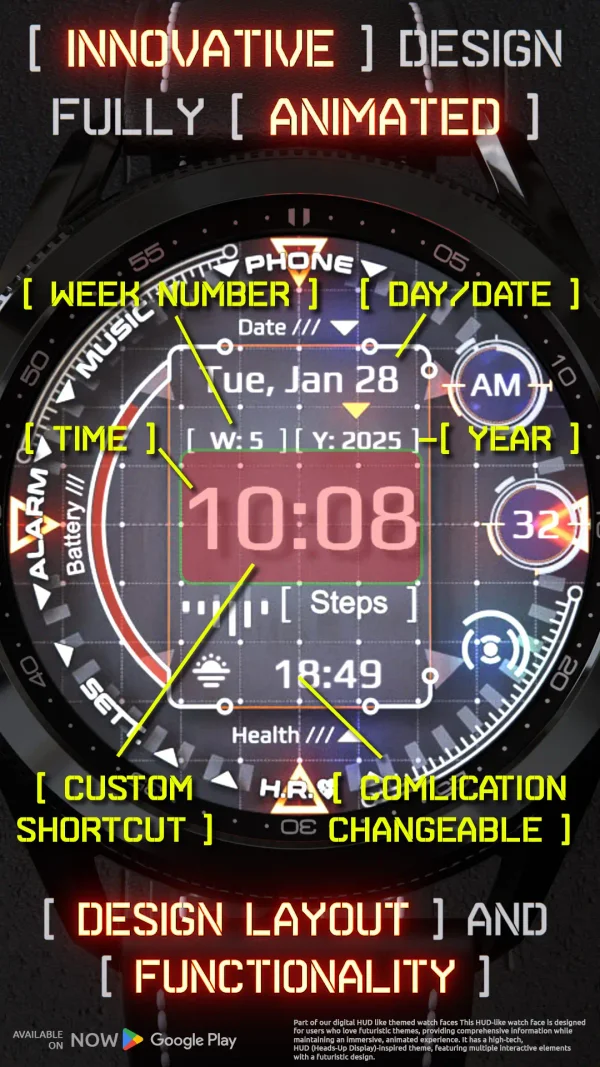
- Gün, Tarih.
- Pil Göstergesi.
- Hafta numarası göstergesi.
- AM/PM Göstergesi.
- Hassasiyet için Saniye Göstergesi.
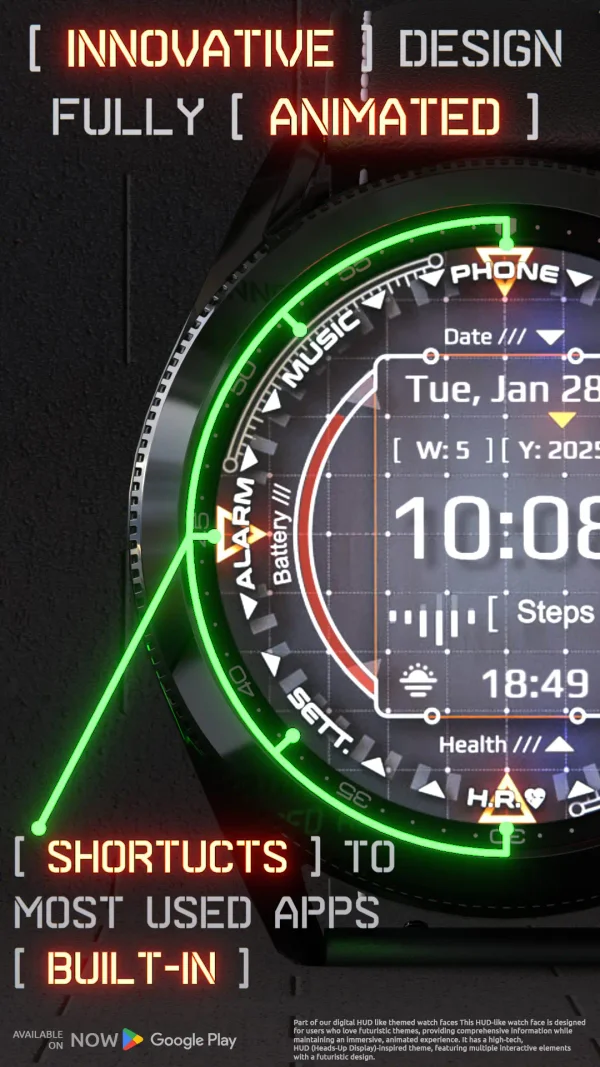
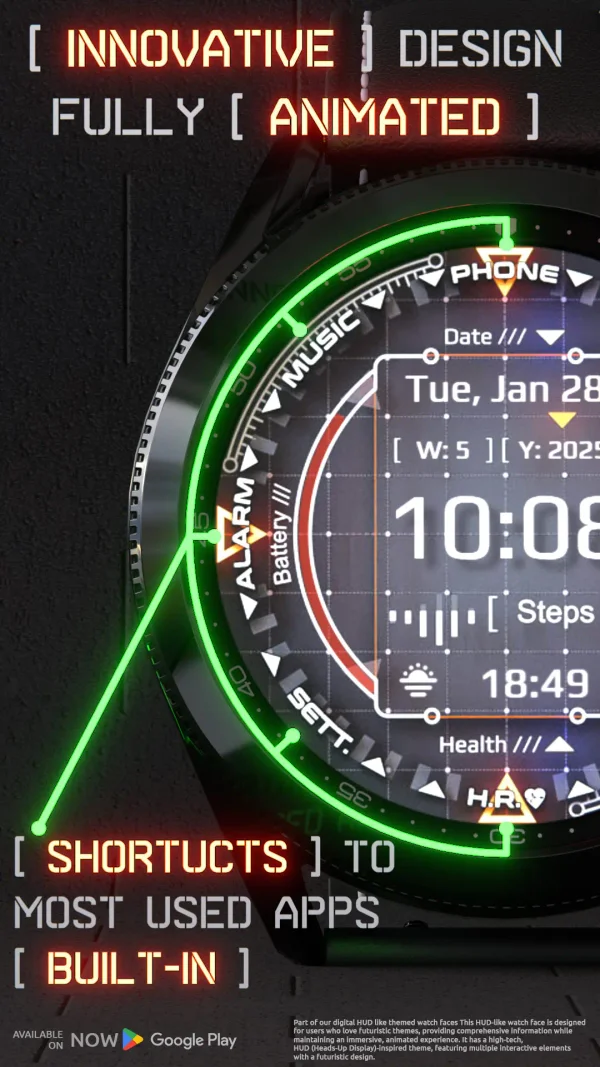
- Hızlı erişim için 5 Önceden Tanımlanmış Kısayol!
- Kişiselleştirme için 2 Değiştirilebilir Komplikasyon.*
- Tarzınıza uygun 5 Renk Teması.
ⓘ Nasıl Yapılır:
- Saat kadranınızı özelleştirmek için ekrana dokunup basılı tutun ve ardından "Özelleştir"e dokunun.
* Bu saat kadranında 2 komplikasyon mevcuttur:
1. İlki dikdörtgen ekranın alt kısmında bulunur ve varsayılan olarak Gün Batımı/Gün Doğumu'na ayarlıdır.
2. İkincisi dijital saatin üzerine yerleştirilmiştir ve metin veya simge görüntülemez. Kısayol görevi görecek şekilde tasarlanmıştır. Varsayılan olarak Kısayol komplikasyonuna ayarlıdır.
İkinci komplikasyonu değiştirmek için:
Dijital saate dokunun ve bir uygulama seçin. Alternatif olarak, herhangi bir uygulamayı seçmek için özelleştirme menüsünü kullanın; bu, daha sonra onu açmak için bir kısayol işlevi görecektir.
En iyi GERÇEKÇİ saat yüzlerimizi kaçırmayın:
ILLUMINATOR Dijital - https://play.google.com/store/apps/details?id=wb.illuminator.digital
Milary ZULU Taktik - https://play.google.com/store/apps/details?id=wb.military.zulu
Ralli-X R.T. Delta - https://play.google.com/store/apps/details?id=we.rallyx.delta
Ay Ustası PRO - https://play.google.com/store/apps/details?id=wb.moon.master
Tourbillon Akuamarin - https://play.google.com/store/apps/details?id=wb.tourbillon.aquamarine
LUNA BENEDICTA - https://play.google.com/store/apps/details?id=wb.luna.benedicta
Harmony GT Premium - https://play.google.com/store/apps/details?id=wb.harmony.gt
VOYAGER WorldTimer - https://play.google.com/store/apps/details?id=wb.voyager.automatic
Analog Ustası - https://play.google.com/store/apps/details?id=wb.analog.master
ⓘ Kurulum
Nasıl kurulur: https://watchbase.store/static/ai/
Kurulumdan sonra: https://watchbase.store/static/ai/ai.html
* Luna Benedicta saat yüzü "Nasıl kurulur" ve "Kurulumdan sonra" bölümünde gösterilmiştir. Aynı kurulum işlemi tüm saat yüzlerimiz için geçerlidir.
Saat yüzünü yüklerken herhangi bir sorunla karşılaşırsanız lütfen yükleme süreci veya diğer Google Play/Watch süreçleri üzerinde hiçbir kontrolümüz olmadığını unutmayın. İnsanların karşılaştığı en yaygın sorun, saat kadranını satın alıp kurduktan sonra onu görememeleri/bulamamalarıdır.
Saat görünümünü yükledikten sonra uygulamak için, ana ekranda (geçerli saat yüzünüz) dokunup basılı tutun ve onu aramak için sola kaydırın. Göremiyorsanız, sondaki " + " işaretine dokunun (bir saat görünümü ekleyin) ve saat yüzümüzü orada bulun.
Kurulum sürecini kolaylaştırmak için telefona eşlik eden bir uygulama kullanıyoruz. Saat yüzümüzü satın alırsanız, yükleme düğmesine (telefon uygulamasında) dokunun, saatinizi kontrol etmelisiniz. Saat yüzünün bulunduğu bir ekran görünecektir. Tekrar yükle'ye dokunun ve kurulumun bitmesini bekleyin. Saat kadranını zaten satın aldıysanız ve saatte tekrar satın almanız isteniyorsa endişelenmeyin, sizden iki kez ücret alınmayacaktır. Bu yaygın bir senkronizasyon sorunudur, biraz bekleyin veya saatinizi yeniden başlatmayı deneyin.
Saat yüzünü yüklemenin başka bir çözümü de, hesabınızla (saatte kullandığınız Google Play hesabı) oturum açmış bir tarayıcıdan yüklemeyi denemektir.
ⓘ Not: Kurulum sırasında herhangi bir sorunla karşılaşırsanız lütfen kapsamlı kılavuzumuza bakın veya yardım için destek ekibimizle iletişime geçin. Saat yüzlerimizle deneyiminizin kusursuz ve keyifli olmasını sağlamak için buradayız.
WatchBase'e KATILIN.
Facebook grubu (Genel saat yüzleri grubu):
https://www.facebook.com/groups/1170256566402887/
Facebook sayfası:
https://www.facebook.com/WatchBase
Instagram'da:
https://www.instagram.com/watch.base/
YouTube kanalımıza ABONE OLUN:
https://www.youtube.com/c/WATCHBASE?sub_confirmation=1
https://www.youtube.com/c/WATCHBASE
Orijinal metni göster
Stand out with this uniquely animated, futuristic HUD-themed watch face for Wear OS
NOTE: Please read the how to section and installation section and check out the images !!!
ⓘ Features:
- Fully ANIMATED for a dynamic experience.
- Futuristic HUD-style theme.
- Day, Date.
- Battery Indicator.
- Week number indactor.
- AM/PM Indicator.
- Seconds Indicator for precision.
- 5 Predefined Shortcuts for quick access!
- 2 Changeable Complications for customization.*
- 5 Color Themes to suit your style.
ⓘ How to:
- To customize your watch face, touch and hold the screen, then tap "Customize."
* There are 2 complications available on this watch face:
1. The first is located at the bottom of the rectangular display and is set to Sunset/Sunrise by default.
2. The second is overlaid on the digital time and does not display text or an icon. It’s designed to act as a shortcut. By default, it is set to the Shortcut complication.
To change the second complication:
Tap on the digital time and select an app. Alternatively, use the customization menu to choose any app, which will then function as a shortcut to open it.
Don't miss out our top REALISTIC watch faces:
ILLUMINATOR Digital - https://play.google.com/store/apps/details?id=wb.illuminator.digital
Milirary ZULU Tactical - https://play.google.com/store/apps/details?id=wb.military.zulu
Rally-X R.T. Delta - https://play.google.com/store/apps/details?id=we.rallyx.delta
Moon Master PRO - https://play.google.com/store/apps/details?id=wb.moon.master
Tourbillon Aquamarine - https://play.google.com/store/apps/details?id=wb.tourbillon.aquamarine
LUNA BENEDICTA - https://play.google.com/store/apps/details?id=wb.luna.benedicta
Harmony GT Premium - https://play.google.com/store/apps/details?id=wb.harmony.gt
VOYAGER WorldTimer - https://play.google.com/store/apps/details?id=wb.voyager.automatic
Analog Master - https://play.google.com/store/apps/details?id=wb.analog.master
ⓘ Installation
How to install: https://watchbase.store/static/ai/
After installation: https://watchbase.store/static/ai/ai.html
* Luna Benedicta watch face shown in "How to install" and "After installation". The same installation process is valid for all of our watch faces.
If you have any issues installing the watch face, please note that we have no control over the installation process or any other Google Play / Watch processes. The most common issue that people face is after they buy the watch face and install it, they can't see/find it.
In order to apply the watch face after you install it, touch and hold on the main screen (your current watch face) the swipe left to look for it. If you can't see it, tap on the " + " sign at the end (add a watch face) and find our watch face there.
We use a companion app for the phone to make the installation process easier. If you buy our watch face, tap on the install button (on the phone app) you must check your watch.. a screen will appear with the watch face.. tap install again and wait for the installation to finish. If you already bought the watch face and it still asks you to buy it again on the watch, don't worry you will not be charged twice. This is a common synchronization issue, just wait a little or try to restart your watch.
Another solution for installing the watch face is to try to install it from a browser, logged with your account (google play account that you use on the watch).
ⓘ Note: If you encounter any issues during installation, please refer to our comprehensive guide or contact our support team for assistance. We're here to ensure your experience with our watch faces is seamless and enjoyable.
JOIN WatchBase.
Facebook group (General watch faces group):
https://www.facebook.com/groups/1170256566402887/
Facebook page:
https://www.facebook.com/WatchBase
Instagram:
https://www.instagram.com/watch.base/
SUBSCRIBE to our YouTube channel:
https://www.youtube.com/c/WATCHBASE?sub_confirmation=1
https://www.youtube.com/c/WATCHBASE
Veri güvenliği
Bu uygulamanın topladığı ve paylaştığı veriler hakkında WatchBase tarafından Google Play üzerinde yapılan beyan.
- Üçüncü taraflarla veri paylaşımı yokGeliştiricilerin, veri paylaşımını nasıl beyan ettikleri hakkında daha fazla bilgi edinin
- Veri toplanamadıGeliştiricilerin, veri toplamayı nasıl beyan ettikleri hakkında daha fazla bilgi edinin
Geliştirici iletişim bilgileri
- E-postasupport@belvek.com
- Gizlilik politikasıwatchbase.store
- Adres6 Prof. Georgi Bradistilov str./blvd. 1700 Sofia Bulgaria
Bilgiler
- Sunan
- WatchBase
- Kategori
- Kişiselleştirme
- Güncellendi
- 28.10.2026
- Yayın tarihi
- 16.01.2025
- Yaş sınırı
- PEGI 3
- Fiyat
- ₺61,99
- Paket adı
- wb.hud.digital