
Table Memo
Memo of spread sheet form
Projetado para iPhone, iPod touch
Grátis · Compras no app
- Classificação etária4+
- CategoriaNegócios
- DesenvolvedorRYOICHI KAWAHARA
- IdiomasInglêse mais 1
- Tamanho5,2 MB
Leva à página oficial na App Store
O Download.org não hospeda nenhum arquivo de Table Memo. O botão abre a página do app na App Store, onde RYOICHI KAWAHARA o publica. Página verificada pela última vez em 23/11/2026.
Capturas de tela


Sobre
O desenvolvedor não forneceu este texto no seu idioma.
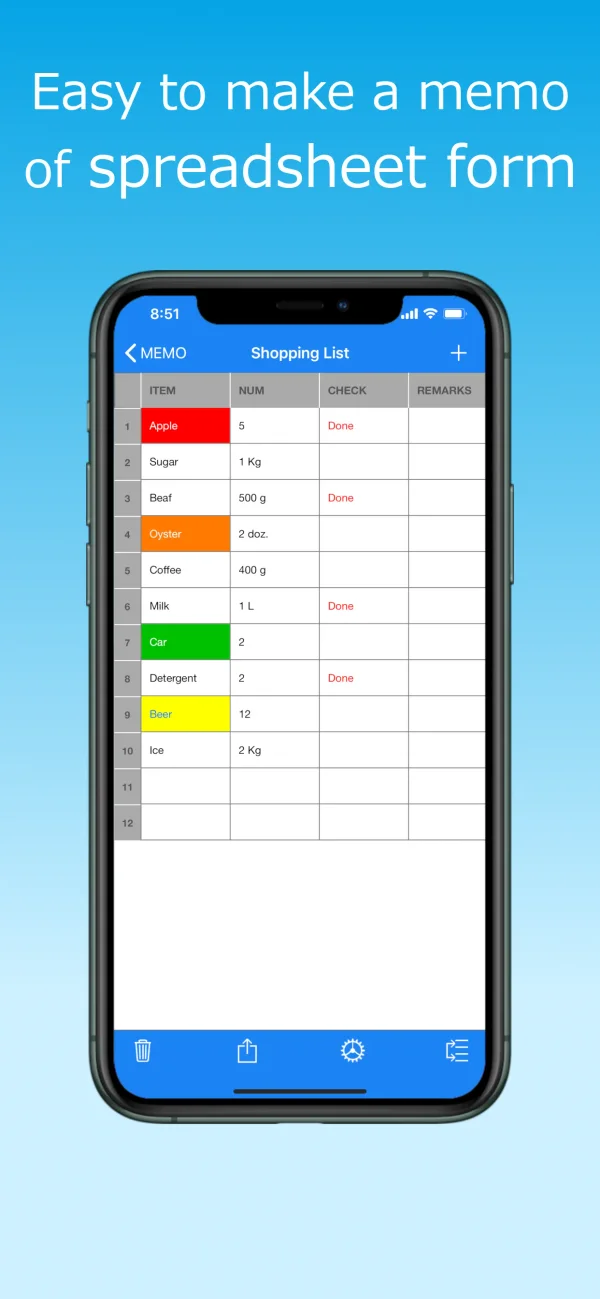
Table Memo is simple memo app of spreadsheet form.
Each memo has a header of several columns, and has rows of memo.
You can add/delete columns, edit each item name, add/delete/copy/move rows of memo.
Created/edited memo can be sent by mail as CSV (with values encapsulated in double quotes) formatted data (UTF-8 encoding).
You can also use Table Memo app as simple CSV (with values encapsulated in double quotes) viewer(use iOS mail app).
How to use:
1. Create Memo
At memo list view (first view of this app), tap add('+') button, and input the memo title.
By tapping Edit button, you can edit memo name, delete memo, and reorder list.
2. Edit Memo data
Select the created memo, and open memo table view.
Tap each cell you want edit, and edit the data.
If color mode is on, text and cell color also can be changed.
To add new row, tap add('+') button.
To copy or delete row, tap the row number of left side and select operation.
By double tapping a cell, the entire contents of the cell is displayed, so you can check and copy the contents.
At the bottom of memo table view, there are four buttons, 1) trash button, 2) action button, 3) table settings button, 4) reorder button, from left to right.
1) trash button
You can delete current opened memo.
2) action button
Current opened memo can be duplicated, or can be sent by mail as CSV formatted data.
3) table setting button
Table settings view will open (see below).
4) reorder button
By tapping this button (the reorder button changes to the edit button), memo table becomes the reorder mode, and you can reorder rows by dragging each row.
To back to edit mode, tap the edit button.
3. Table Settings
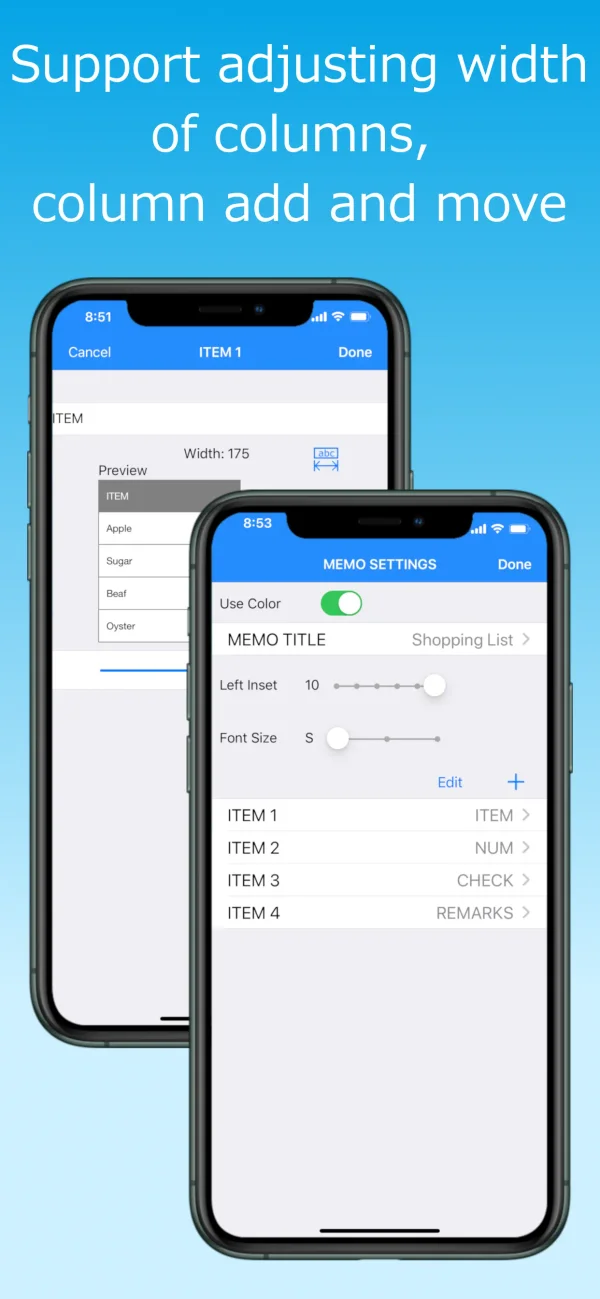
1) Use Color switch
If set ON, text and cell color becomes changeable.
[[CAUTION]] If set OFF after using color, all color data will clear.
2) MEMO TITLE section
Select memo title and edit the title.
3) Left Inset setting
You can adjust the space on the left side of the cell.
4) Font Size setting
You can change the font size of the table.
5) Columns section
To add new column, tap add('+') button.
To delete column or reorder columns, tap Edit button.
By selecting each ITEM of columns, column edit view will open (see below).
4. Column edit
1) ITEM name section
You can edit item name.
2) Column width section
You can change column width by slider.
By tapping the adjust button, the column width will be set to the width of existing data.
*You can also open this view by long press of header item at memo table view.
5. Settings
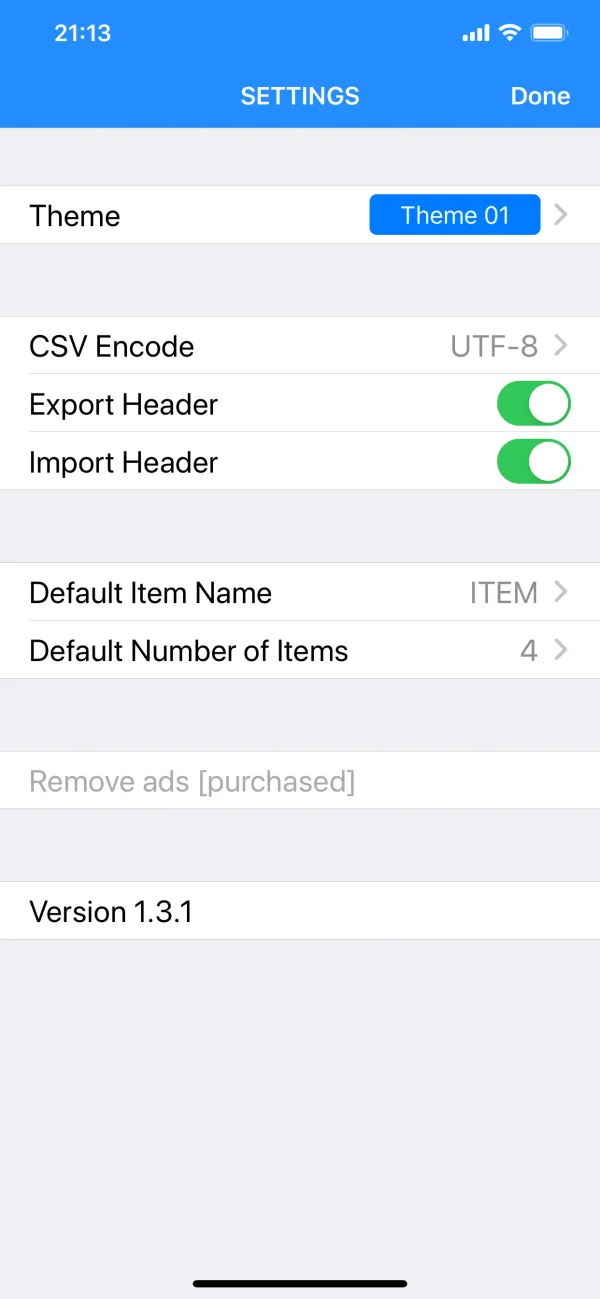
Tapping settings button at memo list view, SETTINGS view will open.
You can change settings below:
1) THEME of this app
2) settings of CSV export/import
- encoding of CSV data
- export header
- import 1st row as header
3) default column name and default number of columns.
Novidades
Versão 1.3.6 · 04/06/2025
Fix a bug that memo not being opened when there were too many columns
Privacidade do app
O que RYOICHI KAWAHARA declara na App Store sobre como este app lida com os dados.
-
Dados usados para rastrear você
Podem ser usados para rastrear você em apps e sites de outras empresas.
- Identificadores
- Dados de uso
-
Dados não vinculados a você
Podem ser coletados, mas não são vinculados à sua identidade.
- Identificadores
- Dados de uso
As práticas de privacidade podem variar, por exemplo, com base nos recursos que você usa ou na sua idade.
Informações
- Vendedor
- RYOICHI KAWAHARA
- Categoria
- Negócios
- Versão
- 1.3.6
- Atualizado
- 04/06/2025
- Lançamento
- 15/01/2014
- Tamanho
- 5,2 MB
- Requer
- iOS 14.0 ou posterior
- Classificação etária
- 4+
- Preço
- Grátis
- Compras no app
- Sim
- Idiomas
- Inglês, Japonês
- Copyright
- © 2014 PUDDING-TABLE
Você também pode gostar
-
 Table Maker, Spreadsheet NotesNegócios
-
 Memorando da TabelaNotebook do estilo da planilha
-
 SunTable-Folha de cálculoCriador de planilhas
-
 Table Notes - Mobile ExcelSheets / Excel alternative
-
 Soma NotasCálculo automático do total
-
 Planilhas - Spreadsheet AppFolha de cálculo Excel
-
 Horário de 24 horas 7 diasGerenciamento de tempo de prog
-
 Planilhas, sheets - SheetletCalculadora finanças a Excel
-
 iSpreadsheet™ : Office SheetsFinanças
-
 Utility SpreadsheetProdutividade