
Captioner: Quick Add Captions
Animated captions, on device
iPhone, iPad, Mac için tasarlandı
Ücretsiz
- Yaş sınırı4+
- KategoriFotoğraf ve Video
- GeliştiriciStephen Robles
- Dillerİngilizce
- Boyut9,4 MB
Resmi App Store sayfasına bağlanır
Download.org, Captioner: Quick Add Captions için hiçbir dosya barındırmaz. Düğme, uygulamanın App Store üzerindeki sayfasını açar; uygulamayı orada Stephen Robles yayınlar. Sayfanın son kontrolü: 26.11.2026.
Ekran görüntüleri

Hakkında
Geliştirici bu metni dilinizde sunmamış.
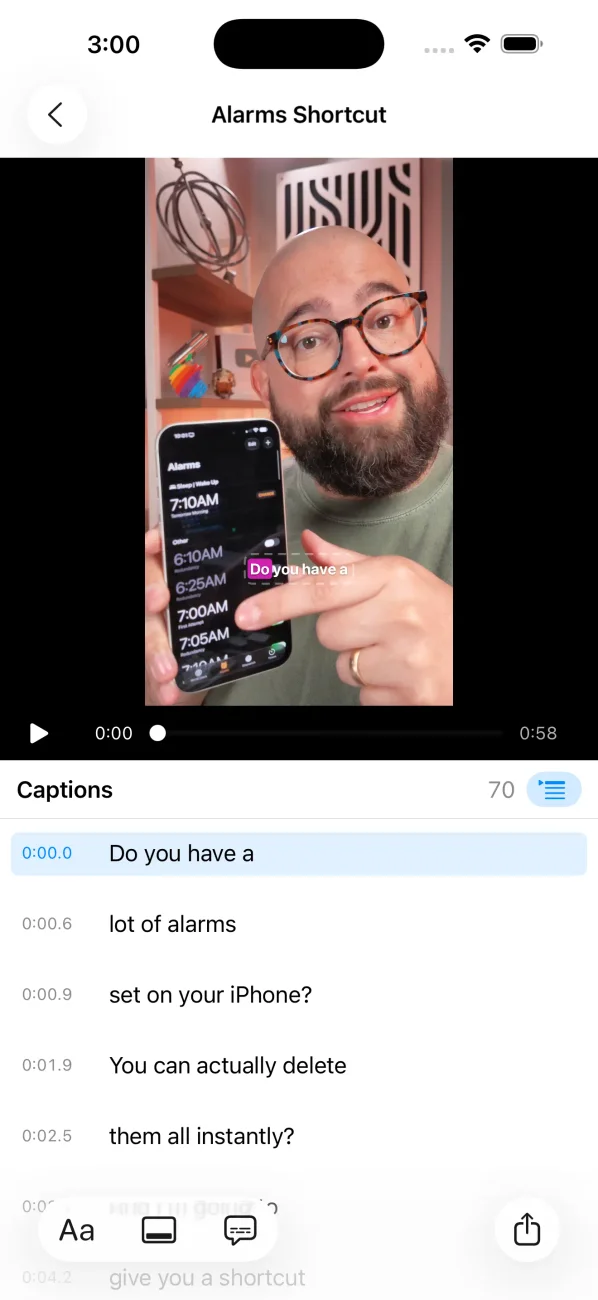
Captioner adds animated, word-by-word captions to your videos, entirely on your device. Drop in a clip, pick a style, fix any word, and export a new video with the captions burned in. Nothing is uploaded, there is no account, and it's free.
WORD BY WORD
Captioner listens to your video with Apple's on-device speech engine and keeps the moment every word is spoken, so the word being said lights up as it's said. Perfect for Reels, Shorts, TikTok and any video watched with the sound off.
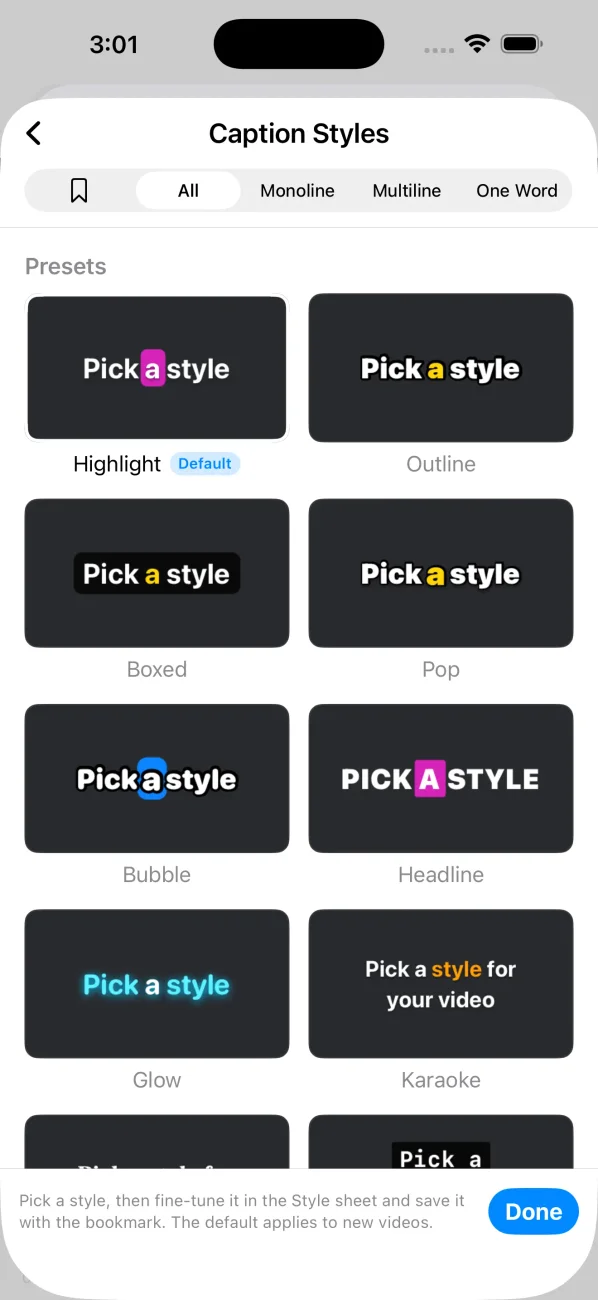
FIFTEEN STYLES, ALL YOURS TO CHANGE
Highlight boxes, outlines, karaoke colors, pops, typewriter reveals, boxed subtitles, and single-word styles that show only the spoken word. Every style's font, weight, size, case, colors, outline, shadow and animation can be changed. Use San Francisco in sans serif, rounded, serif or monospaced designs, any font on your device, or a font file you add. Save your own styles and make one the default for every new video.
PUT THEM WHERE YOU WANT
Drag the caption in the preview, or set a vertical position and left, center or right alignment. Vertical 9:16 and widescreen 16:9 videos each remember their own spot.
FIX THE WORDS
Every caption is editable next to the preview. Split a line before any word, merge two, delete one, or rebuild from the original recognition. Punctuation, title case and curse words are simple toggles.
TRANSLATE
Turn the captions into Spanish, French, German, Portuguese, Japanese, Chinese and dozens more with Apple's on-device translation, keeping them timed to the original speech.
YOUR VIDEO, UNTOUCHED
Exports keep the original resolution and frame rate, and the audio is copied exactly as it was. H.264 by default, HEVC if you prefer. Already have an SRT or WebVTT file? Use it instead of transcribing.
PRIVATE BY DESIGN
Speech recognition, translation and rendering all happen on your device. Captioner has no account, no analytics and no tracking.
The first time you caption a language, the system downloads Apple's speech model for it; after that it works offline. Captioner for Mac adds batch queues and watched folders that caption and export videos automatically.
Yenilikler
Sürüm 1.4 · 24.11.2026
Export Captions Only. Finish your edit somewhere else: Captioner can now export just the animated captions over a transparent background, ready to drop on top of your video in Final Cut Pro, Premiere Pro, DaVinci Resolve or any editor that reads transparency.
• Same size, frame rate and length as your video, so it lines up on the timeline. No audio, no watermark.
• ProRes 4444 by default, or HEVC with transparency for much smaller files (Settings › Export).
• On the Mac: File › Export Captions Only (⌥⌘E), the arrow beside Export, or right-click a video. On iPhone and iPad: beside Export in the editor; the file is saved to Captioner's folder in Files.
Uygulama gizliliği
Bu uygulamanın verileri nasıl işlediği hakkında Stephen Robles tarafından App Store üzerinde yapılan beyan.
-
Veri toplanmıyor
Geliştirici bu uygulamadan hiçbir veri toplamıyor.
Gizlilik uygulamaları, örneğin kullandığınız özelliklere veya yaşınıza göre değişiklik gösterebilir.
Bilgiler
- Satıcı
- Stephen Robles
- Kategori
- Fotoğraf ve Video
- Sürüm
- 1.4
- Güncellendi
- 24.11.2026
- Yayın tarihi
- 13.10.2026
- Boyut
- 9,4 MB
- Gereksinim
- iOS 26.0 veya sonrası
- Yaş sınırı
- 4+
- Fiyat
- Ücretsiz
- Diller
- İngilizce
- Telif hakkı
- © 2026 Stephen Robles
Bunları da beğenebilirsiniz
-
 Clipora - Video SaverFotoğraf ve Video
-
 Lumora: Fotoğraf ve VideoHayatın da izlemeye değer
-
 Shutterbug: Photo StacksFotoğraf ve Video
-
 Photos by Date: MonthBoxFotoğraf ve Video
-
 PlayTube – PiP Floating VideoFotoğraf ve Video
-
 Popfold: Pop-up Photo CardsFotoğraf ve Video
-
 VideoRedactor - Blur and HideFotoğraf ve Video
-
 Movie EditorFotoğraf ve Video
-
 PicPost EZCapture, Note & Share Photos
-
 Shredly: Fotoğraf ÖğütücüFotoğrafları eğlenerek düzenle