Handpad
Wireless trackpad for your Mac
iPhone, iPad için tasarlandı
Ücretsiz
- Yaş sınırı4+
- KategoriYardımcılar
- GeliştiriciDLC39DEGREE
- Dillerİngilizce+ 1 dil daha
- Boyut2,9 MB
Resmi App Store sayfasına bağlanır
Download.org, Handpad için hiçbir dosya barındırmaz. Düğme, uygulamanın App Store üzerindeki sayfasını açar; uygulamayı orada DLC39DEGREE yayınlar. Sayfanın son kontrolü: 12.11.2026.
Ekran görüntüleri


Hakkında
Geliştirici bu metni dilinizde sunmamış.
Handpad turns your iPhone into a precision wireless trackpad and keyboard for your Mac. Whether you're presenting, watching a movie, gaming, or just working from the couch — your iPhone is your remote.
— TRACKPAD —
Slide, tap, and two-finger scroll just like a real MacBook trackpad. Sub-pixel precision, instant response, multi-touch gestures.
— SHORTCUTS THAT FIT THE MOMENT —
Customizable button grids for any scenario:
• Movies — play, pause, mute, fullscreen
• Presentations — next slide, previous, blackout
• Games — quick keys mapped to anything
Switch between layouts instantly with a swipe.
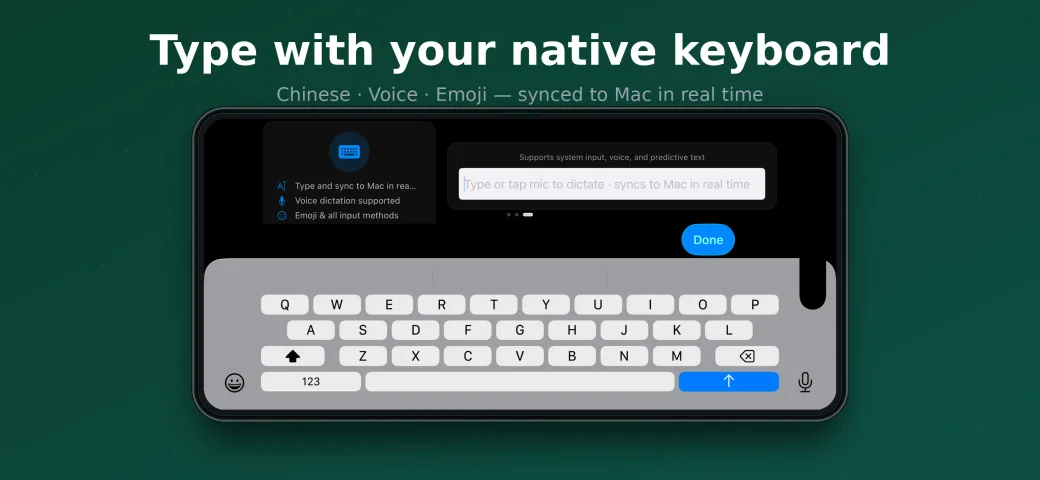
— TYPE WITH YOUR NATIVE KEYBOARD —
Use your iPhone's full iOS keyboard to type into your Mac. Chinese, Japanese, Korean, emoji, voice dictation — everything syncs to your Mac in real time. No more squinting at a remote keyboard across the room.
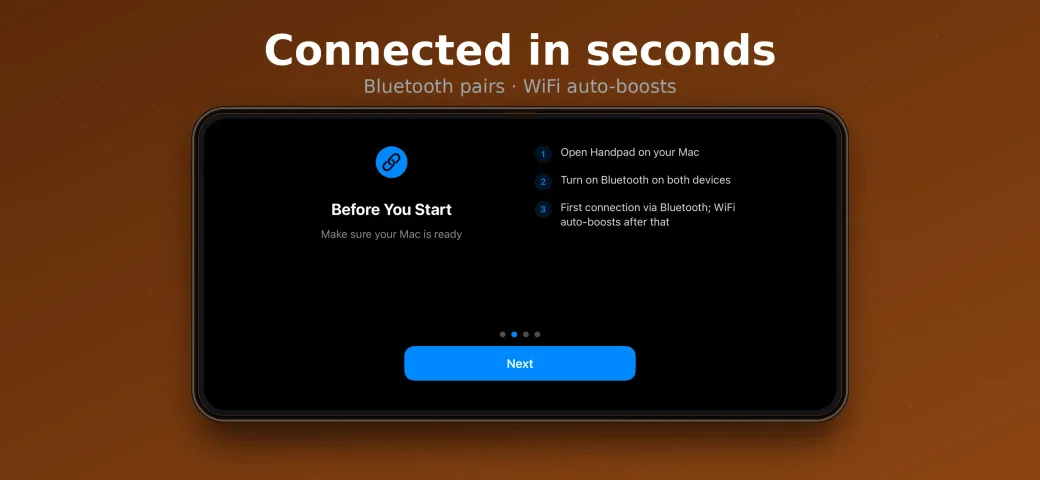
— CONNECTED IN SECONDS —
• Bluetooth pairs the first time
• WiFi auto-boosts after that for lower latency
• Works on the same local network
• No router or hotspot configuration needed
— PRIVATE BY DESIGN —
Everything stays between your iPhone and your Mac. AES-256 encrypted link. Zero internet dependency. No accounts. No telemetry. No data collection. Your inputs never leave your local network.
— REQUIREMENTS —
• Free Handpad companion app for macOS
• macOS 13 Ventura or later
• Bluetooth and WiFi enabled
• Both devices on the same local network for best performance
— FAQ —
Q: Does it work without internet?
A: Yes. The app works entirely on your local network.
Q: Does it support multiple Macs?
A: One iPhone can pair with multiple Macs, with one active connection at a time.
Q: Will my keyboard work the same?
A: Yes — Handpad uses your iPhone's native keyboard, so all your custom inputs, dictionaries, and IMEs work normally.
Made with care. No tracking. No ads. Ever.
Yenilikler
Sürüm 1.1 · 10.06.2026
• Choose which Mac to control — tap the connection badge to switch between Macs by name
• Custom shortcut combos — build any ⌘/⇧/⌥/⌃ + key combination
• Smoother trackpad over Bluetooth
• Connection badge now shows WiFi vs Bluetooth
Uygulama gizliliği
Bu uygulamanın verileri nasıl işlediği hakkında DLC39DEGREE tarafından App Store üzerinde yapılan beyan.
-
Veri toplanmıyor
Geliştirici bu uygulamadan hiçbir veri toplamıyor.
Gizlilik uygulamaları, örneğin kullandığınız özelliklere veya yaşınıza göre değişiklik gösterebilir.
Bilgiler
- Satıcı
- DLC 39 DEGREE LTD
- Kategori
- Yardımcılar
- Sürüm
- 1.1
- Güncellendi
- 10.06.2026
- Yayın tarihi
- 08.06.2026
- Boyut
- 2,9 MB
- Gereksinim
- iOS 16.0 veya sonrası
- Yaş sınırı
- 4+
- Fiyat
- Ücretsiz
- Diller
- İngilizce, Basitleştirilmiş Çince
- Telif hakkı
- © 2026 DLC39DEGREE
Bunları da beğenebilirsiniz
-
 eTrackPad: Kablosuz TrackpadKlavye, kumanda, gestures
-
 LAN Screen ControlYardımcılar
-
 RemotePadYardımcılar
-
 Virtual TouchPadYardımcılar
-
 MiniTrackYardımcılar
-
 RPad: Uzaktan Trackpad & FareSunum Kumandası & Lazer
-
 KeyBindControlMakro ve shortcut kontrol
-
 Accent Letters: Type AccentsYardımcılar
-
 点点水印相机Yardımcılar
-
 MouseMeYardımcılar