
Ghost Camera - Match Shots
Same angle, every shot
Được thiết kế cho iPhone, iPod touch
Miễn phí
- Độ tuổi4+
- Danh mụcẢnh & Video
- Nhà phát triểnFanlun Liu
- Ngôn ngữTiếng Anh
- Kích thước18,7 MB
Liên kết đến trang App Store chính thức
Download.org không lưu trữ tệp nào của Ghost Camera - Match Shots. Nút này mở trang ứng dụng trên App Store, nơi Fanlun Liu phát hành ứng dụng. Trang được kiểm tra lần cuối: 23/11/2026.
Ảnh chụp màn hình
Giới thiệu
Nhà phát triển chưa cung cấp nội dung này bằng ngôn ngữ của bạn.
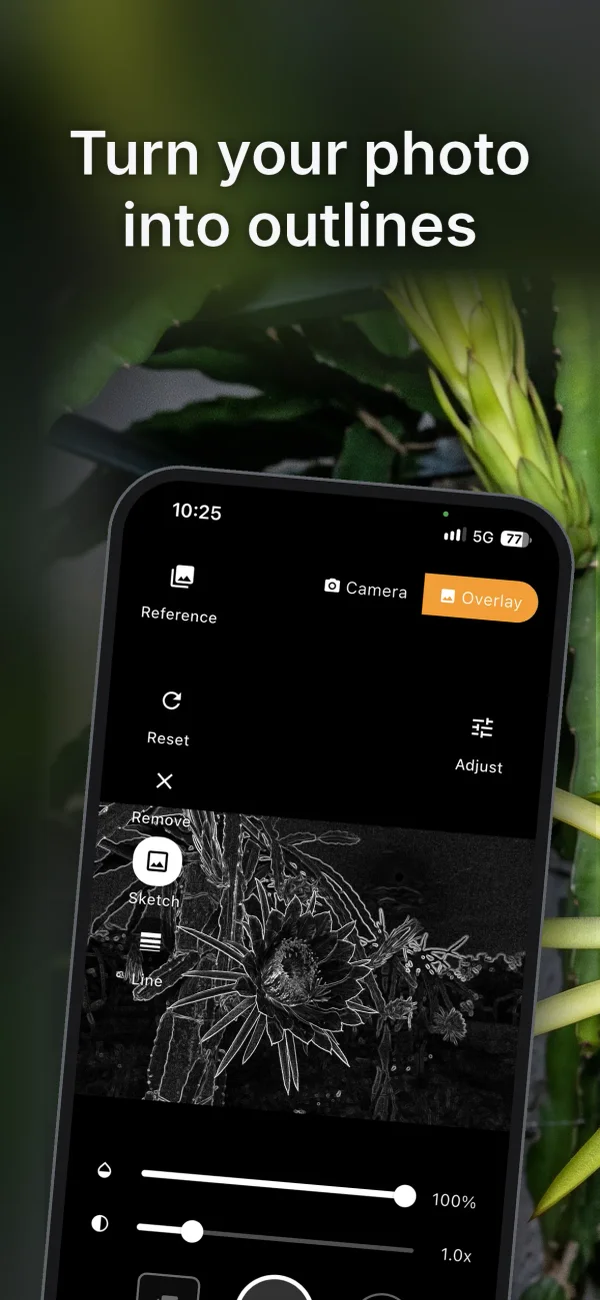
Ghost Camera overlays a reference photo, semi-transparent, on your live camera view, so every shot matches the same angle, distance and framing.
Great for:
• Photographing the same place, plant, artwork or space over time for before-and-after comparisons
• Consistent framing for products, food and portfolios
• Recreating the angle and position of an old photo
Features:
• Semi-transparent reference overlay with adjustable opacity and contrast
• Outline mode: shows only the reference's contour lines so they don't hide the scene, with three line strengths
• Dark / light backdrop layer: dims a busy or bright background so the outlines stand out
• Pinch to scale, rotate and move the reference; drag with one finger to align
• Front and back camera, flash and zoom
• Exposure compensation, AE lock, and tap to focus and meter
• Every shot saves two photos: a clean original and a screenshot with the overlay, so you can check alignment afterwards
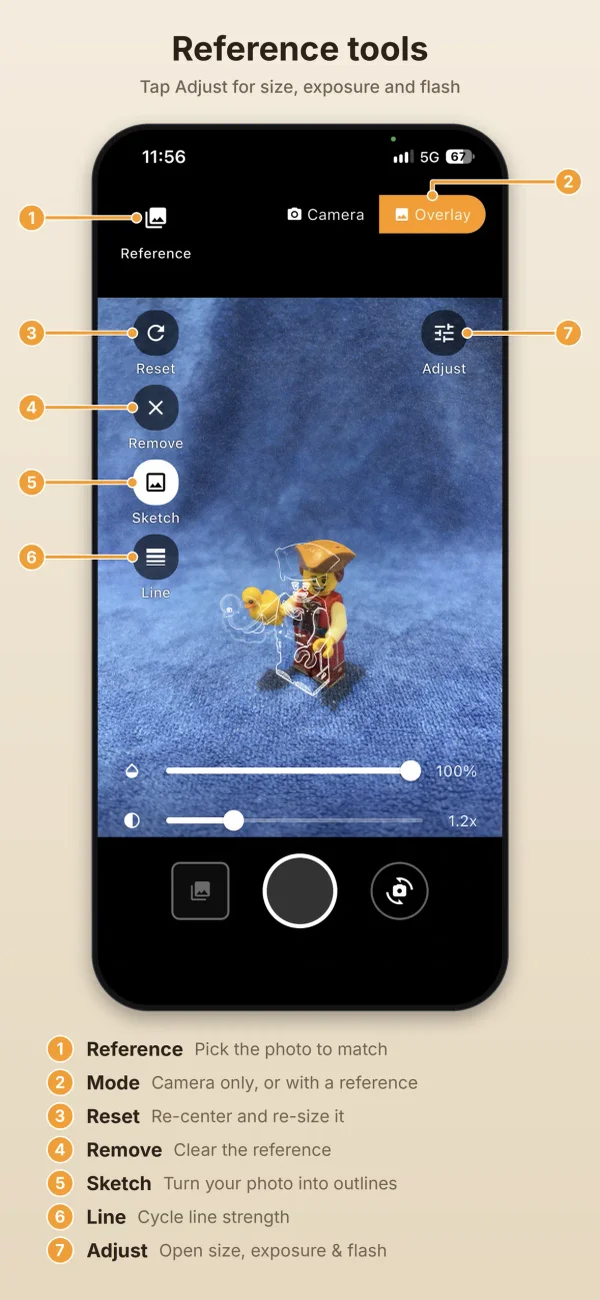
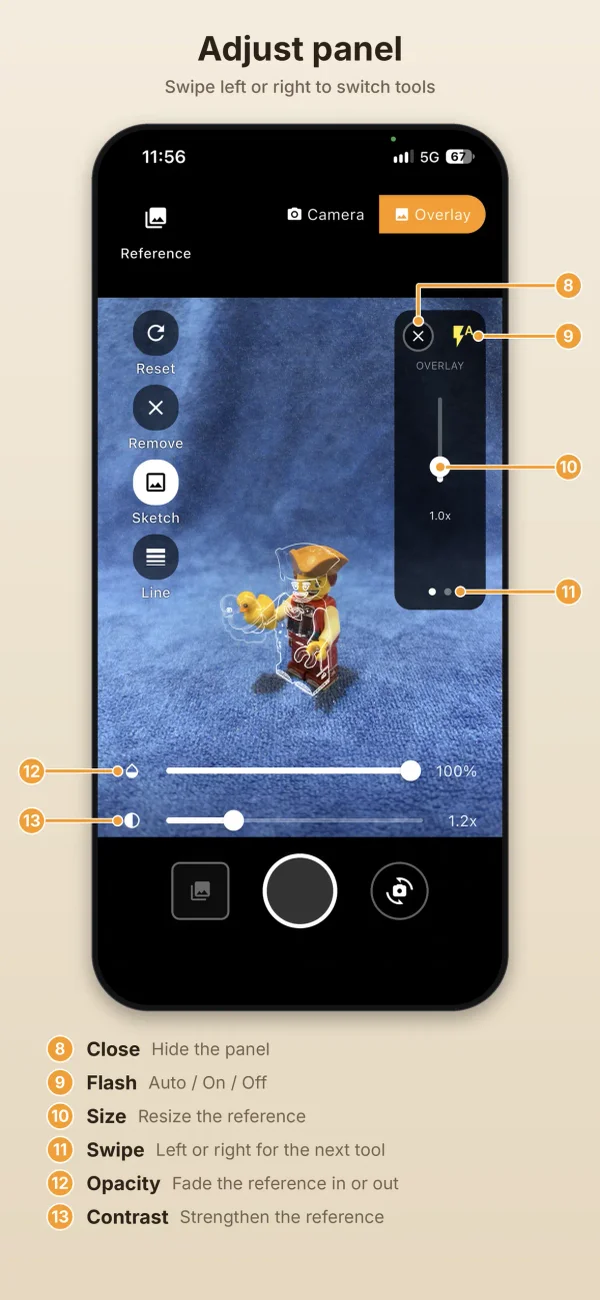
Button guide (numbers match the screenshots):
Screenshot 1 – Reference tools
① Reference: pick the photo to match
② Mode: Camera only, or Overlay with your reference
③ Reset: re-center the reference and restore its size
④ Remove: clear the reference
⑤ Sketch: turn your photo into outlines
⑥ Line: cycle through three line strengths
⑦ Adjust: open the Adjust panel
Screenshot 2 – Adjust panel
⑧ Close: hide the panel
⑨ Flash: auto / on / off
⑩ Size: resize the reference (zoom when there is no reference)
⑪ Swipe: swipe left or right to switch between size and exposure; the dots show the current page
⑫ Opacity: fade the reference in or out
⑬ Contrast: contrast of the reference
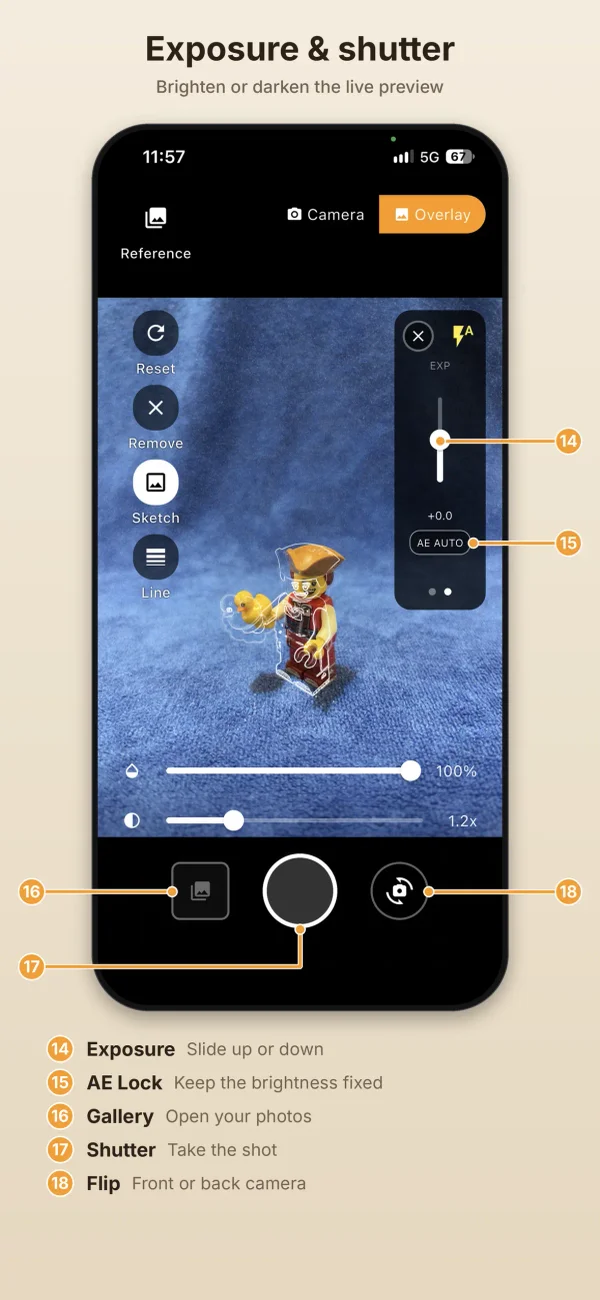
Screenshot 3 – Exposure and shutter
⑭ Exposure: slide up or down to brighten or darken
⑮ AE Lock: keep the brightness fixed (tap again to release)
⑯ Gallery: open your photos
⑰ Shutter: take the shot
⑱ Flip: switch between front and back camera
Privacy: all photos are processed on your device only. Nothing is uploaded and no data is collected.
Có gì mới
Phiên bản 1.4.6 · 20/11/2026
- No overlay screenshot is saved when there is no reference image
- With a reference image, you choose on the first shot whether to also save the overlay screenshot; the choice stays until you reopen the app
Quyền riêng tư của ứng dụng
Những gì Fanlun Liu khai báo trên App Store về cách ứng dụng này xử lý dữ liệu.
-
Dữ liệu không được thu thập
Nhà phát triển không thu thập bất kỳ dữ liệu nào từ ứng dụng này.
Phương thức đảm bảo quyền riêng tư có thể khác nhau, chẳng hạn như tuỳ theo các tính năng bạn sử dụng hoặc độ tuổi của bạn.
Thông tin
- Người bán
- Fanlun Liu
- Danh mục
- Ảnh & Video
- Phiên bản
- 1.4.6
- Cập nhật
- 20/11/2026
- Phát hành
- 06/11/2026
- Kích thước
- 18,7 MB
- Yêu cầu
- iOS 15.0 trở lên
- Độ tuổi
- 4+
- Giá
- Miễn phí
- Ngôn ngữ
- Tiếng Anh
- Bản quyền
- © 2026 Allen Liu
Có thể bạn cũng thích
-
 Afterall Photo: Before & AfterẢnh & Video
-
 FramewiserẢnh & Video
-
 AuraFilm: Retro Film CameraẢnh & Video
-
 Mamera - 필름카메라Ảnh & Video
-
 palet - your pocket cameraẢnh & Video
-
 Overlay Camera - MatchShotẢnh & Video
-
 ReShoot: Crop Video & ReframeẢnh & Video
-
 GhostFrame: Recreate Any PhotoẢnh & Video
-
 Lumera CameraẢnh & Video
-
 OverCam - Camera chồng ảnhChồng ảnh mẫu để canh khung