
Griddal: Carousel & Grid Maker
Swipe Layouts & Photo Splits
Được thiết kế cho iPhone
Miễn phí · Mua hàng trong ứng dụng
- Độ tuổi4+
- Danh mụcẢnh & Video
- Nhà phát triểnFoobar Creative
- Ngôn ngữTiếng Anh+ 37 ngôn ngữ khác
- Kích thước43,9 MB
Liên kết đến trang App Store chính thức
Download.org không lưu trữ tệp nào của Griddal: Carousel & Grid Maker. Nút này mở trang ứng dụng trên App Store, nơi Foobar Creative phát hành ứng dụng. Trang được kiểm tra lần cuối: 12/11/2026.
Ảnh chụp màn hình


Giới thiệu
Nhà phát triển chưa cung cấp nội dung này bằng ngôn ngữ của bạn.
Griddal turns one photo into content that looks right the moment you post it.
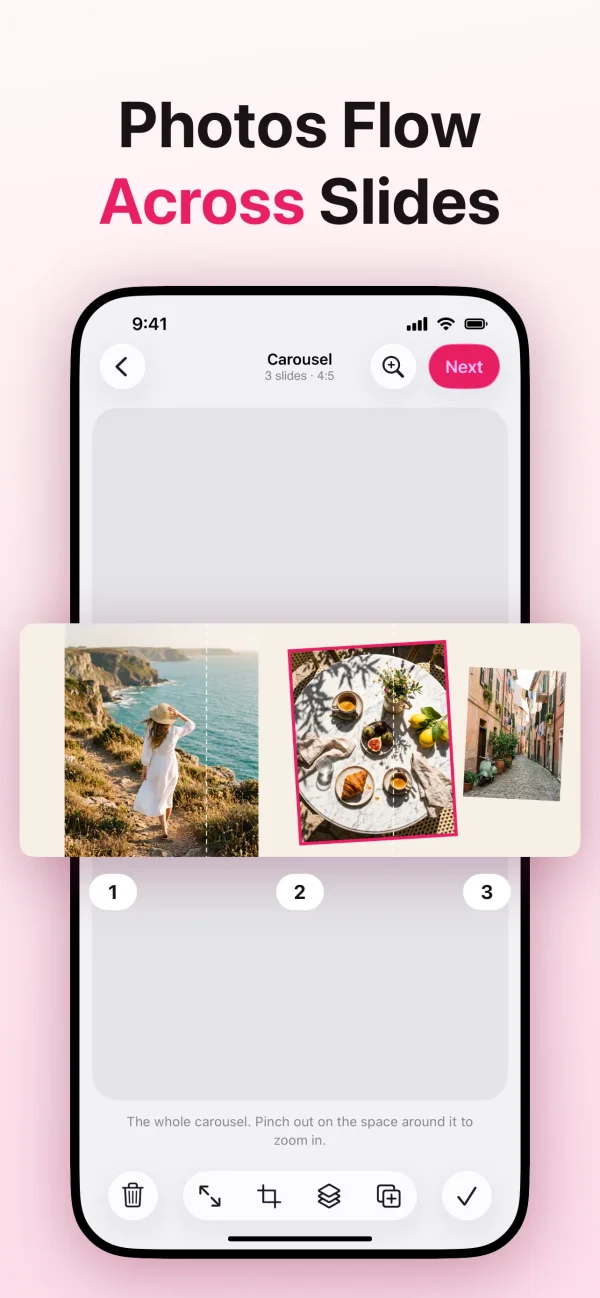
Make seamless carousels. Start with one wide canvas, add your photos, then drag, pinch and rotate them across the slide seams so the swipe flows as one continuous image. Choose 2 to 10 slides in 4:5, 3:4 or 1:1. Edge snapping keeps everything aligned, and a built-in crop tool fine-tunes each frame.
Export that lines up. Every slide saves at 1080 px wide, drawn from your full-resolution photos so the seams match on the feed. Preview the swipe before you export, then Save All to Photos with slide 1 first in your Recents, or share straight away.
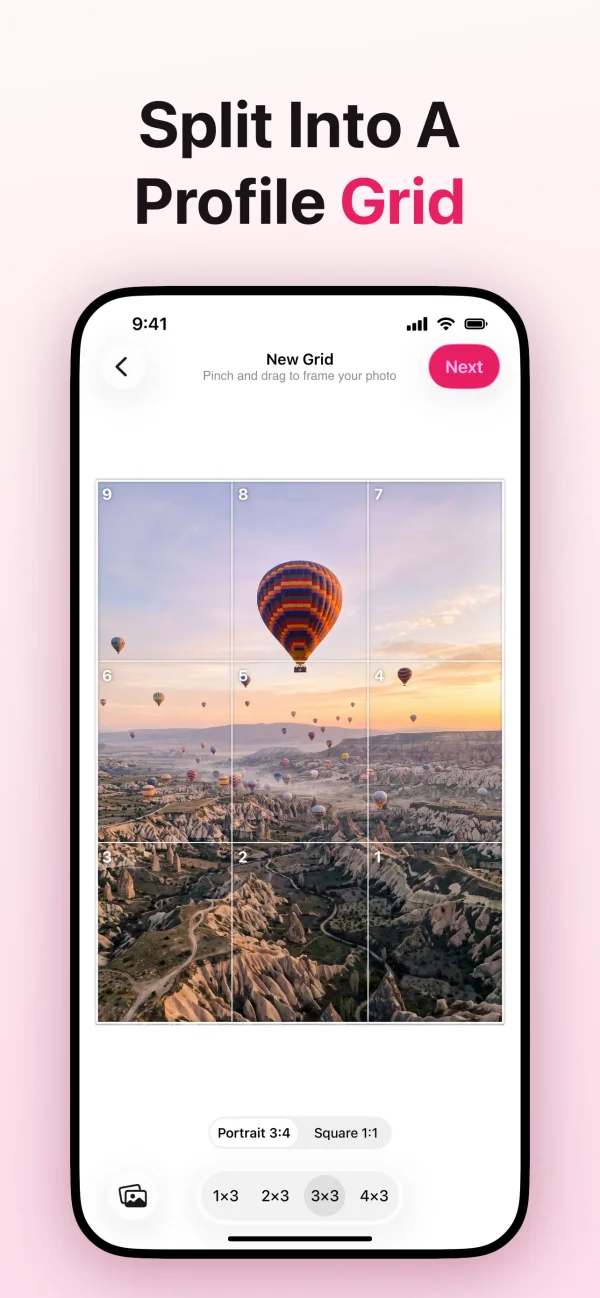
Split a photo into a profile grid. Turn one image into a clean grid, from 3x1 up to 3x5 tiles, in 3:4 (the current profile grid shape) or 1:1. Older square splitters leave you cropped on a modern profile. Griddal does not.
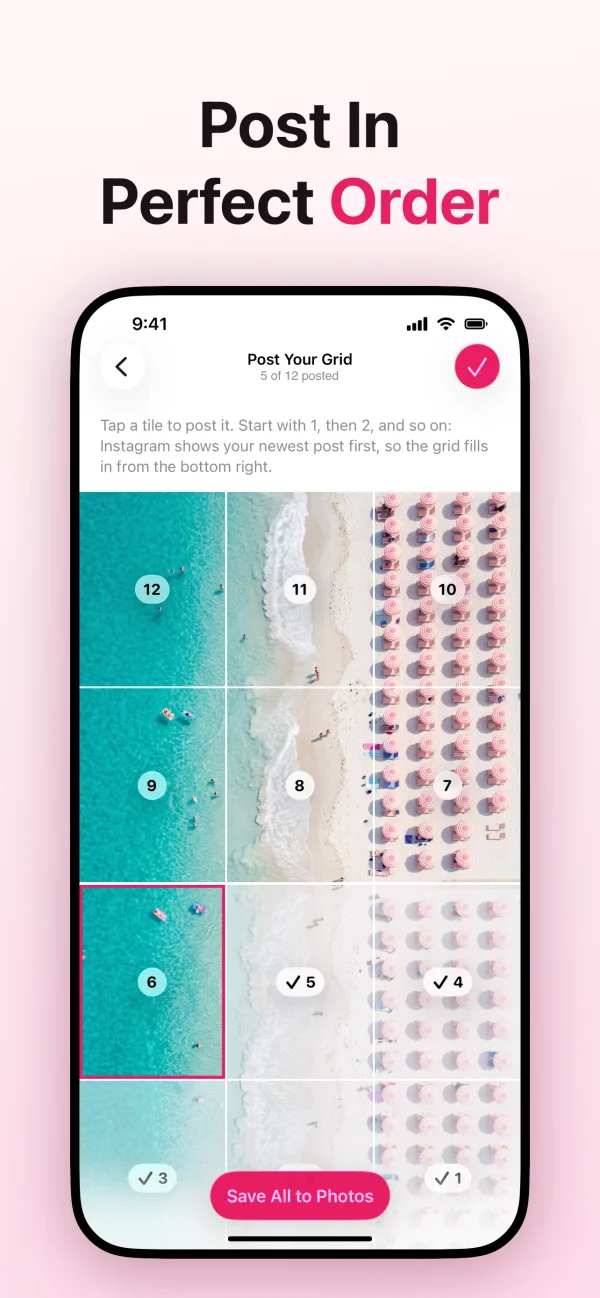
Post in the right order. Tiles are numbered in posting order, starting bottom right. Tap a tile to share it, mark it posted as you go, and resume later without losing your place.
Private by design. Griddal works offline with no account and no sign-up. Your projects stay on your device. No ads, no tracking, no watermark on your exports.
Built to be fast and crisp, not another slow template gallery.
Instagram and IG are trademarks of Instagram
Có gì mới
Phiên bản 2.0 · 19/10/2026
New in 2.0:
- Seamless carousels: spread one wide photo across 2 to 10 slides so the swipe lines up, in 4:5, 3:4 or 1:1.
- Layer, drag, pinch and rotate multiple photos across the slide seams, with edge snapping and a crop tool.
- Profile grid splits in 3:4 (the current profile shape) or 1:1, with tiles numbered in posting order.
Quyền riêng tư của ứng dụng
Những gì Foobar Creative khai báo trên App Store về cách ứng dụng này xử lý dữ liệu.
-
Dữ liệu không liên kết với bạn
Có thể được thu thập nhưng không liên kết với danh tính của bạn.
- Mục mua
- Chẩn đoán
Phương thức đảm bảo quyền riêng tư có thể khác nhau, chẳng hạn như tuỳ theo các tính năng bạn sử dụng hoặc độ tuổi của bạn.
Thông tin
- Người bán
- Foobar Creative
- Danh mục
- Ảnh & Video
- Phiên bản
- 2.0
- Cập nhật
- 19/10/2026
- Phát hành
- 03/08/2017
- Kích thước
- 43,9 MB
- Yêu cầu
- iOS 18.0 trở lên
- Độ tuổi
- 4+
- Giá
- Miễn phí
- Mua hàng trong ứng dụng
- Có
- Ngôn ngữ
- Tiếng Anh, Tiếng Ả Rập, Azerbaijani, Bulgarian, Tiếng Catalan, Tiếng Croatia, Tiếng Séc, Tiếng Đan Mạch, Tiếng Hà Lan, Tiếng Phần Lan, Tiếng Pháp, Tiếng Đức + 26 ngôn ngữ khác
- Bản quyền
- © 2017 Foobar Creative
Có thể bạn cũng thích
-
 Split the Pic: New Grid layoutGrid Photo Maker
-
 Tall Grid Maker: 9 Photo SplitẢnh & Video
-
 Photo Grid: Split Grid PostsẢnh & Video
-
 Grids Maker - Grid Photo SplitẢnh & Video
-
 Grid Maker & No Crop PhotoẢnh & Video
-
 Grid Maker - GridzillaẢnh & Video
-
 PhotoSplit for InstagramẢnh & Video
-
 Feed Preview Grid MakerẢnh & Video
-
 Grid・Photo Split for InstagramẢnh & Video
-
 Grid: Collage & Photo EditorPicture Frame & Feed Planner