Samsung My Files
Samsung Electronics Co., Ltd.- EveryoneAge rating
- ToolsCategory
- Jun 29, 2026Updated
- FreePrice
Links to the official Google Play listing of com.sec.android.app.myfiles. Last checked on Nov 27, 2026.
Screenshots


About this app
File manager to access files or folders in your device
[Introducing My Files]
"My Files" manages all the files on your smartphone, just like a file explorer on your computer.
You can also manage files stored on SD cards, USB drives and files in the cloud storage connected with your smartphone at the same time.
Download and experience "My Files" now.
[New features in My Files]
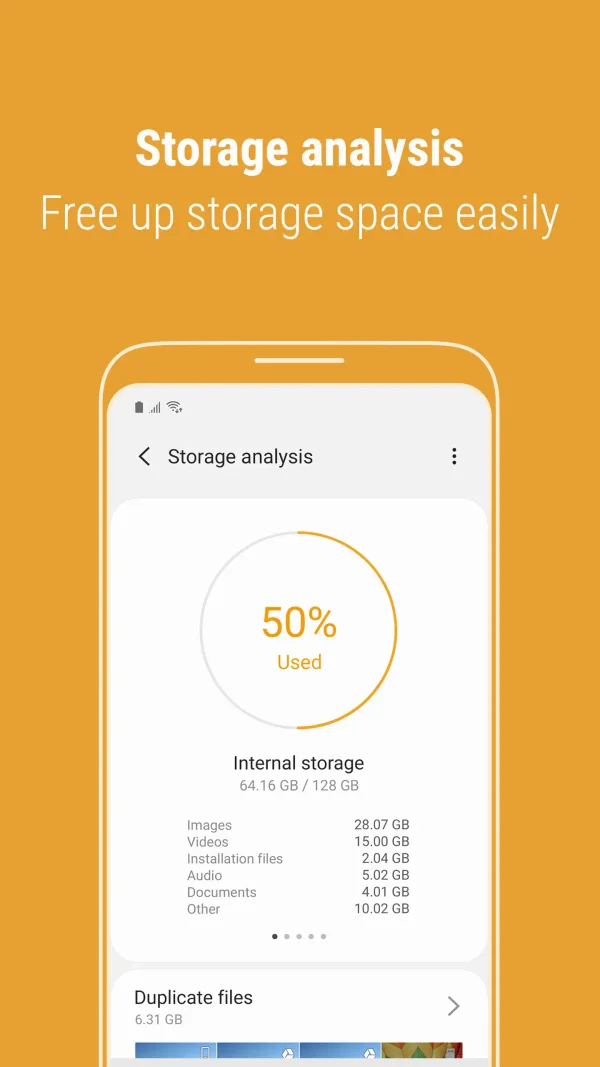
1. Free up storage space easily by tapping the "Storage Analysis" button on the main screen.
2. You can hide any unused storage space from the main screen via the "Edit My Files home".
3. You can view long file names without ellipses using the "Listview" button.
[Key features]
- Browse and manage files stored on your smartphone, SD card, or USB drive conveniently.
.Users can create folders; move, copy, share, compress, and decompress files; and view file details.
- Try our user-friendly features.
.The Recent Files list: Files the user has downloaded, run, and/or opened
.The Categories list: Types of files, including downloaded, document, image, audio, video, and installation files (.APK)
.Folder and file shortcuts: Show on the device home screen and the My Files main screen
.Provides a function used to analyze and free up storage space.
- Enjoy our convenient Cloud services.
.Google Drive
.OneDrive
※ Supported features may be different depending on models.
The following permissions are required for the app service.
[Required permissions]
-Storage: Used to open, delete, edit, search files and folders on internal / external memory (lower than Android 13)
- Notifications : Used to show the progress of ongoing actions such as moving or copying files and folders
Data safety
What Samsung Electronics Co., Ltd. declares on Google Play about the data this app collects and shares.
- No data shared with third partiesLearn more about how developers declare sharing
- No data collectedLearn more about how developers declare collection
What’s new
Jun 29, 2026
- When searching the internal storage, you can immediately add or delete Favorites while checking the folder route.
- When compressing files, you can strengthen the security by entering a password. Compressed files with passwords can also be unzipped.
- “Analyze storage” now shows you how much storage is being used by file type on OneDrive/Google Drive.
Developer contact
- Emailnoreply.sec@samsung.com
- Privacy policysamsung.com
- Address대한민국 16677 경기도 수원시 영통구 삼성로 129 (매탄동)
Information
- Offered by
- Samsung Electronics Co., Ltd.
- Category
- Tools
- Updated
- Jun 29, 2026
- Released
- Apr 9, 2018
- Age rating
- Everyone
- Price
- Free
- Package name
- com.sec.android.app.myfiles
Similar apps
-
 File Manager
Tools
-
 Galaxy Wearable
Tools
-
 File Manager
Productivity
-
 Android System Intelligence
Tools
-
 Samsung Calculator
Tools
-
 Phone by Google
Tools
-
 DAVx⁵ – CalDAV CardDAV WebDAV
Productivity
-
 Calculator Pro: Calculator App
Tools
-
 Samsung Members
Tools
-
 Device Care
Tools
-
 AT&T Personal Cloud
Tools
-
 Digital Wellbeing
Tools