Calphace
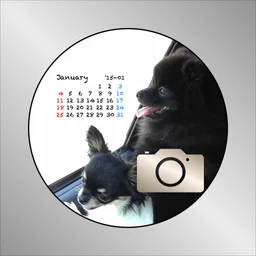
Watch face with calendar photo
Entwickelt für iPhone
Kostenlos · In-App-Käufe
- Altersfreigabe4+
- KategorieDienstprogramme
- EntwicklerAkihiro Usui
- SprachenEnglisch+ 1 weitere
- Größe7,4 MB
Verlinkt auf die offizielle App Store-Seite
Download.org hostet keine Datei von Calphace. Die Schaltfläche öffnet die App-Seite bei App Store, wo Akihiro Usui die App veröffentlicht. Eintrag zuletzt geprüft am 12.11.2026.
Screenshots
Info
Der Entwickler hat diesen Text nicht in Ihrer Sprache bereitgestellt.
Calendar + Photo + Face = Calphace!
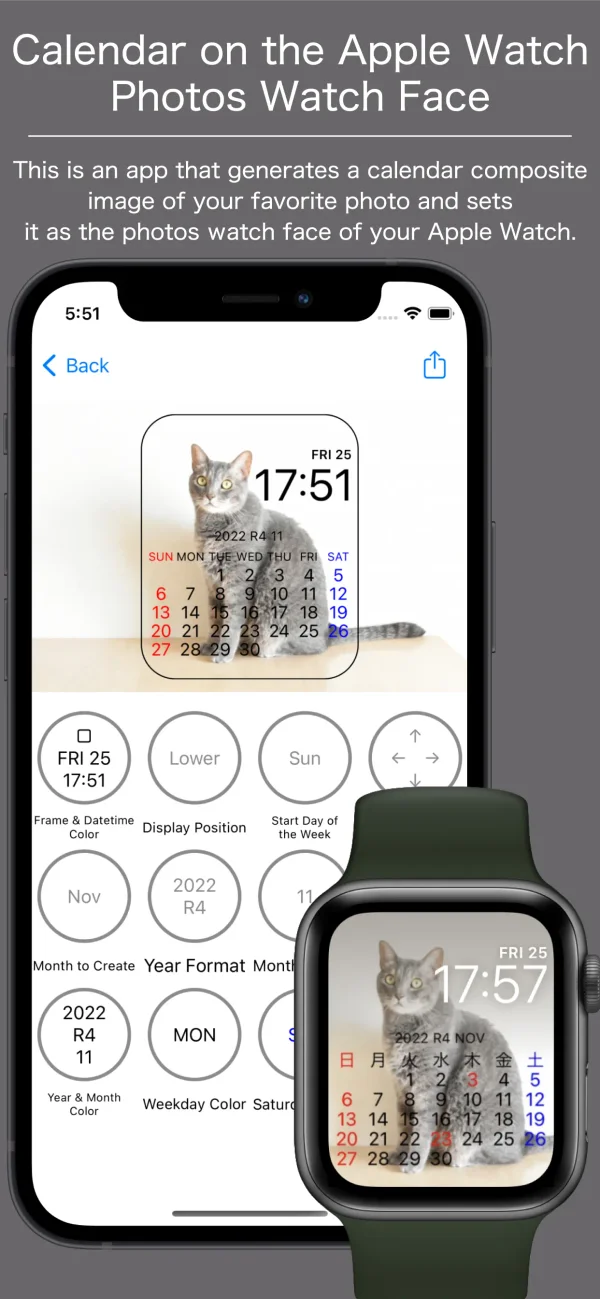
Calphace is an application that generates a composite image of a calendar on a photo of your choice and sets it on the photos watch face of your Apple Watch.
There are times when you just want to easily check your calendar on your Apple Watch!
Some calendar apps allow you to check your calendar, but it takes several taps.
In such cases, if you set the image generated by Calphace as a photos watch face, you can check the calendar just by lifting your wrist.
*Calphace does not display a calendar with complications, but only generates a composite image of a calendar,
so it is not possible to check the schedule, etc. entered with the iPhone calendar application. Please understand.
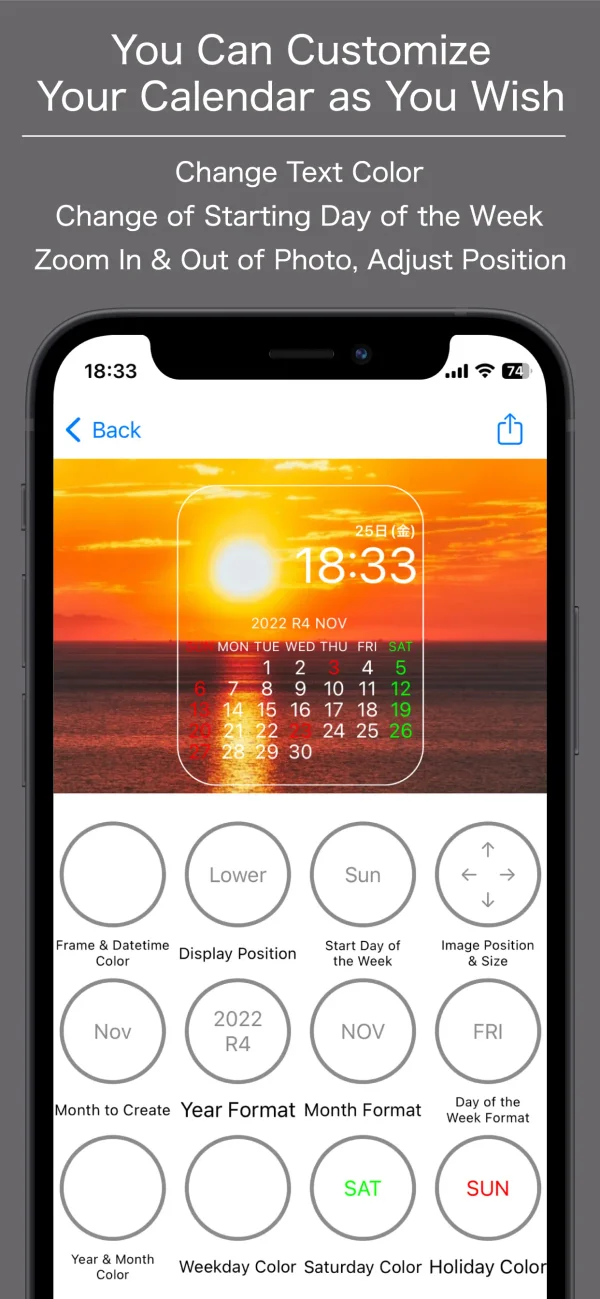
・You can adjust the position and size of the image while checking it in the preview.
・You can select the calendar to be created from the current month and the following month.
・The color of each calendar letter (year, month, weekday, Saturday, and holiday) can be freely selected.
・You can select the starting day of the month or day of the week for the calendar.
・The year display format can be selected, such as 2021, Reiwa 3, etc.
・Month display format can be selected, such as September, SEP, etc.
・Select the display format for the day of the week, such as Mon, MON, etc.
・Japanese national holidays are supported.
・URL scheme support (calphace://)
*Starting with watchOS 11, you can adjust the position of the watch using the following steps. If it overlaps with the calendar, please adjust it accordingly.
・Open the Watch app on your iPhone.
・Select the photo watch face you want to adjust from "My Watch" and "My Faces".
・Tap the "n photos" button next to "Select Photos" under "Content".
・Tap the photo you want to adjust and adjust the layout.
・Tap "Save" in the top-right corner.
Neue Funktionen
Version 1.57.1 · 09.11.2026
Updated SDKs.
App-Datenschutz
Was Akihiro Usui im App Store zum Umgang dieser App mit Daten angibt.
-
Daten, die zum Tracking Ihrer Person verwendet werden
Können verwendet werden, um Sie über Apps und Websites anderer Unternehmen hinweg zu verfolgen.
- Standort
- Kennungen
- Nutzungsdaten
- Diagnose
-
Mit Ihnen verknüpfte Daten
Können erfasst und mit Ihrer Identität verknüpft werden.
- Standort
- Kennungen
- Nutzungsdaten
- Diagnose
-
Nicht mit Ihnen verknüpfte Daten
Können erfasst werden, sind aber nicht mit Ihrer Identität verknüpft.
- Diagnose
Die Datenschutzpraktiken können variieren, zum Beispiel je nach den von Ihnen verwendeten Funktionen oder Ihrem Alter.
Informationen
- Anbieter
- Akihiro Usui
- Kategorie
- Dienstprogramme
- Version
- 1.57.1
- Aktualisiert
- 09.11.2026
- Veröffentlicht
- 25.09.2021
- Größe
- 7,4 MB
- Erfordert
- iOS 17.0 oder neuer
- Altersfreigabe
- 4+
- Preis
- Kostenlos
- In-App-Käufe
- Ja
- Sprachen
- Englisch, Japanisch
- Copyright
- © 2021 Akihiro Usui
Das könnte Ihnen auch gefallen
-
 Wristwatch calendarDienstprogramme
-
 Color Calendar GenDienstprogramme
-
 Wrist CalendarDienstprogramme
-
 SourceCanvasAI-Diagramme auf dem Mac
-
 Image SaliencyDienstprogramme
-
 OmniSeeDienstprogramme
-
 ChronaDienstprogramme
-
 Activity Monitor: CPU, Mem, ..Dienstprogramme
-
 AnyCal PROAnywhere Calendar
-
 NewClockDienstprogramme