
Calphace
Watch face with calendar photo
Designed for iPhone
Free · In-app purchases
- Age rating4+
- CategoryUtilities
- DeveloperAkihiro Usui
- LanguagesEnglish+ 1 more
- Size7.4 MB
Links to the official App Store page
Download.org hosts no file of Calphace. The button opens its official App Store page, published by Akihiro Usui. Listing last checked on Nov 12, 2026.
Screenshots
About
Calendar + Photo + Face = Calphace!
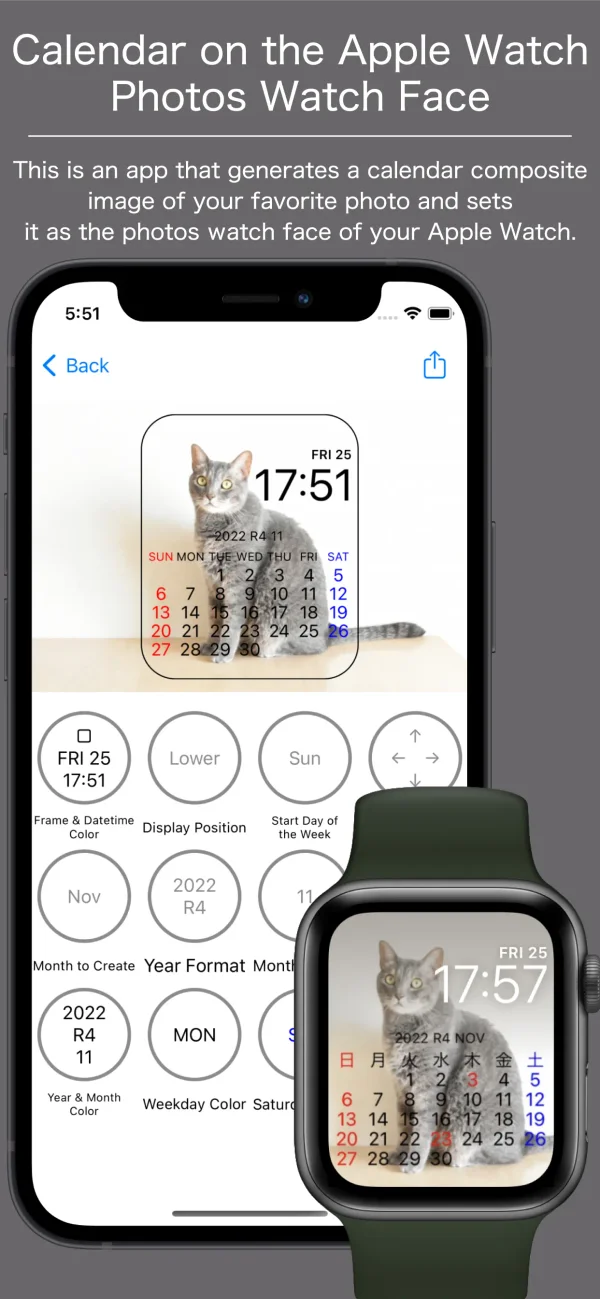
Calphace is an application that generates a composite image of a calendar on a photo of your choice and sets it on the photos watch face of your Apple Watch.
There are times when you just want to easily check your calendar on your Apple Watch!
Some calendar apps allow you to check your calendar, but it takes several taps.
In such cases, if you set the image generated by Calphace as a photos watch face, you can check the calendar just by lifting your wrist.
*Calphace does not display a calendar with complications, but only generates a composite image of a calendar,
so it is not possible to check the schedule, etc. entered with the iPhone calendar application. Please understand.
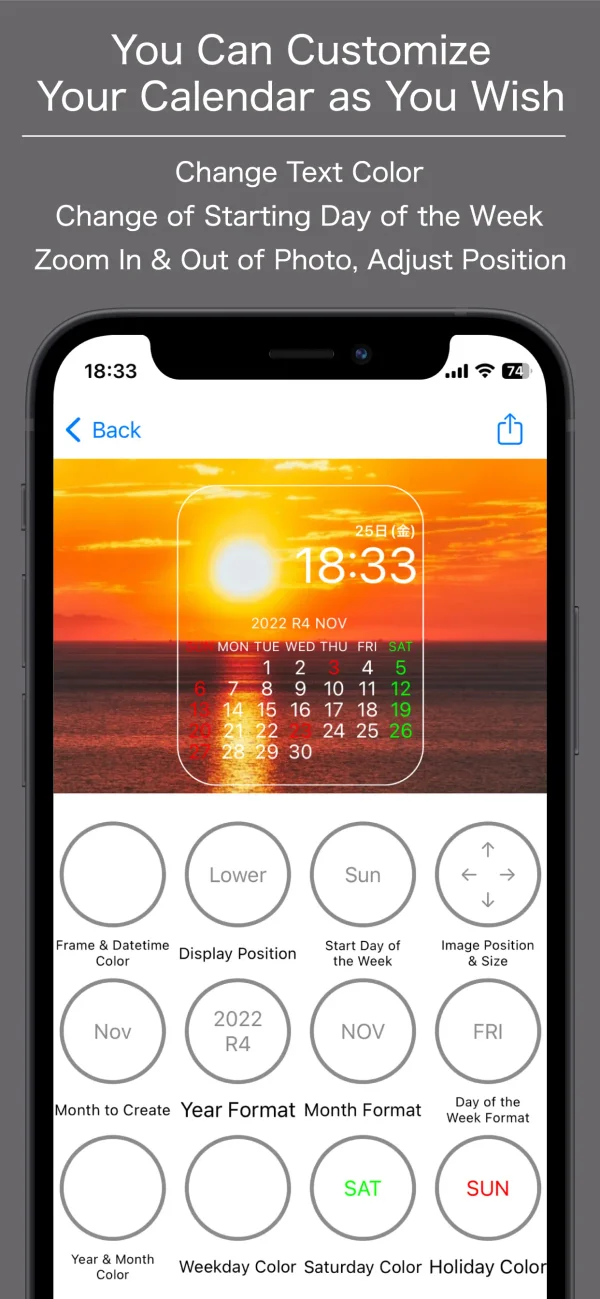
・You can adjust the position and size of the image while checking it in the preview.
・You can select the calendar to be created from the current month and the following month.
・The color of each calendar letter (year, month, weekday, Saturday, and holiday) can be freely selected.
・You can select the starting day of the month or day of the week for the calendar.
・The year display format can be selected, such as 2021, Reiwa 3, etc.
・Month display format can be selected, such as September, SEP, etc.
・Select the display format for the day of the week, such as Mon, MON, etc.
・Japanese national holidays are supported.
・URL scheme support (calphace://)
*Starting with watchOS 11, you can adjust the position of the watch using the following steps. If it overlaps with the calendar, please adjust it accordingly.
・Open the Watch app on your iPhone.
・Select the photo watch face you want to adjust from "My Watch" and "My Faces".
・Tap the "n photos" button next to "Select Photos" under "Content".
・Tap the photo you want to adjust and adjust the layout.
・Tap "Save" in the top-right corner.
What’s new
Version 1.57.1 · Nov 9, 2026
Updated SDKs.
App privacy
What Akihiro Usui declares on the App Store about how this app handles data.
-
Data used to track you
May be used to track you across apps and websites owned by other companies.
- Location
- Identifiers
- Usage data
- Diagnostics
-
Data linked to you
May be collected and linked to your identity.
- Location
- Identifiers
- Usage data
- Diagnostics
-
Data not linked to you
May be collected but is not linked to your identity.
- Diagnostics
Privacy practices may vary, for example with the features you use or your age.
Information
- Seller
- Akihiro Usui
- Category
- Utilities
- Version
- 1.57.1
- Updated
- Nov 9, 2026
- Released
- Sep 25, 2021
- Size
- 7.4 MB
- Requires
- iOS 17.0 or later
- Age rating
- 4+
- Price
- Free
- In-app purchases
- Yes
- Languages
- English, Japanese
- Copyright
- © 2021 Akihiro Usui
You might also like
-
 Wristwatch calendarUtilities
-
 Color Calendar GenHigh Visibility Calendar
-
 Wrist CalendarUtilities
-
 SourceCanvasAI diagram viewer for Mac
-
 Image SaliencyUtilities
-
 OmniSeeSmart Security,Always On Guard
-
 ChronaCountdown Timer
-
 Activity Monitor: CPU, Mem, ..CPU MEM Energy Disk Network AI
-
 AnyCal PROAnywhere Calendar
-
 NewClockMake Time for Yourself