
Credibility Analyzer
Fact-check pages with AI
Entwickelt für iPhone, iPad, Mac
Kostenlos
- Altersfreigabe4+
- KategorieDienstprogramme
- EntwicklerEvergreen Labs
- SprachenEnglisch
- Größe3,1 MB
Verlinkt auf die offizielle App Store-Seite
Download.org hostet keine Datei von Credibility Analyzer. Die Schaltfläche öffnet die App-Seite bei App Store, wo Evergreen Labs die App veröffentlicht. Eintrag zuletzt geprüft am 13.11.2026.
Screenshots

Info
Der Entwickler hat diesen Text nicht in Ihrer Sprache bereitgestellt.
Credibility Analyzer is a Safari Web Extension that helps you judge whether a webpage, text you select, or a photo you share is reliable.
Open a page and run an analysis from the toolbar, or share selected text or a photo into the app. You’ll get:
• A credibility / factualness score from 1–10
• A short justification of that score
• Clear bullet-point findings (3, 4, or 5 — configurable)
• Source links when Gemini web grounding returns citations
• Results in the same language as the page when possible
AI models (bring your own API key)
• Gemini Flash (latest) — Google’s current Flash model with live web grounding for fact-checking
• Claude Sonnet — Anthropic’s Sonnet for knowledge-based analysis
• GPT-6 Sol — OpenAI’s GPT-6 Sol for knowledge-based analysis
Getting started
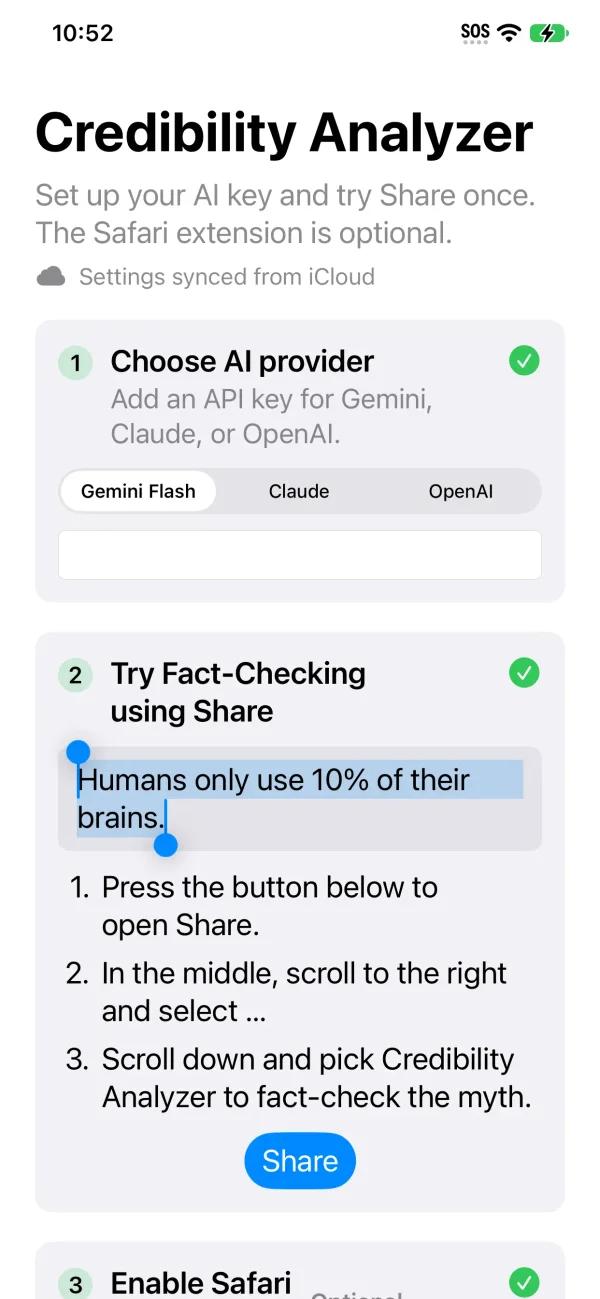
The host app walks you through a short checklist:
1. Add an API key for Gemini, Claude, or OpenAI
2. Try fact-checking a sample myth with Share → Credibility Analyzer
3. Optionally enable the Safari extension in Settings → Apps → Safari → Extensions
How to use (Safari toolbar)
1. Enable Credibility Analyzer in Settings → Apps → Safari → Extensions and grant site access
2. Visit a normal webpage
3. Tap the Credibility Analyzer toolbar button to analyze the page or selected text
4. Choose a model and run the analysis
5. Review the score, findings, and sources
How to use (Share)
1. Select text in Safari (or another app), or share a photo or screenshot
2. Tap Share → Credibility Analyzer
3. Review the credibility results in the Share extension
Privacy
• Analysis runs only when you start it
• Page content, a photo you share, and (optionally) the URL if you enable “Include URL context” are sent to the AI provider you selected, using your API key
• API keys go only to the provider you chose — never to us
• The developer does not run a backend that stores your page content
• API keys stay in Safari extension / App Group storage on your device
• No ads, no account required from us
• Anonymous, privacy-first usage analytics (Aptabase) — page content and API keys are never sent
Requirements
• iPhone or iPad with Safari that supports Safari Web Extensions
• An API key from Google AI Studio, Anthropic, and/or OpenAI for the models you want to use
Notes
• Safari and system pages cannot be analyzed
• Cloud AI usage is billed by the provider under your account with them
• Enable the extension and allow website access after installing the app
Make complex articles easier to skim — and easier to trust or question — without leaving Safari.
Neue Funktionen
Version 1.6.9 · 07.10.2026
Fact-check a photo or screenshot from the share sheet, or an image on a web page. You still get a score, a claim check, and sources.
App-Datenschutz
Was Evergreen Labs im App Store zum Umgang dieser App mit Daten angibt.
-
Nicht mit Ihnen verknüpfte Daten
Können erfasst werden, sind aber nicht mit Ihrer Identität verknüpft.
- Diagnose
Die Datenschutzpraktiken können variieren, zum Beispiel je nach den von Ihnen verwendeten Funktionen oder Ihrem Alter.
Informationen
- Anbieter
- Evergreen Labs
- Kategorie
- Dienstprogramme
- Version
- 1.6.9
- Aktualisiert
- 07.10.2026
- Veröffentlicht
- 17.09.2026
- Größe
- 3,1 MB
- Erfordert
- iOS 17.0 oder neuer
- Altersfreigabe
- 4+
- Preis
- Kostenlos
- Sprachen
- Englisch
- Copyright
- © 2026 Evergreen Labs
Das könnte Ihnen auch gefallen
-
 KI Notizen Aufnehmen⁺Sprachnotizen mit Mitschrift
-
 Instant Background CheckDienstprogramme
-
 Busybody: Personal DashboardDienstprogramme
-
 dictate. — Voice to TextDienstprogramme
-
 Filemorph: File PDF ConverterDienstprogramme
-
 TruthSearch: KI PersonensucheIntelligente Personen Suchen
-
 Turn Up - Max Volume BoosterDienstprogramme
-
 AI Message GeneratorDienstprogramme
-
 Sign In Authenticator2FA-Codes, auch offline
-
 Spokeo AIDienstprogramme