
- 対象年齢4+
- カテゴリユーティリティ
- 開発元Evergreen Labs
- 言語英語
- サイズ3.1 MB
App Storeの公式ページにリンクしています
Download.orgはCredibility Analyzerのファイルを一切ホストしていません。ボタンを押すと、Evergreen Labsが公開しているApp Storeのアプリページが開きます。ページの最終確認:2026/11/13。
スクリーンショット

概要
開発元はこのテキストをお使いの言語で提供していません。
Credibility Analyzer is a Safari Web Extension that helps you judge whether a webpage, text you select, or a photo you share is reliable.
Open a page and run an analysis from the toolbar, or share selected text or a photo into the app. You’ll get:
• A credibility / factualness score from 1–10
• A short justification of that score
• Clear bullet-point findings (3, 4, or 5 — configurable)
• Source links when Gemini web grounding returns citations
• Results in the same language as the page when possible
AI models (bring your own API key)
• Gemini Flash (latest) — Google’s current Flash model with live web grounding for fact-checking
• Claude Sonnet — Anthropic’s Sonnet for knowledge-based analysis
• GPT-6 Sol — OpenAI’s GPT-6 Sol for knowledge-based analysis
Getting started
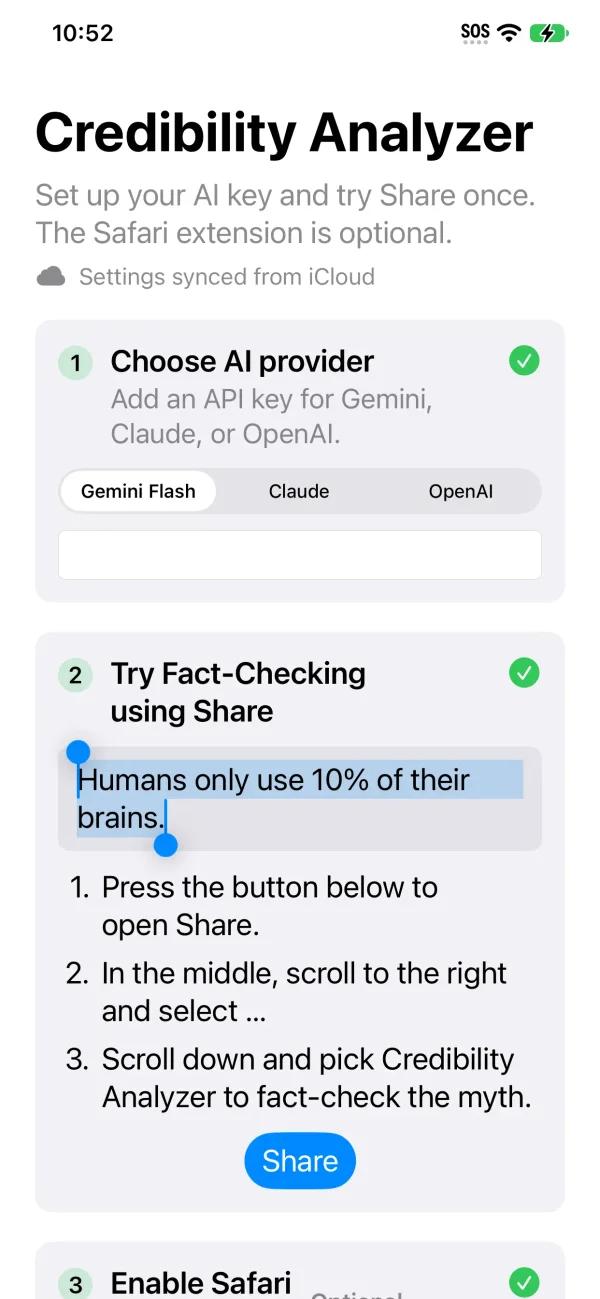
The host app walks you through a short checklist:
1. Add an API key for Gemini, Claude, or OpenAI
2. Try fact-checking a sample myth with Share → Credibility Analyzer
3. Optionally enable the Safari extension in Settings → Apps → Safari → Extensions
How to use (Safari toolbar)
1. Enable Credibility Analyzer in Settings → Apps → Safari → Extensions and grant site access
2. Visit a normal webpage
3. Tap the Credibility Analyzer toolbar button to analyze the page or selected text
4. Choose a model and run the analysis
5. Review the score, findings, and sources
How to use (Share)
1. Select text in Safari (or another app), or share a photo or screenshot
2. Tap Share → Credibility Analyzer
3. Review the credibility results in the Share extension
Privacy
• Analysis runs only when you start it
• Page content, a photo you share, and (optionally) the URL if you enable “Include URL context” are sent to the AI provider you selected, using your API key
• API keys go only to the provider you chose — never to us
• The developer does not run a backend that stores your page content
• API keys stay in Safari extension / App Group storage on your device
• No ads, no account required from us
• Anonymous, privacy-first usage analytics (Aptabase) — page content and API keys are never sent
Requirements
• iPhone or iPad with Safari that supports Safari Web Extensions
• An API key from Google AI Studio, Anthropic, and/or OpenAI for the models you want to use
Notes
• Safari and system pages cannot be analyzed
• Cloud AI usage is billed by the provider under your account with them
• Enable the extension and allow website access after installing the app
Make complex articles easier to skim — and easier to trust or question — without leaving Safari.
新機能
バージョン 1.6.9 · 2026/10/7
Fact-check a photo or screenshot from the share sheet, or an image on a web page. You still get a score, a claim check, and sources.
アプリのプライバシー
このアプリのデータの取り扱いについて、Evergreen LabsがApp Storeで申告している内容です。
-
ユーザーに関連付けられないデータ
収集される場合がありますが、ユーザーの識別情報には関連付けられません。
- 診断
プライバシーの取り扱いは、ご利用の機能やお客様の年齢などに応じて異なる場合があります。
情報
- 販売元
- Evergreen Labs
- カテゴリ
- ユーティリティ
- バージョン
- 1.6.9
- 更新日
- 2026/10/7
- リリース
- 2026/9/17
- サイズ
- 3.1 MB
- 必要条件
- iOS 17.0以降
- 対象年齢
- 4+
- 価格
- 無料
- 言語
- 英語
- 著作権
- © 2026 Evergreen Labs
こちらもおすすめ
-
 AIノート作成アシスタント・音声テキスト変換⁺録音文字起こし・会議・講義メモ作成
-
 Instant Background Checkユーティリティ
-
 Busybody: Personal Dashboardユーティリティ
-
 dictate. — AI音声入力キーボード音声をテキストに
-
 Filemorph: File PDF Converterユーティリティ
-
 TruthSearch:人工知能による人物検索スマートな検索&チェックツール
-
 Turn Up - Max Volume Boosterユーティリティ
-
 AIメッセージメーカーAIによるメッセージ内容提案アプリ
-
 Sign In Authenticator - 2段階認証認証アプリでワンタイムパスワードを管理
-
 Spokeo AIユーティリティ