
Credibility Analyzer
Fact-check pages with AI
iPhone, iPad, Mac için tasarlandı
Ücretsiz
- Yaş sınırı4+
- KategoriYardımcılar
- GeliştiriciEvergreen Labs
- Dillerİngilizce
- Boyut3,1 MB
Resmi App Store sayfasına bağlanır
Download.org, Credibility Analyzer için hiçbir dosya barındırmaz. Düğme, uygulamanın App Store üzerindeki sayfasını açar; uygulamayı orada Evergreen Labs yayınlar. Sayfanın son kontrolü: 13.11.2026.
Ekran görüntüleri
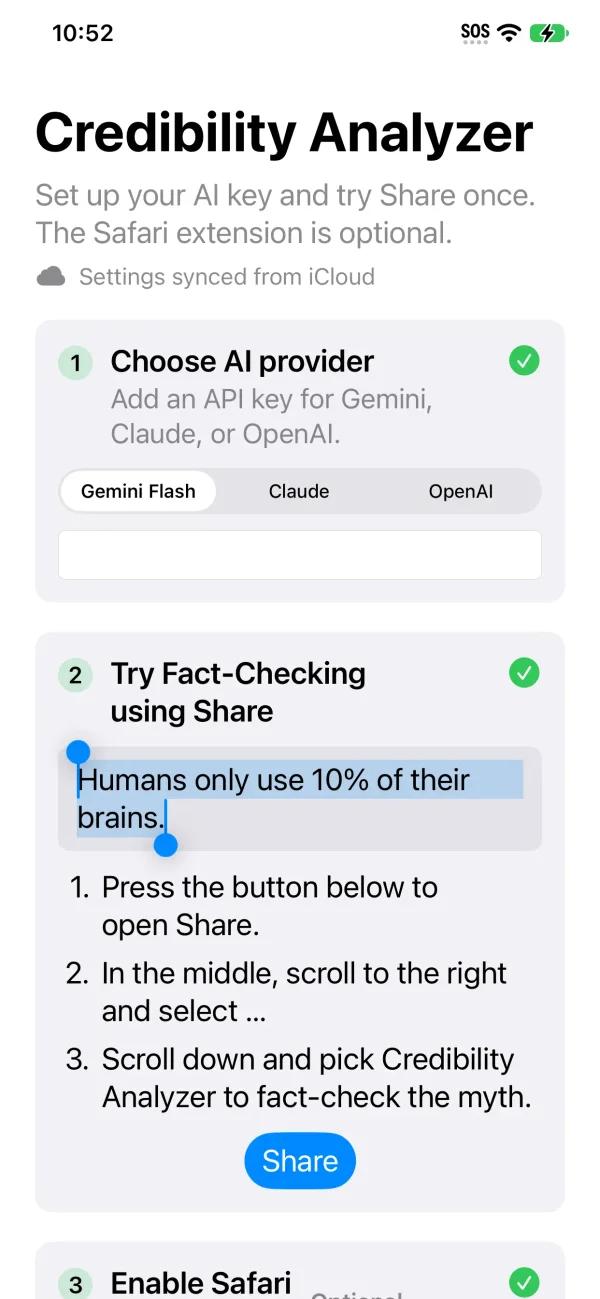

Hakkında
Geliştirici bu metni dilinizde sunmamış.
Credibility Analyzer is a Safari Web Extension that helps you judge whether a webpage, text you select, or a photo you share is reliable.
Open a page and run an analysis from the toolbar, or share selected text or a photo into the app. You’ll get:
• A credibility / factualness score from 1–10
• A short justification of that score
• Clear bullet-point findings (3, 4, or 5 — configurable)
• Source links when Gemini web grounding returns citations
• Results in the same language as the page when possible
AI models (bring your own API key)
• Gemini Flash (latest) — Google’s current Flash model with live web grounding for fact-checking
• Claude Sonnet — Anthropic’s Sonnet for knowledge-based analysis
• GPT-6 Sol — OpenAI’s GPT-6 Sol for knowledge-based analysis
Getting started
The host app walks you through a short checklist:
1. Add an API key for Gemini, Claude, or OpenAI
2. Try fact-checking a sample myth with Share → Credibility Analyzer
3. Optionally enable the Safari extension in Settings → Apps → Safari → Extensions
How to use (Safari toolbar)
1. Enable Credibility Analyzer in Settings → Apps → Safari → Extensions and grant site access
2. Visit a normal webpage
3. Tap the Credibility Analyzer toolbar button to analyze the page or selected text
4. Choose a model and run the analysis
5. Review the score, findings, and sources
How to use (Share)
1. Select text in Safari (or another app), or share a photo or screenshot
2. Tap Share → Credibility Analyzer
3. Review the credibility results in the Share extension
Privacy
• Analysis runs only when you start it
• Page content, a photo you share, and (optionally) the URL if you enable “Include URL context” are sent to the AI provider you selected, using your API key
• API keys go only to the provider you chose — never to us
• The developer does not run a backend that stores your page content
• API keys stay in Safari extension / App Group storage on your device
• No ads, no account required from us
• Anonymous, privacy-first usage analytics (Aptabase) — page content and API keys are never sent
Requirements
• iPhone or iPad with Safari that supports Safari Web Extensions
• An API key from Google AI Studio, Anthropic, and/or OpenAI for the models you want to use
Notes
• Safari and system pages cannot be analyzed
• Cloud AI usage is billed by the provider under your account with them
• Enable the extension and allow website access after installing the app
Make complex articles easier to skim — and easier to trust or question — without leaving Safari.
Yenilikler
Sürüm 1.6.9 · 07.10.2026
Fact-check a photo or screenshot from the share sheet, or an image on a web page. You still get a score, a claim check, and sources.
Uygulama gizliliği
Bu uygulamanın verileri nasıl işlediği hakkında Evergreen Labs tarafından App Store üzerinde yapılan beyan.
-
Sizinle ilişkilendirilmeyen veriler
Toplanabilir ancak kimliğinizle ilişkilendirilmez.
- Tanılama
Gizlilik uygulamaları, örneğin kullandığınız özelliklere veya yaşınıza göre değişiklik gösterebilir.
Bilgiler
- Satıcı
- Evergreen Labs
- Kategori
- Yardımcılar
- Sürüm
- 1.6.9
- Güncellendi
- 07.10.2026
- Yayın tarihi
- 17.09.2026
- Boyut
- 3,1 MB
- Gereksinim
- iOS 17.0 veya sonrası
- Yaş sınırı
- 4+
- Fiyat
- Ücretsiz
- Diller
- İngilizce
- Telif hakkı
- © 2026 Evergreen Labs
Bunları da beğenebilirsiniz
-
 YZ Destekli Not Alma⁺AI Toplantı ve Ders Notları
-
 Instant Background CheckYardımcılar
-
 Busybody: Personal DashboardYardımcılar
-
 dictate. — Voice to TextYardımcılar
-
 Filemorph: File PDF ConverterYardımcılar
-
 TruthSearch: YZ Kişi BulucuAkıllı Bulma ve Kontrol Aracı
-
 Turn Up - Max Volume BoosterYardımcılar
-
 AI Message GeneratorYardımcılar
-
 Sign In AuthenticatorYardımcılar
-
 Spokeo AIYardımcılar