
Credibility Analyzer
Fact-check pages with AI
Được thiết kế cho iPhone, iPad, Mac
Miễn phí
- Độ tuổi4+
- Danh mụcTiện Ích
- Nhà phát triểnEvergreen Labs
- Ngôn ngữTiếng Anh
- Kích thước3,1 MB
Liên kết đến trang App Store chính thức
Download.org không lưu trữ tệp nào của Credibility Analyzer. Nút này mở trang ứng dụng trên App Store, nơi Evergreen Labs phát hành ứng dụng. Trang được kiểm tra lần cuối: 13/11/2026.
Ảnh chụp màn hình

Giới thiệu
Nhà phát triển chưa cung cấp nội dung này bằng ngôn ngữ của bạn.
Credibility Analyzer is a Safari Web Extension that helps you judge whether a webpage, text you select, or a photo you share is reliable.
Open a page and run an analysis from the toolbar, or share selected text or a photo into the app. You’ll get:
• A credibility / factualness score from 1–10
• A short justification of that score
• Clear bullet-point findings (3, 4, or 5 — configurable)
• Source links when Gemini web grounding returns citations
• Results in the same language as the page when possible
AI models (bring your own API key)
• Gemini Flash (latest) — Google’s current Flash model with live web grounding for fact-checking
• Claude Sonnet — Anthropic’s Sonnet for knowledge-based analysis
• GPT-6 Sol — OpenAI’s GPT-6 Sol for knowledge-based analysis
Getting started
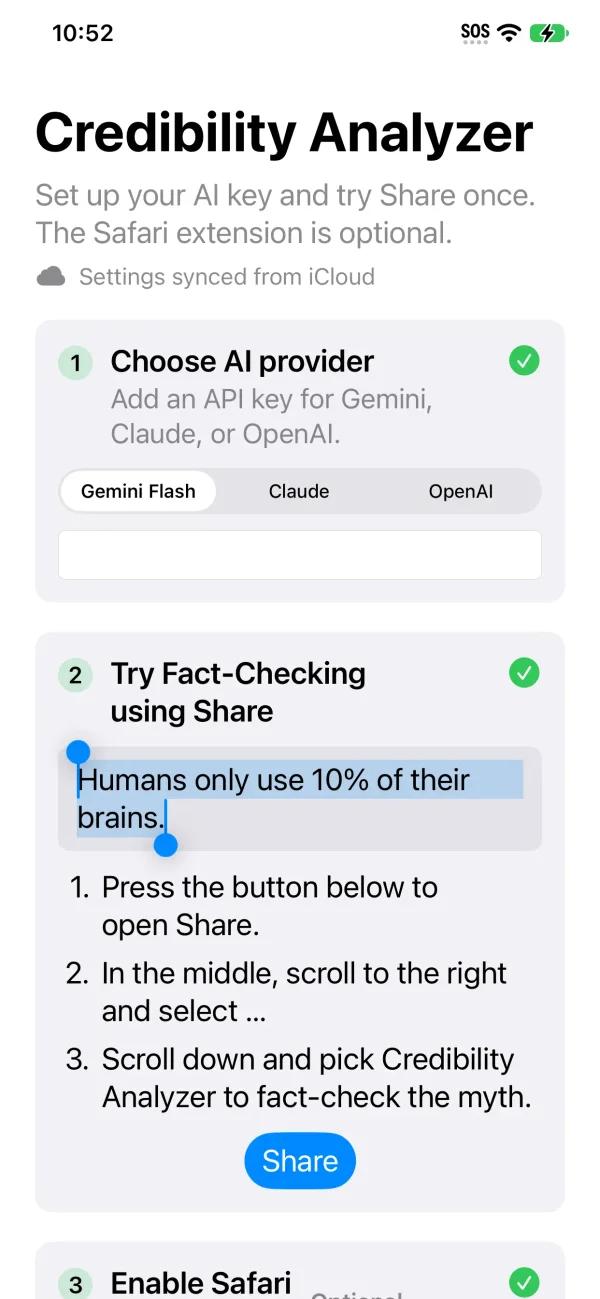
The host app walks you through a short checklist:
1. Add an API key for Gemini, Claude, or OpenAI
2. Try fact-checking a sample myth with Share → Credibility Analyzer
3. Optionally enable the Safari extension in Settings → Apps → Safari → Extensions
How to use (Safari toolbar)
1. Enable Credibility Analyzer in Settings → Apps → Safari → Extensions and grant site access
2. Visit a normal webpage
3. Tap the Credibility Analyzer toolbar button to analyze the page or selected text
4. Choose a model and run the analysis
5. Review the score, findings, and sources
How to use (Share)
1. Select text in Safari (or another app), or share a photo or screenshot
2. Tap Share → Credibility Analyzer
3. Review the credibility results in the Share extension
Privacy
• Analysis runs only when you start it
• Page content, a photo you share, and (optionally) the URL if you enable “Include URL context” are sent to the AI provider you selected, using your API key
• API keys go only to the provider you chose — never to us
• The developer does not run a backend that stores your page content
• API keys stay in Safari extension / App Group storage on your device
• No ads, no account required from us
• Anonymous, privacy-first usage analytics (Aptabase) — page content and API keys are never sent
Requirements
• iPhone or iPad with Safari that supports Safari Web Extensions
• An API key from Google AI Studio, Anthropic, and/or OpenAI for the models you want to use
Notes
• Safari and system pages cannot be analyzed
• Cloud AI usage is billed by the provider under your account with them
• Enable the extension and allow website access after installing the app
Make complex articles easier to skim — and easier to trust or question — without leaving Safari.
Có gì mới
Phiên bản 1.6.9 · 07/10/2026
Fact-check a photo or screenshot from the share sheet, or an image on a web page. You still get a score, a claim check, and sources.
Quyền riêng tư của ứng dụng
Những gì Evergreen Labs khai báo trên App Store về cách ứng dụng này xử lý dữ liệu.
-
Dữ liệu không liên kết với bạn
Có thể được thu thập nhưng không liên kết với danh tính của bạn.
- Chẩn đoán
Phương thức đảm bảo quyền riêng tư có thể khác nhau, chẳng hạn như tuỳ theo các tính năng bạn sử dụng hoặc độ tuổi của bạn.
Thông tin
- Người bán
- Evergreen Labs
- Danh mục
- Tiện Ích
- Phiên bản
- 1.6.9
- Cập nhật
- 07/10/2026
- Phát hành
- 17/09/2026
- Kích thước
- 3,1 MB
- Yêu cầu
- iOS 17.0 trở lên
- Độ tuổi
- 4+
- Giá
- Miễn phí
- Ngôn ngữ
- Tiếng Anh
- Bản quyền
- © 2026 Evergreen Labs
Có thể bạn cũng thích
-
 Ghi Chú Bằng trí Tuệ Nhân Tạo⁺Ghi Chú Cuộc Họp và Bài Giảng
-
 Instant Background CheckTiện Ích
-
 Busybody: Personal DashboardTiện Ích
-
 dictate. — Voice to TextTiện Ích
-
 Filemorph: File PDF ConverterTiện Ích
-
 TruthSearch: Tìm Người AITìm Kiếm Thông Minh
-
 Turn Up - Max Volume BoosterTiện Ích
-
 AI Message GeneratorTiện Ích
-
 Sign In AuthenticatorTiện Ích
-
 Spokeo AITiện Ích