
Credibility Analyzer
Fact-check pages with AI
Conçue pour iPhone, iPad, Mac
Gratuit
- Classification d’âge4+
- CatégorieUtilitaires
- DéveloppeurEvergreen Labs
- LanguesAnglais
- Taille3,1 Mo
Renvoie vers la page App Store officielle
Download.org n’héberge aucun fichier de Credibility Analyzer. Le bouton ouvre la page de l’application sur App Store, où Evergreen Labs la publie. Fiche vérifiée pour la dernière fois le 13/11/2026.
Captures d’écran

À propos
Le développeur n’a pas fourni ce texte dans votre langue.
Credibility Analyzer is a Safari Web Extension that helps you judge whether a webpage, text you select, or a photo you share is reliable.
Open a page and run an analysis from the toolbar, or share selected text or a photo into the app. You’ll get:
• A credibility / factualness score from 1–10
• A short justification of that score
• Clear bullet-point findings (3, 4, or 5 — configurable)
• Source links when Gemini web grounding returns citations
• Results in the same language as the page when possible
AI models (bring your own API key)
• Gemini Flash (latest) — Google’s current Flash model with live web grounding for fact-checking
• Claude Sonnet — Anthropic’s Sonnet for knowledge-based analysis
• GPT-6 Sol — OpenAI’s GPT-6 Sol for knowledge-based analysis
Getting started
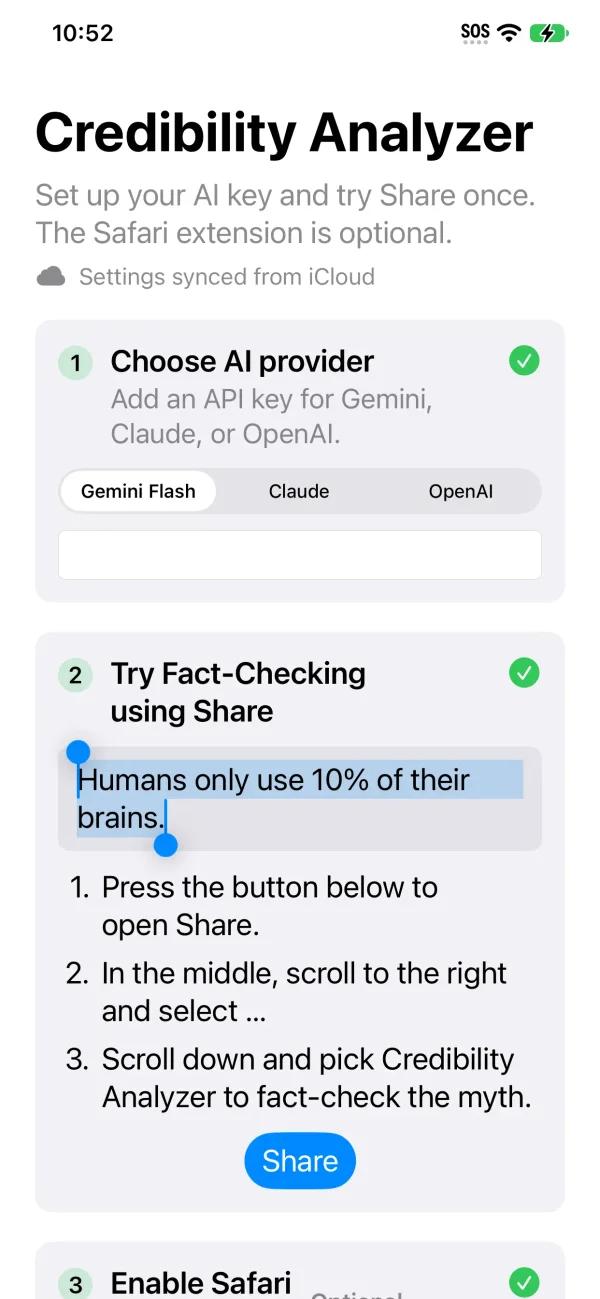
The host app walks you through a short checklist:
1. Add an API key for Gemini, Claude, or OpenAI
2. Try fact-checking a sample myth with Share → Credibility Analyzer
3. Optionally enable the Safari extension in Settings → Apps → Safari → Extensions
How to use (Safari toolbar)
1. Enable Credibility Analyzer in Settings → Apps → Safari → Extensions and grant site access
2. Visit a normal webpage
3. Tap the Credibility Analyzer toolbar button to analyze the page or selected text
4. Choose a model and run the analysis
5. Review the score, findings, and sources
How to use (Share)
1. Select text in Safari (or another app), or share a photo or screenshot
2. Tap Share → Credibility Analyzer
3. Review the credibility results in the Share extension
Privacy
• Analysis runs only when you start it
• Page content, a photo you share, and (optionally) the URL if you enable “Include URL context” are sent to the AI provider you selected, using your API key
• API keys go only to the provider you chose — never to us
• The developer does not run a backend that stores your page content
• API keys stay in Safari extension / App Group storage on your device
• No ads, no account required from us
• Anonymous, privacy-first usage analytics (Aptabase) — page content and API keys are never sent
Requirements
• iPhone or iPad with Safari that supports Safari Web Extensions
• An API key from Google AI Studio, Anthropic, and/or OpenAI for the models you want to use
Notes
• Safari and system pages cannot be analyzed
• Cloud AI usage is billed by the provider under your account with them
• Enable the extension and allow website access after installing the app
Make complex articles easier to skim — and easier to trust or question — without leaving Safari.
Nouveautés
Version 1.6.9 · 07/10/2026
Fact-check a photo or screenshot from the share sheet, or an image on a web page. You still get a score, a claim check, and sources.
Confidentialité de l’application
Ce que Evergreen Labs déclare sur l’App Store au sujet du traitement des données par cette application.
-
Données n’établissant aucun lien avec vous
Peuvent être collectées, mais ne sont pas liées à votre identité.
- Diagnostic
Les pratiques en matière de confidentialité peuvent varier, notamment en fonction des fonctionnalités que vous utilisez ou de votre âge.
Informations
- Vendeur
- Evergreen Labs
- Catégorie
- Utilitaires
- Version
- 1.6.9
- Mis à jour
- 07/10/2026
- Publié
- 17/09/2026
- Taille
- 3,1 Mo
- Nécessite
- iOS 17.0 ou version ultérieure
- Classification d’âge
- 4+
- Prix
- Gratuit
- Langues
- Anglais
- Copyright
- © 2026 Evergreen Labs
Vous aimerez peut-être aussi
-
 Prise de Note Vocale par IA⁺Dictée Vocal Retranscription
-
 Instant Background CheckUtilitaires
-
 Busybody: Personal DashboardUtilitaires
-
 dictate. — Voice to TextUtilitaires
-
 Filemorph: File PDF ConverterUtilitaires
-
 TruthSearch : Personnes IARecherche Intelligente
-
 Turn Up - Max Volume BoosterUtilitaires
-
 AI Message GeneratorUtilitaires
-
 Sign In Authentificateur 2FAVos codes 2FA, toujours prêts
-
 Spokeo AIUtilitaires