
MDscan: Batch Scanner
Scan, Enhance & Export PDFs
Entwickelt für iPhone
Kostenlos · In-App-Käufe
- Altersfreigabe4+
- KategorieProduktivität
- Entwickler晖 容
- SprachenEnglisch+ 1 weitere
- Größe3,8 MB
Verlinkt auf die offizielle App Store-Seite
Download.org hostet keine Datei von MDscan: Batch Scanner. Die Schaltfläche öffnet die App-Seite bei App Store, wo 晖 容 die App veröffentlicht. Eintrag zuletzt geprüft am 22.11.2026.
Screenshots
Info
Der Entwickler hat diesen Text nicht in Ihrer Sprache bereitgestellt.
Turn your iPhone into a document scanner for quick handheld captures or larger batches with a phone stand. Capture one page at a time when you only have a few documents, or use continuous capture for larger scanning sessions.
A clear workflow from capture to export:
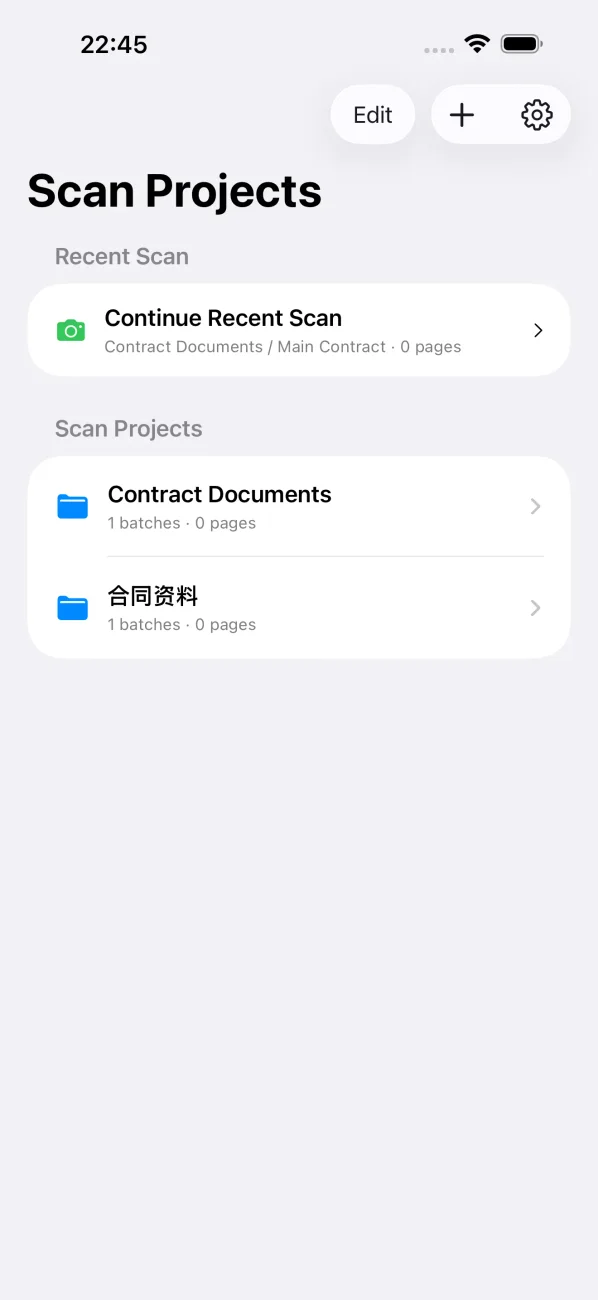
• Organize documents, archives, and books as Projects → Batches → Pages.
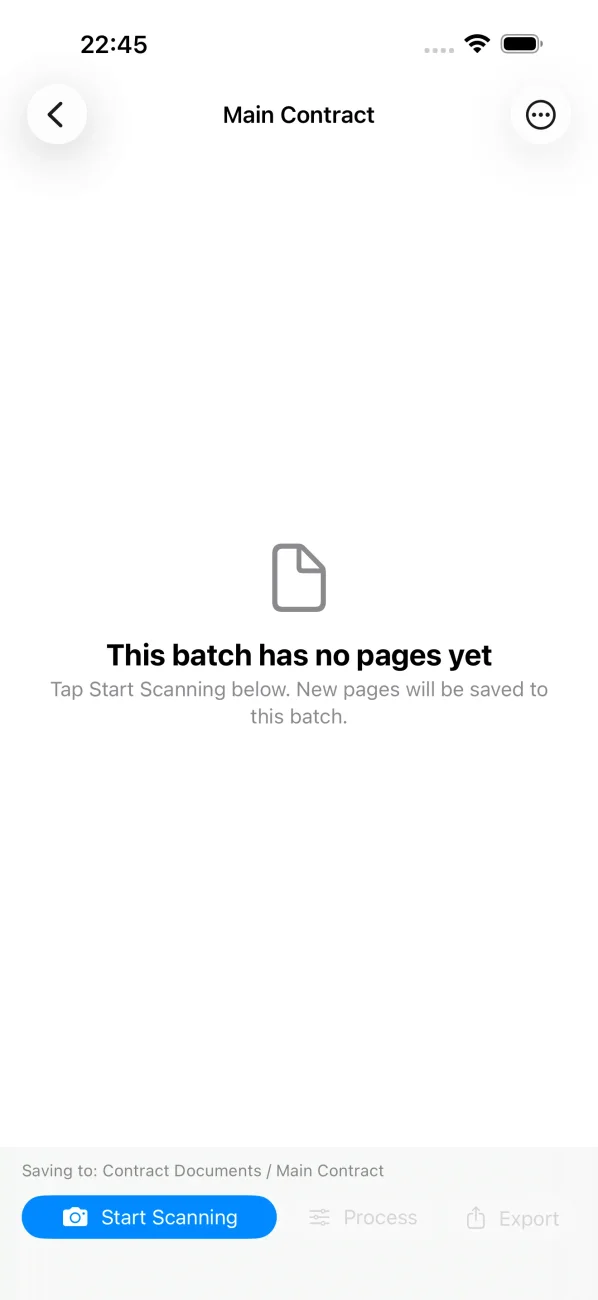
• Create a project and its first batch in one flow, or continue scanning directly from an existing batch.
• See the current project, batch, and saved page count while capturing.
• Finish scanning and go directly to page review, image processing, and export.
• Use grouped capture and merging for bound books.
Keep your originals:
Apply batch image adjustments and processing modes, including color, grayscale, and black and white. Processing and export do not overwrite your original captures.
Export for use and sharing:
Export original images, processed JPEG or PNG images, or PDFs. Exported files are saved locally. Save a copy through Apple’s Files app or share a PDF.
On-device processing and privacy:
No account is required. MDscan has no advertising or cross-app tracking. Scans are processed on your iPhone and are not uploaded to the developer’s servers.
Free to download, with a user-initiated three-day full trial. The trial does not charge you or renew automatically. After it expires, you can still view, organize, and delete existing scans and export original images. New scanning, rescanning, batch image processing, and processed image/PDF exports require a one-time lifetime unlock. No subscription.
Neue Funktionen
Version 1.3 · 10.10.2026
A clearer scanning workflow, with every page saved where you expect it.
• Organize your scans as Projects → Batches → Pages, and create a new scan directly from the home screen.
• Start or continue scanning from a batch without returning to the home screen.
• See the current project, batch, and saved page count while capturing. Single-page and continuous capture both save to your selected batch.
• Finish scanning and go directly to the same batch to review, process, and export.
• Continue your most recently selected batch, while keeping access to existing scans.
App-Datenschutz
Was 晖 容 im App Store zum Umgang dieser App mit Daten angibt.
-
Keine Daten erfasst
Der Entwickler erfasst keine Daten von dieser App.
Die Datenschutzpraktiken können variieren, zum Beispiel je nach den von Ihnen verwendeten Funktionen oder Ihrem Alter.
Informationen
- Anbieter
- 晖 容
- Kategorie
- Produktivität
- Version
- 1.3
- Aktualisiert
- 10.10.2026
- Veröffentlicht
- 04.08.2026
- Größe
- 3,8 MB
- Erfordert
- iOS 17.0 oder neuer
- Altersfreigabe
- 4+
- Preis
- Kostenlos
- In-App-Käufe
- Ja
- Sprachen
- Englisch, Vereinf. Chinesisch
- Copyright
- © 2026 Hui Rong
Das könnte Ihnen auch gefallen
-
 ScanLark - PDF ScannerScannen, ordnen, Text erkennen
-
 TimeTracketeProduktivität
-
 LensFix PDF ScannerOCR, Bilder & Formate
-
 PDF Image Extract-PDF to ImagePDF to Long Image Converter
-
 不玩手机-自律习惯养成记Produktivität
-
 Steel weight calculatorProduktivität
-
 Scanner Mini: Scannen & FaxDokumente/Fotos/Belege scannen
-
 PDF Reader – PDFelementPDF viewer, Anmerken von PDF
-
 Turbo VPN Private BrowserSicheres privates Surfen